

Last updated: October 2026
The need for the best UEM solution has flooded the market with platforms that all promise to “manage and secure every endpoint from a single console.” That sentence is true of all of them and useful for choosing none of them. What actually separates the best unified endpoint management software in 2026 is narrower: how deep it goes on your operating systems, whether identity and security are built in or bolted on, how much your team can run day to day, and how it prices at your scale.
This guide compares ten leading UEM solutions on those dimensions, with a side-by-side comparison and a per-vendor breakdown of strengths, shortcomings, and pricing — so you can shortlist the right platform in minutes. The question isn’t which UEM is best in the abstract; it’s which one is best for your business specifically.
Key takeaways
- Best overall for mixed fleets: Scalefusion — the broadest practical OS coverage with identity (OneIdP) and endpoint security (Veltar) built in, from $2/device/month.
- By environment: Microsoft shops → Intune · Citrix/virtual-workspace → Citrix · regulated or air-gapped → BlackBerry · security + AI insight → IBM MaaS360 · AI-driven automation at scale → Ivanti · cloud-or-on-prem at a low entry price → ManageEngine · RMM/IT-ops led → NinjaOne or SuperOps.
- Pricing spans a wide range — roughly $1.32 to $8 per device or user per month — and five of the ten are quote-only, so compare at your real device count.
- Deployment flexibility varies: most are cloud-only; ManageEngine (cloud/on-prem), BlackBerry (incl. air-gapped), and Scalefusion (cloud/VPC/on-prem) are the exceptions.
- How to choose: weigh your OS mix and ownership models, built-in identity and security, deployment model, ease of use, integrations, and cost at scale — then pilot your hardest enrollment scenarios, not the demo path.
What is UEM?
Unified endpoint management (UEM) is software that lets an organization enroll, configure, secure, monitor, and manage every endpoint — smartphones, tablets, laptops, desktops, rugged devices, kiosks, wearables, and IoT — from one centralized console. It integrates device provisioning, app distribution, policy enforcement, remote troubleshooting, data security, and device-lifecycle management into a single system, so IT admins can apply security settings, track device health, and maintain compliance across a diverse fleet from one dashboard.
Modern UEM goes further than configuration and patching: it adds identity and access controls, Zero Trust enforcement, and endpoint data-loss prevention — the areas where endpoint management and security now converge.
Understanding the difference between unified endpoint management and endpoint management software
The terms “endpoint management software” and “unified endpoint management” are often used interchangeably, but they solve problems at different scopes — and the distinction matters when you are choosing a platform.
Endpoint management software is the broader, older category: any tool that configures, secures, or monitors a class of endpoints. In practice it is often point solutions — a patch-management tool, an antivirus console, a mobile device management (MDM) product, a desktop-imaging utility — each handling one slice of the estate, frequently one operating system, from its own dashboard. It gets the job done for a single device type, but IT ends up stitching several consoles (and several data silos) together.
Unified endpoint management (UEM) collapses those silos. A UEM platform manages and secures every endpoint type — smartphones, tablets, laptops, desktops, rugged devices, kiosks, wearables, and IoT — across Windows, macOS, Linux, Android, iOS/iPadOS, and ChromeOS from a single console. Beyond basic configuration and patching, modern UEM adds identity and access controls, Zero Trust enforcement, endpoint data-loss prevention, and full device-lifecycle automation.
The simplest way to decide: if you manage one operating system or one device class and do not expect that to change, a focused endpoint management tool may be enough. If you run a mixed fleet — or want management, identity, and security consolidated into one platform and one bill — UEM is the right category. Most organizations today effectively need UEM, even when they start the search looking for “endpoint management software.”
Top UEM solutions: comparison
| Solution | Platforms | Deployment | Identity & security built-in | Ease of use | Key integrations | Starting price | G2 rating |
|---|---|---|---|---|---|---|---|
| Scalefusion | Android, Apple (iOS/iPadOS/macOS/tvOS), Windows, Linux, ChromeOS | Cloud (+ VPC/on-prem) | Yes — OneIdP (Zero Trust) + Veltar (endpoint DLP) | ★★★★★ | Entra ID, Okta, Google, Jira, Check Point MTD | $2/device/mo | 4.7★ (405) |
| Ivanti Neurons | Windows, macOS, Linux, iOS, Android, ChromeOS, rugged/IoT | Cloud | Passwordless identity, conditional access, Zero Trust (MTD add-on) | ★★★ | Ivanti Neurons platform | On request | 4.3★ |
| ManageEngine Endpoint Central | Windows, macOS, Linux, Android, iOS/iPadOS, ChromeOS, tvOS | Cloud & on-prem | Secure Private Access, DLP, vuln mgmt, EDR (Zia AI) | ★★★★ | ServiceNow, Jira, Splunk, CrowdStrike | From ~$1.32/device/mo | 4.5★ (1,000+) |
| IBM MaaS360 | iOS/iPadOS, Android, Windows, macOS, ChromeOS | Cloud | Mobile threat defense + Watson AI, IAM/SSO, Zero Trust | ★★★ | TeamViewer, IBM Security, MTD partners | From $1.50/device/mo | 4.2★ (198) |
| Microsoft Intune | Windows, macOS, Linux, iOS/iPadOS, Android, ChromeOS | Cloud | Entra SSO + Conditional Access, Defender, app protection | ★★★ | Entra ID, Defender, Microsoft 365, ServiceNow | $8/user/mo | 4.5★ (258) |
| Omnissa Workspace ONE | Windows, macOS, Linux, iOS, Android, ChromeOS, rugged | Cloud | Conditional access, posture checks, per-app VPN, SSO (Omnissa Access) | ★★★ | Omnissa Access/Intelligence, Horizon, ServiceNow | From $1.67/device/mo | 4.0★ (G2) |
| Citrix Endpoint Management | Android, iOS/iPadOS, macOS, Windows | Cloud | App containerization, conditional access, micro-VPN | ★★★ | Citrix Workspace/DaaS, Entra/AD, Apple Business Manager | On request | 4.0★ (27) |
| SuperOps | Windows, macOS, Linux (+ iOS/Android MDM) | Cloud | Patch mgmt, remote support, network monitoring, MDM | ★★★★★ | Built-in PSA/service desk (all-in-one) | On request | 4.5★ (130) |
| BlackBerry UEM | iOS/iPadOS, macOS, Android, Windows | Cloud, on-prem, hybrid, air-gapped | Security-first: containerization, secure gateway (FIPS/gov) | ★★★ | Entra/AD, Intune co-management, BlackBerry Dynamics | On request | 3.8★ (376) |
| NinjaOne | Windows, macOS, Linux (+ iOS/Android MDM) | Cloud (+ FedRAMP) | Endpoint security, vuln mgmt, autonomous patch, secure remote access | ★★★★★ | CrowdStrike, SentinelOne, ServiceNow, Okta, Entra | On request | 4.7★ (4,584) |
1. Scalefusion UEM
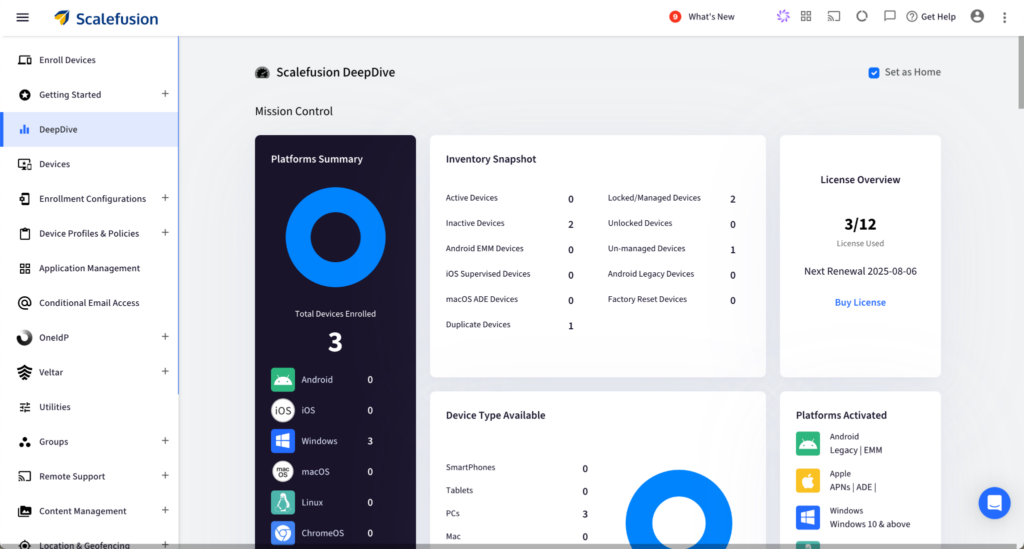
Scalefusion is the pick when you want genuinely broad platform coverage without paying enterprise premiums or committing to one vendor’s ecosystem. It manages Android, iOS, iPadOS, macOS, tvOS, Windows, Linux, and ChromeOS — plus kiosks, rugged devices, POS, and digital signage — from one console, and it pairs device management with its own identity (OneIdP) and endpoint-security (Veltar) products, so conditional access, Zero Trust Access, and endpoint DLP are part of the same platform rather than a separate purchase.
Features:
- Widest practical OS and device range: manages Android, Apple (iOS/iPadOS/macOS/tvOS), Windows, Linux, and ChromeOS — plus kiosk and rugged lockdown — from one dashboard.
- Identity and security built in: SSO, conditional access, and Zero Trust Access via OneIdP; endpoint DLP, encryption management, and remote wipe via Veltar and core UEM.
- Fast remote support: Remote Cast & Control, remote commands, file transfer, and VoIP calling.
- AI-assisted scripting: AirThink AI turns natural-language prompts into deployment-ready PowerShell, Shell, Bash, and Python scripts (validate output before deploying).
- Deployment flexibility: cloud, Virtual Private Cloud, and on-premises.
Shortcomings:
- Learning curve: the breadth of features takes a little time to learn.
- On-prem scope: the on-premises option is aimed at large enterprise rollouts rather than small ones.
Pricing (as of October 2026): from $2/device/month (Basic, billed annually), with a 14-day trial that unlocks every feature. (Verified: scalefusion.com/pricing.) G2: 4.7★ (405).
Best for: SMBs to enterprises running a mixed Apple/Android/Windows/Linux/ChromeOS fleet that want management, identity, and security in one place at accessible pricing.
Not ideal if: you need a single-OS niche tool and won’t use the broader UEM, identity, and security capabilities.

2. Ivanti Neurons
Ivanti Neurons is a cloud platform built around AI-driven automation: it discovers endpoints across the network, prioritizes patches by risk, and runs self-healing remediation for large, heterogeneous estates. It fits enterprises that want automated detection and fix workflows wired into their ITSM, rather than hands-on device administration.
Features:
- AI-driven remediation: near-real-time detection and remediation of IT and security issues.
- Enhanced visibility: automatic discovery and monitoring of all devices, including IoT and unmanaged endpoints.
- Patch Intelligence: risk-based prioritization of the vulnerabilities that matter most.
- Identity and access: passwordless identity and conditional access; Zero Trust via a mobile-threat-defense add-on.
Shortcomings:
- Involved setup: you invest configuration effort before the automation pays off.
- Lighter ITSM: some niceties (e.g., customizable dashboards) are lighter than dedicated ITSM suites.
Pricing (as of October 2026): on request (quote-only). G2: 4.3★.
Best for: mid-to-large enterprises standardizing on AI-driven automation across a complex, multi-vendor estate.
Not ideal if: you want a lightweight, fast-to-deploy console for a mostly straightforward fleet.
3. ManageEngine Endpoint Central
ManageEngine Endpoint Central manages, secures, and automates endpoints across Windows, macOS, Linux, Android, iOS/iPadOS, ChromeOS, and tvOS from one console, with strong patch, software-deployment, and OS-imaging tooling. Its differentiator is deployment choice — it runs equally as cloud or on-premises — at one of the lowest entry prices here.
Features:
- Automated patching: patch deployment across multiple OSes and third-party apps.
- OS imaging: images and deploys operating systems with required drivers and apps.
- Security tooling: Secure Private Access, endpoint DLP, vulnerability management, and EDR add-ons; Zia AI analytics.
- Deployment and integrations: cloud and on-prem; connects to ServiceNow, Jira, Splunk, and CrowdStrike.
Shortcomings:
- Learning curve: the console carries a lot of surface area to learn.
- Setup time: initial configuration can be time-consuming.
Pricing (as of October 2026): from ~$1.32/device/month (Professional, cloud, billed annually; free for ≤25 devices) — among the lowest here; on-prem also available. G2: 4.5★ (1,000+).
Best for: teams that need on-prem or the lowest entry price without giving up breadth.
Not ideal if: you want a heavily guided, minimal-setup console.
4. IBM MaaS360
IBM MaaS360 leans hardest into security and analytics, pairing endpoint management with Watson AI for risk detection and contextual insight across iOS/iPadOS, Android, Windows, macOS, and ChromeOS. Native identity, mobile threat defense, and Zero Trust support make it a fit for security-led enterprises.
Features:
- AI insight: Watson AI flags anomalous device behavior and recommends actions.
- Threat defense: automated protection against malware and phishing across users, devices, apps, and data.
- Containerization: separates corporate and personal data on BYOD devices.
- Identity: streamlined enrollment and IAM/SSO with Zero Trust support.
Shortcomings:
- Tiered cost: several advanced capabilities sit behind higher, costlier tiers.
- Rigid configuration: customizing settings can be time-consuming.
Pricing (as of October 2026): from $1.50/device/month (entry tier; higher editions step up). G2: 4.2★ (198).
Best for: enterprises that want security and AI-driven insight at the core.
Not ideal if: your budget is tight — the capabilities you want may sit in higher tiers.
5. Microsoft Intune
Microsoft Intune is a cloud-native UEM whose advantage is the ecosystem: native ties to Entra ID, Microsoft 365, and Defender make identity-driven conditional access and Zero Trust feel like one system. It covers Windows, Apple, Android, Linux, and ChromeOS, with MDM and app-protection policies for corporate and BYOD devices.
Features:
- Microsoft integration: native ties to Entra ID, Defender, Microsoft 365, and Configuration Manager.
- Conditional access: combines device state with user, app, and Defender signals.
- Zero-touch onboarding: Windows Autopilot and Apple ADE; patching via AutoPatch.
- App protection: policies that secure app data without full device enrollment.
Shortcomings:
- Cross-platform depth: deep management for macOS, Linux, iOS, and Android can lean on extra tooling.
- Complexity and cost: advanced capabilities need higher-tier plans, and conditional access grows complex quickly.
Pricing (as of October 2026): $8/user/month for Intune Plan 1 (standalone); also bundled into Microsoft 365 E3/E5. G2: 4.5★ (258).
Best for: organizations already invested in the Microsoft stack.
Not ideal if: you’re outside the Microsoft ecosystem, or you want a gentle setup curve.
6. Omnissa Workspace ONE UEM
Omnissa Workspace ONE UEM (formerly VMware’s) manages Windows, macOS, Linux, iOS, Android, ChromeOS, and rugged devices, and pairs device management with experience analytics (Intelligence) and virtual desktops (Horizon). It fits large enterprises that want data-driven automation across management, security, and end-user experience.
Features:
- Experience management: AI-driven monitoring and optimization of end-user experience.
- Automation: workflow automation for device provisioning and app delivery.
- Security and identity: conditional access, posture checks, per-app VPN, and SSO via Omnissa Access.
- Granular control: role-based permissions, with integration to virtual desktops for remote work.
Shortcomings:
- Complexity: the comprehensive feature set can overwhelm new admins.
- Add-on products: several capabilities live across separate Omnissa products bought at additional cost.
Pricing (as of October 2026): from $1.67/device/month (entry; add-on products extend capabilities). G2: 4.0★; Gartner Peer Insights: 4.4★ (688).
Best for: large enterprises wanting device management plus experience analytics and virtual desktops.
Not ideal if: you want one all-inclusive price and console without add-on products.
7. Citrix Endpoint Management
Citrix Endpoint Management is the natural choice where Citrix virtual apps and desktops already anchor the environment. It combines MDM and MAM with app containerization and micro-VPN per-app tunneling to secure hybrid work across Android, iOS/iPadOS, macOS, and Windows without full device VPNs.
Features:
- App containerization: MDX containerization and micro-VPN per-app tunneling.
- Identity-aware access: conditional access with SSO across Citrix Workspace, Entra/AD, and Apple Business Manager.
- Visibility: alerts for unmanaged devices and comprehensive reporting.
- Ecosystem fit: tight integration with the wider Citrix virtual-app and DaaS ecosystem.
Shortcomings:
- Console experience: can feel less intuitive, which can slow policy deployment.
- External configuration: some capabilities depend on configuration outside the core product.
Pricing (as of October 2026): on request (enterprise, quote-only). G2: 4.0★ (27).
Best for: enterprises invested in Citrix virtual environments.
Not ideal if: you’re outside the Citrix ecosystem.
8. SuperOps
SuperOps is an RMM and PSA platform with device management built in, aimed at MSPs and lean IT teams that want monitoring, a service desk, and endpoint management in one tool. It enrolls and secures Windows, macOS, and Linux endpoints (plus iOS/Android via MDM) and adds agentic AI to automate routine IT tasks.
Features:
- All-in-one console: unified RMM, PSA, and device management in a single modern interface.
- Agentic AI: automates common IT and support tasks.
- Operations: patch management, remote support, and network monitoring across devices.
- Security enforcement: encryption, passcodes, and remote wipe/lock.
Shortcomings:
- Lighter integrations: integration and customization options can complicate complex environments.
- RMM-first depth: dedicated-UEM depth is lighter than specialist platforms.
Pricing (as of October 2026): on request (typically per-technician). G2: 4.5★ (130).
Best for: MSPs and IT teams consolidating RMM, PSA, and device management.
Not ideal if: you need deep, mobile-specific UEM controls for a large, mixed device fleet.
9. BlackBerry UEM
BlackBerry UEM is built for organizations where security and compliance come first. It protects iOS/iPadOS, macOS, Android, and Windows endpoints with strong containerization, device hardening, a secure gateway, and mobile threat detection — and it’s one of the few platforms here that supports air-gapped deployment.
Features:
- Device compliance: enforces compliance with automatic access blocking when checks fail.
- Data segmentation: containerizes data to keep apps and content isolated.
- Threat detection: real-time detection for malware, phishing, and unsafe networks.
- Flexible deployment: cloud, on-prem, hybrid, and air-gapped; FIPS/government-grade posture.
Shortcomings:
- Complex setup: advanced security configuration makes onboarding harder for new admins.
- Cost: pricing can run higher than lighter alternatives.
Pricing (as of October 2026): on request (quote-only). G2: 3.8★ (376).
Best for: government, defense, and regulated enterprises with strict security or air-gap requirements.
Not ideal if: you want a simple, fast-to-deploy console for a general-purpose fleet.
10. NinjaOne
NinjaOne treats device management as one part of a broader RMM/IT-operations platform — monitoring, automation, patching, and remote support in one pane for Windows, macOS, and Linux (plus iOS/Android via MDM). It fits IT teams that want device management folded into daily operations rather than a standalone UEM.
Features:
- Autonomous patching: AI-assisted patch management across Windows, macOS, Linux, and third-party apps.
- Automated remediation: real-time monitoring and scripted fixes via lightweight agents.
- Form-based scripting: deploy scripts without deep coding knowledge.
- Integrations: CrowdStrike, SentinelOne, ServiceNow, Okta, and Entra; FedRAMP availability.
Shortcomings:
- Early-release polish: some new features can be rough at launch.
- RMM-first depth: customization and reporting are lighter in places, and mobile-specific depth trails dedicated UEM tools.
Pricing (as of October 2026): on request (quote-only). G2: 4.7★ (4,584).
Best for: IT teams unifying RMM and endpoint operations across desktops and servers.
Not ideal if: you need deep, mobile-specific UEM features for a large mobile or rugged fleet.
Key features to look for in UEM solutions: customization, ease of use, and integration
Feature checklists blur together across vendors. Three dimensions consistently separate a UEM platform you will still be happy with in two years from one you will fight — customization, ease of use, and integration — alongside the fundamentals of OS coverage, built-in security, and transparent pricing.
Ease of use. The console is where your team lives every day. Look for an intuitive dashboard, zero-touch enrollment (Apple Business Manager, Android Zero-Touch, Windows Autopilot), guided policy creation, and a shallow learning curve so new admins are productive in days, not months. Ease of use is the single biggest driver of whether a rollout actually sticks.
Customization. No two fleets are identical, so the platform should bend to your policies rather than the reverse — granular, role-based access control; custom device profiles and configuration policies per OS and per group; custom properties and scripting (PowerShell, Bash, Python) for edge cases; and branded, self-service enrollment flows.
Integration. A UEM platform is only as useful as the stack it plugs into. Prioritize native connections to your identity provider (Microsoft Entra ID, Okta, Google Workspace), ITSM tools (ServiceNow, Jira), and security systems (SIEM, threat defense, conditional access) — plus open APIs and webhooks so you can automate workflows that span tools.
Weigh these against your must-haves — depth on your operating systems, built-in identity and security versus bolt-on add-ons, deployment flexibility, and pricing you can predict at scale — and the shortlist narrows quickly.
How to deploy UEM across multiple operating systems
Rolling out UEM across a mixed Windows/macOS/Linux/mobile fleet is less about the tool and more about sequencing. A repeatable approach keeps the project predictable:
- Inventory the OS mix and ownership models first. Know how many Windows, macOS, Linux, Android, iOS, and ChromeOS devices you have, and which are corporate, BYOD, kiosk, or rugged — this dictates enrollment methods and policy design.
- Use native zero-touch enrollment per platform. Apple Business Manager / Automated Device Enrollment for Apple, Android Zero-Touch and Android Enterprise for Android, Windows Autopilot for Windows, and automated enrollment for ChromeOS. This removes manual setup and scales cleanly.
- Build policies per OS, then group by role. Each operating system exposes different controls; define a baseline per OS, then layer group- or role-specific profiles (frontline, knowledge worker, kiosk) on top.
- Pilot before you scale. Start with a small cross-section of devices and users, validate enrollment, policies, app delivery, and remote support, then roll forward in waves.
- Plan for the hard cases. BYOD privacy separation, offline or rugged devices, VPN and network requirements, and clear user communication are where multi-OS rollouts usually stall — test these first, not last.
A platform with genuinely deep, native support for each OS — rather than one strong OS and the rest bolted on — makes every step above simpler, which is why multi-OS depth belongs at the top of your evaluation.
Choose the best UEM solution for efficient management
While comparing the top platforms is crucial, it is equally important to know how to choose the right UEM solution for your organization. Score each candidate against the criteria that actually move the needle, weighted to your situation:
- Business size and scale: SMBs need fast setup and predictable pricing; enterprises need granular RBAC, multi-tenancy, and proven scale to tens of thousands of devices.
- Device and OS mix (and ownership): Map your real fleet — corporate, BYOD, kiosk, rugged — and check how deep each tool goes on your operating systems, not just how many it lists.
- Deployment model: Cloud, on-premises, or hybrid. Regulated or air-gapped environments narrow the field fast, so confirm this early.
- Built-in identity and security vs. bolt-ons: Conditional access, Zero Trust, endpoint DLP, and encryption management are far cheaper and cleaner when native to the platform than when bought as a separate stack.
- Pricing model at your scale: Per-device vs. per-user vs. per-technician pricing, tier-gating, and minimums change the real number — compare against your actual device count.
- Ease of use and admin capacity: The most powerful platform is the wrong one if your team cannot run it day to day.
Comparing your organization’s needs and budget against each solution’s capabilities filters out the noise and surfaces the genuinely best fit.
For a genuinely mixed fleet that wants broad management, built-in identity and security, and value in one console, Scalefusion is the strongest all-round UEM solution — the broadest practical OS coverage, with identity and endpoint security built in, from SMBs to large enterprises. Its capabilities extend through OneIdP for Zero Trust access and Veltar for endpoint security and compliance, without forcing a separate identity or security purchase.
See how Scalefusion manages Android, Apple, Windows, Linux, and ChromeOS — with identity and security built in — from one console. Start a 14-day free trial (all features unlocked).
FAQ
What is the difference between UEM and traditional endpoint management?
Traditional endpoint management typically handles one device class or operating system — for example an MDM for phones or a patch tool for Windows — from its own console. Unified endpoint management (UEM) manages every endpoint type across all major operating systems from a single console and adds identity, Zero Trust, and security controls. In short, UEM is the consolidated, multi-OS evolution of endpoint management.
Which UEM solutions offer the best customization options?
The deepest customization typically comes from ManageEngine Endpoint Central (extensive policies, scripting, and reporting), Scalefusion (granular per-OS profiles, kiosk lockdown, REST API and webhooks, and Maker-Checker approval workflows), and Microsoft Intune (configuration service providers and the Graph API). Match the depth to your team’s capacity — more customization usually means a steeper learning curve.
How does ease of use vary among popular UEM platforms?
Ease of use ranges widely. Scalefusion, NinjaOne, and SuperOps are consistently rated easiest — single-console setup, zero-touch enrollment, and a short learning curve. Enterprise suites like Microsoft Intune, Omnissa Workspace ONE, Ivanti Neurons, and BlackBerry UEM are more powerful but trade simplicity for depth and take longer to configure.
Can I deploy UEM software across multiple device operating systems easily?
Yes. Leading UEM platforms support zero-touch enrollment for Windows (Autopilot), Apple (Apple Business Manager), Android (Zero-Touch and Android Enterprise), and ChromeOS, so a mixed fleet can be onboarded with minimal manual work. How easy it is depends on how deep the platform’s native support is for each OS, so test your hardest enrollment scenarios during a pilot.
What factors should I consider when choosing a UEM solution for my business size?
Weigh your OS and device mix, deployment model (cloud, on-premises, or hybrid), built-in identity and security, pricing model at your scale, ease of use, and integrations with your identity, ITSM, and security tools. SMBs usually prioritize fast setup and predictable per-device pricing; enterprises prioritize role-based access, scale, and native security.
How we compared: each solution was assessed on platform coverage, deployment, built-in identity and security, ease of use, integrations, and pricing, drawn from vendors’ official product and pricing pages and cross-referenced with peer reviews on Gartner Peer Insights and G2 (ratings and review counts as of October 2026). Several vendors price by quote only; confirm current pricing on each vendor’s site before purchase, as SaaS pricing changes.

