It’s that time of the year again! With iOS 27, iPadOS 27, macOS 27, and tvOS 27, Apple introduced new controls and changes across device configuration, authentication, setup, compliance, and security management. These updates reaffirm Apple’s shift toward declarative device management (DDM), bringing changes to how IT teams configure and manage enterprise devices.
At Scalefusion, we have been prepared for these changes to ensure your Apple devices are ready from day zero. Scalefusion applications have been tested on the latest operating systems, while new profile settings, DDM-based configurations, Automated Device Enrollment (ADE) options, and compliance support help IT teams adopt the new OS versions without disrupting existing management workflows.
Scalefusion applications, delivered at speed
First things first, we’ve tested the Scalefusion applications across iOS 27, iPadOS 27, macOS 27, and tvOS 27 to make sure everything continues to work as expected. We’ve also made the necessary updates to keep device and policy management running smoothly.
Scalefusion now delivers Apple Intelligence restrictions through the DDM channel
Changes to Device Profiles
- Apple Intelligence settings move to DDM
Apple deprecated the MDM restriction keys used to control Apple Intelligence behavior starting with iOS 26.4 and macOS 26.4, moving these controls to the DDM declaration.
Scalefusion now delivers Apple Intelligence restrictions through the DDM channel on supported OS versions, while continuing to use the existing MDM restriction keys for devices running earlier versions.
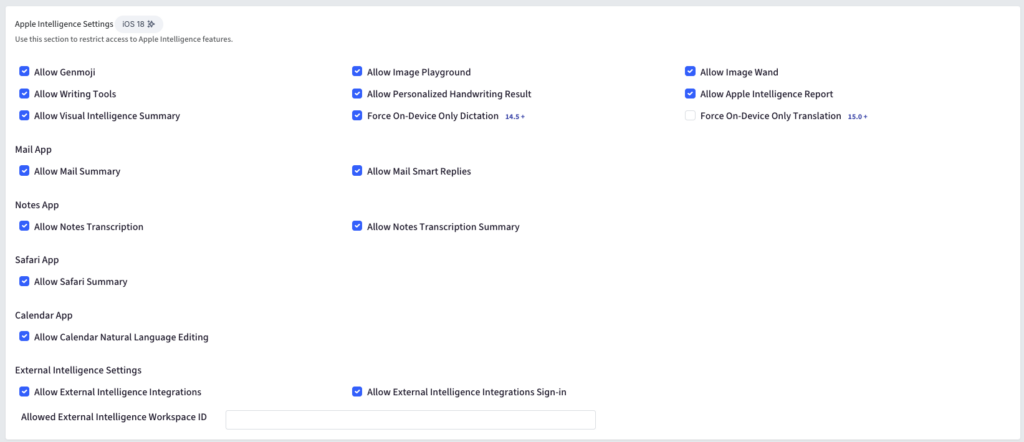
On iOS 26.4 and later, the following settings are delivered through DDM:
- Allow Genmoji
- Allow Image Playground
- Allow Image Wand
- Allow Writing Tools
- Allow Personalized Handwriting Result
- Allow Mail Summary
- Force On-Device Only Dictation
- Force On-Device Only Translation
Scalefusion also adds the following DDM-only settings:
- Allow Apple Intelligence Report
- Allow Visual Intelligence Summary
- Allow Safari Summary
- Allow Mail Smart Replies
- Allow Notes Transcription
- Allow Notes Transcription Summary
- Allow Calendar Natural Language Editing (iOS 27.0+)
On macOS 26.4 and later, the same DDM migration applies, with platform-specific differences. Image Wand, Personalized Handwriting Result, Visual Intelligence Summary, and On-Device Only Translation do not apply to macOS. Allow Calendar Natural Language Editing is available from macOS 27.0.
- External Intelligence settings
External Intelligence Integrations and External Intelligence Integrations Sign-in are now delivered through the DDM declaration on iOS 26.4+ and macOS 26.4+. You can also configure the new Allowed External Intelligence Workspace ID field on both platforms.
- Siri settings move to DDM
For iOS 26.4+ and macOS 26.4+, Siri-related settings are now delivered through DDM. The migrated settings include:
- Allow Siri
- Force Siri Profanity Filter
- Allow Assistant while Locked
You can also use the new Allow Siri User-Generated Web Content restriction for supervised devices.
- New iOS restrictions
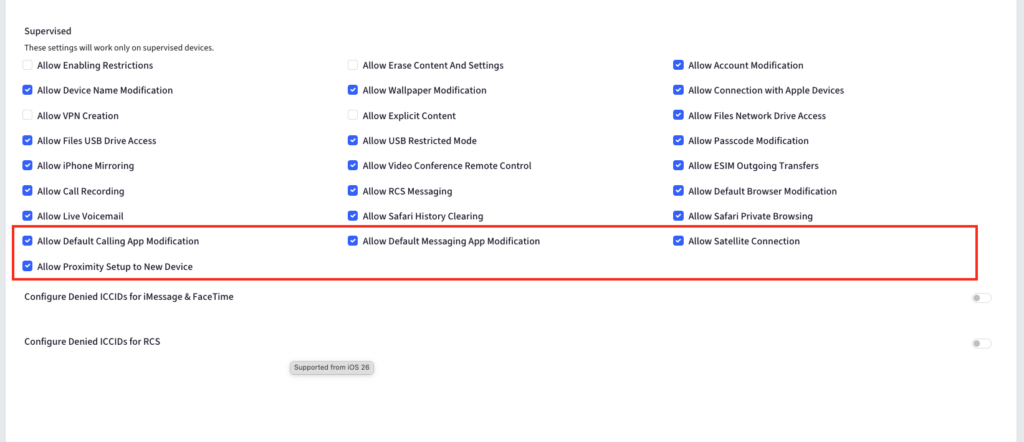
You can now configure additional restrictions on iOS devices to give IT teams more control over default apps, connectivity, and device setup:
- Allow Default Calling App Modification — Prevent users from changing the default calling app and maintain the organization’s preferred configuration.
- Allow Default Messaging App Modification — Prevent users from changing the default messaging app to keep messaging workflows consistent.
- Allow Satellite Connection — Enable or disable satellite connectivity based on your organization’s requirements.
- Allow Proximity Setup to New Device — Control whether users can use proximity-based setup when configuring a new device.
- New macOS restrictions
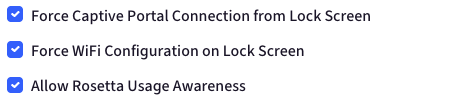
New macOS restrictions give IT teams more control over network access, device setup, and the user experience:
- Force Captive Portal Connection from Lock Screen: Ensure users can connect to networks that require captive portal authentication directly from the lock screen.
- Force Wi-Fi Configuration on Lock Screen: Allow users to configure Wi-Fi connections from the lock screen when network access is required before sign-in.
- Allow Rosetta Usage Awareness: Control whether users receive notifications about apps that use Rosetta, helping them stay aware of compatibility and performance considerations.
- iOS OS update settings
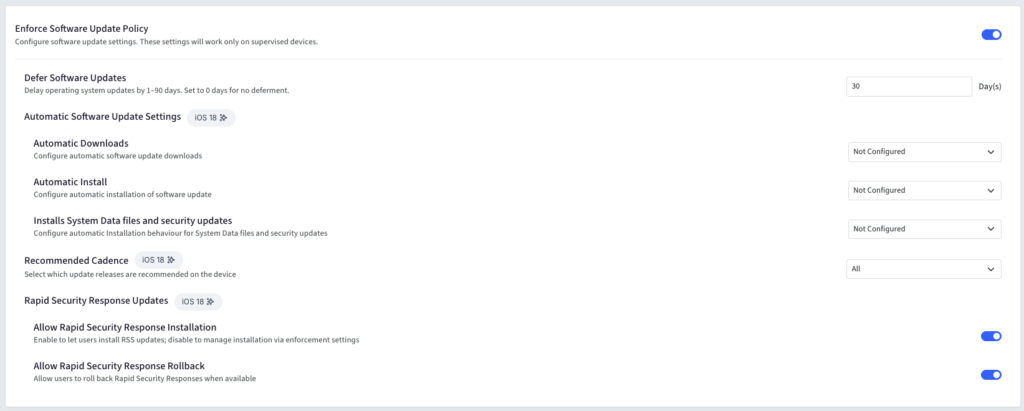
The iOS OS Update section has been restructured to provide more granular control over software updates.
You can now configure:
- Enforce Software Update Policy: Enable or disable enforcement of the software update policy.
- Defer Software Updates: Delay software updates by 1–90 days.
- Automatic Software Update Settings: Configure automatic installation, automatic downloads, and installation of system data files and security updates on iOS 18+.
- Recommended Cadence: Choose between All, Oldest, or Newest.
- Rapid Security Response Updates: Allow installation or rollback of Rapid Security Response updates on iOS 18+.
- AUE iOS profile deprecations
The Allow Siri and Allow Assistant while Locked settings in the AUE iOS profile now carry a deprecation indicator, reflecting Apple’s changes to these restrictions. However, there’s no action required for existing configurations. These restrictions will continue to be sent as configured, so their current behavior remains unchanged.
- Changes to Apple configuration
a. Platform SSO with OpenID authentication
macOS 27 introduces OpenID as a new authentication method for Platform SSO, and Scalefusion plans to support it alongside existing methods. You can select OpenID from the authentication options and configure authentication, FileVault, Login, and Unlock policies accordingly, including offline and authentication grace periods and Touch ID or Apple Watch-based options.
b. New Platform SSO keys
Scalefusion will also extend support to two new Platform SSO configuration keys:
- Sync Password from Web Login: Synchronize passwords detected during web login to local accounts.
- Allowed Web Login URLs: Configure the hosts allowed in the Platform SSO web view. This is required when OpenID is selected or when OpenID is enabled as a Touch ID fallback.
- PPPC deprecations
Since Apple has deprecated the Camera, Microphone, and Speech Recognition Privacy Preferences Policy Control (PPPC) permissions in macOS 27, Scalefusion now displays a deprecation indicator for these permissions in the PPPC configuration UI and Third Party App Catalog. On devices running macOS 27 and later, these permissions will no longer be sent, even if they remain configured.
- Changes in ADE
You can now skip additional screens during Apple device setup. On iOS, new skip options cover screens related to multitasking, the OS showcase, and Liquid Glass. macOS adds more flexibility with options to skip software update, Apple Watch unlock, OS showcase, Liquid Glass, and Accessibility screens.
- Auto Advance for macOS and tvOS
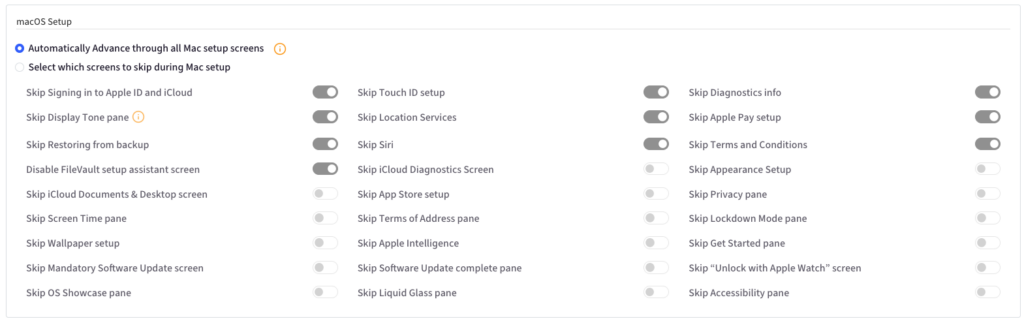
You can now use Auto Advance to move through the Setup Assistant automatically on macOS and tvOS. For macOS, you can either advance through all setup screens or choose which screens to skip. When Auto Advance is enabled, Scalefusion automatically selects Do not create Primary Account to support a fully automated setup. The same streamlined setup experience is now available for Apple TV.
- Enable FileVault during Setup Assistant
In the upcoming week (week of 15th September), a new Force Enable During Setup Assistant option will be made available under macOS Profile > FileVault Settings on the Scalefusion dashboard. When enabled, the ADE flow will use the Await Device Configured command to hold the Setup Assistant, install the FileVault profile, and will then send the Device Configured command.
This capability will be supported on macOS 14 onwards.
- Compliance benchmark with mSCP 2.0
The macOS Security Compliance Project (mSCP) has moved from version 1.0 to version 2.0 with a structural redesign of its compliance schema. Scalefusion’s compliance backend will be updated to support the new mSCP 2.0 schema, along with CIS Level 1 and Level 2 compliance benchmarks for devices running iOS 27, iPadOS 27, and macOS 27.
Ready for Apple’s latest OS with Scalefusion
Apple’s latest OS releases bring new configuration controls, authentication capabilities, setup options, and changes to how devices are managed through DDM. With Day Zero support from Scalefusion, you can adopt iOS 27, iPadOS 27, macOS 27, and tvOS 27 with the latest management capabilities already in place.
As Apple continues to evolve its platforms, Scalefusion stays alongside you with the updates and support you need to keep your Apple environment running smoothly. From preparing for new OS releases to adapting to changes in Apple’s management framework, we’re committed to helping you stay ready at every step.