

K-12 web filtering uses policy-based controls to prevent students from accessing harmful, inappropriate, distracting, or malicious online content while keeping legitimate educational resources available. Modern school filtering should work across networks and managed devices, apply age-appropriate policies, limit bypass attempts, and protect learning without unnecessarily blocking useful information.
Key Takeaways
- Student safety: Web filters restrict access to explicit, harmful, malicious, and other school-defined inappropriate content.
- Compliance: U.S. schools subject to CIPA need more than a blocklist; filtering is one part of a broader Internet safety program.
- Anywhere protection: School-issued devices may need consistent policies at school, at home, and on other networks.
- Age matters: Elementary, middle, and high school students should not automatically receive identical internet-access policies.
- Modern risks: VPNs, proxies, encrypted websites, generative AI, phishing, and newly created websites make static URL blocklists insufficient.
- Balance matters: Effective filtering protects students without routinely blocking legitimate research or collecting more browsing data than a school actually needs.
What Is K-12 Web Filtering?
K-12 web filtering is the process of controlling which websites, online content, and internet services students can access through school-managed networks or devices. Schools typically use categories, URLs, domain reputation, content analysis, user identity, and device policies to decide whether a request should be allowed, blocked, or monitored.
K-12 content filtering can cover more than traditional websites. Depending on the technology used, policies may also apply to search results, YouTube, social platforms, web applications, AI tools, downloads, phishing sites, and malicious domains.
A typical filtering decision looks something like this:
- A student requests a website or online resource.
- The filtering service identifies the domain, URL, content category, or security reputation.
- It checks the student’s grade, group, device, location, or applicable policy.
- The request is allowed, restricted, or blocked.
- Relevant activity may be logged for troubleshooting, safety, or compliance.
Why Do K-12 Schools Need Web Filtering?
Schools need web filtering to combine student safety, cybersecurity, regulatory compliance, and productive internet access.
For qualifying U.S. schools participating in E-Rate, CIPA requires an Internet safety policy and a technology protection measure that blocks or filters specified visual content. Schools must also address monitoring minors’ online activity, educate students about appropriate online behavior, and meet public-notice requirements. See USAC’s current CIPA requirements.
Filtering also contributes to cybersecurity. Students can encounter phishing pages, malicious downloads, compromised sites, and other threats while researching perfectly ordinary schoolwork. CISA specifically recommends that K-12 institutions build broader, layered cybersecurity programs rather than rely on a single security measure. CISA’s K-12 cybersecurity guidance
There is also a practical classroom issue. A filter can restrict gaming or distracting content during lessons while still allowing teachers to use video, news, forums, or other resources when they have instructional value.
What Should K-12 Web Filtering Include in 2026?
A modern K-12 web filtering solution should provide age-based policies, off-network protection for managed devices, anti-bypass controls, real-time content categorization, cross-platform support, reporting, and straightforward exceptions for legitimate educational content. It should also give schools meaningful control over what data is collected and who can access it.
Key capabilities include:
- Policies by grade, school, user group, or role
- URL and content-category filtering
- Protection against proxies, VPNs, and newly created malicious domains
- SafeSearch and granular video controls
- Phishing and malware protection
- Chromebook, Windows, macOS, iOS, and other relevant device support
- Filtering for school-issued devices outside the campus network
- Separate student, staff, guest, and BYOD policies
- Time-based or classroom-specific rules
- Clear block reasons and teacher-friendly unblock workflows
- Audit and compliance reporting
- Controls for generative AI and emerging online tools
The goal should not be to block as much internet as possible. It should be to make access appropriate to the student and the learning context.
K-12 Content Filtering Approaches Compared
| Approach | How it works | Best fit | Main limitation |
|---|---|---|---|
| Network/DNS filtering | Controls requests through the school’s network or DNS resolver | Campus networks, guest Wi-Fi, basic domain blocking | Limited page-level visibility and may not follow devices onto unrelated networks |
| Cloud/proxy filtering | Routes or evaluates internet traffic through a cloud filtering service | Distributed schools and centralized policy management | Configuration, encrypted traffic, and application compatibility require careful planning |
| Device/agent filtering | Enforces policy directly on a managed endpoint | 1:1 and take-home device programs | Requires deployment and endpoint management |
| Hybrid filtering | Combines network, cloud, DNS, and/or endpoint enforcement | Mixed-device districts with on- and off-campus use | More moving parts to configure and govern |
The right architecture depends on where students work. A district with thousands of take-home laptops has different requirements from a primary school where devices rarely leave the classroom.

How Can Schools Avoid Overblocking?
Schools can reduce overblocking by treating filtering as an instructional policy, not simply a security blocklist.
An elementary student and a Grade 12 researcher do not need identical access. A health, history, literature, or current-events resource may contain terms that look risky to an automated system but are entirely legitimate in context.
A WIRED investigation of school filtering records documented cases in which students were prevented from accessing legitimate health, history, and research material. WIRED’s investigation into school internet filtering
A practical approach is to:
- Set different policies for elementary, middle, and high school students.
- Give teachers a fast process for requesting temporary exceptions.
- Review frequently blocked educational domains.
- Show users why a page was blocked rather than displaying a generic error.
- Review filtering categories each term instead of leaving vendor defaults untouched.
Web Filtering and Student Privacy Should Be Designed Together
Filtering can produce highly detailed records of searches and browsing activity. That makes data governance part of the deployment, not an afterthought.
Schools should decide what information genuinely needs to be recorded, how long it should be retained, who can view student-level logs, and when individual activity should be investigated.
The U.S. Department of Education advises schools to evaluate how educational technology providers collect, use, maintain, and disclose student information and to consider privacy and security when selecting online services. See the Department of Education’s student privacy guidance.
A good principle: collect enough data to protect students, troubleshoot problems, and meet legitimate compliance needs, but not simply because a dashboard makes deeper surveillance possible.
How Should a School Choose a Web Filter?
Start with the school’s actual environment rather than a vendor feature list.
- Map devices and networks. Include school Wi-Fi, take-home devices, BYOD, hotspots, and remote learning.
- Define legal and policy requirements. Separate mandatory controls from locally chosen restrictions.
- Create age-based policies. Test elementary, middle, high school, staff, and guest use separately.
- Test real curriculum URLs. Ask teachers and librarians for sites students genuinely need.
- Test bypass scenarios. Include proxies, VPNs, new domains, search engines, video, and AI tools.
- Review privacy controls. Check logging, retention, role-based access, and vendor data practices.
- Measure both failure directions. Track inappropriate content that gets through and legitimate content incorrectly blocked.
That last point matters. A filter that blocks everything will look highly effective on one metric and perform terribly as an educational tool.
How Veltar Extends K-12 Web Filtering Protection Beyond Campus
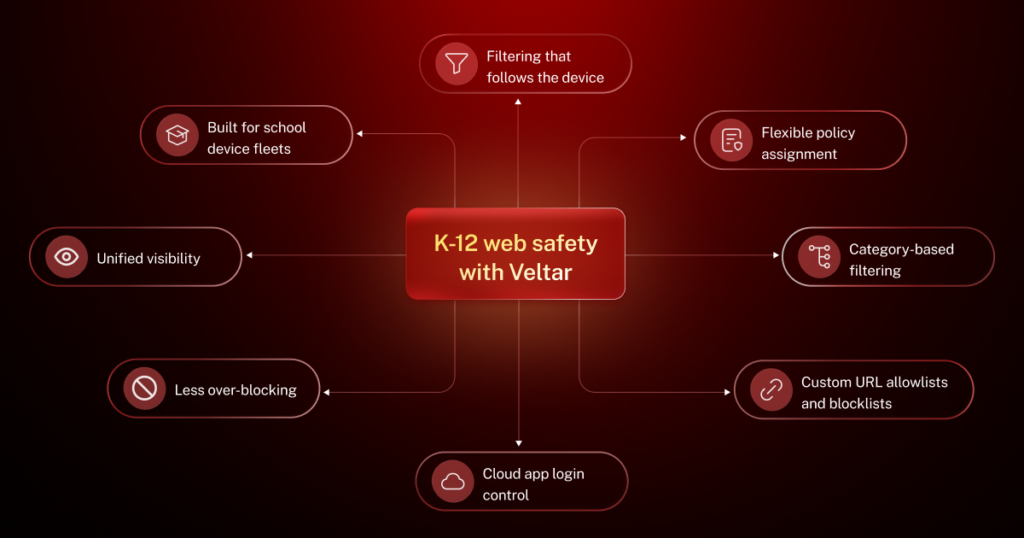
Veltar web filtering for schools enables them to apply web filtering policies directly to managed endpoints, helping ensure protection remains active wherever students learn.
- Filtering that follows the device – Policies stay active on school Wi-Fi, home broadband, public hotspots, and mobile data, so protection does not disappear when students leave campus.
- Flexible policy assignment – Apply different browsing rules by grade level, campus, or user group without managing devices individually.
- Category-based filtering – Block categories such as social media, gaming, and adult content to support age-appropriate browsing.
- Custom URL allowlists and blocklists – Set precise access rules for specific sites when category-based filtering requires exceptions.
- Cloud app login control – Allow Google and Microsoft logins only from verified school accounts, even when students are off campus.
- Less over-blocking – Keep academically important sites accessible, even when they sit inside restricted categories.
- Unified visibility – Track allowed and blocked access attempts from one dashboard, with logs that support reviews and audits.
- Built for school device fleets – Manage web content filtering alongside broader device policies, so changes can be rolled out across campuses with less manual work.
With Veltar, schools can deliver a more consistent approach to student online safety across classrooms, homes, and every location in between.
Secure the Learning Experience, Wherever it Happens
One of the realities of K-12 education is that learning no longer happens in a single place. Students connect from classrooms, homes, libraries, and countless other locations throughout the day. Yet many web filtering strategies still depend on infrastructure built for a campus-first model.
That disconnect creates gaps in visibility, policy enforcement, and student protection precisely where schools have the least oversight. The answer isn’t more network policies; it’s web content filtering at the endpoint, where policies remain active regardless of the network a student uses.
With Scalefusion Veltar web filtering software for schools, institutes can extend consistent WCF, compliance enforcement, and browsing safeguards directly to every managed device, ensuring protection remains in place wherever learning happens.
Because the goal isn’t to secure a school network anymore, it’s to secure the learning experience itself.

FAQs
1. Is web filtering required for K-12 schools?
Web filtering is required for U.S. schools subject to CIPA as part of their eligibility for certain E-Rate discounts. CIPA also requires an Internet safety policy and other measures, so installing filtering software alone does not automatically establish compliance.
2. Can school web filtering work when students are at home?
Yes. Device-based, cloud, or hybrid filtering can enforce school policies on managed devices outside the school network. Architecture matters: filtering that exists only at the campus network gateway cannot automatically control traffic when the device uses a different internet connection.
3. Can students bypass school web filters?
Students may attempt to bypass filters with proxy sites, VPNs, alternate browsers, personal hotspots, encrypted DNS, or newly created websites. Schools should combine filtering with managed-device controls and regularly test common circumvention methods instead of relying only on static blocklists.
4. Should K-12 schools block generative AI?
Schools do not necessarily need to block every generative AI service. A better approach is to define approved tools and use cases by age, subject, and instructional purpose while restricting services that create safety, privacy, academic-integrity, or data-governance concerns.
5. Is web filtering the same as a firewall or device management?
No. Web filtering controls access to internet content; firewalls primarily control network traffic, while device management configures and secures endpoints. These technologies can complement each other, especially when schools need consistent controls across large fleets of managed devices.

