

Android Enterprise for schools helps to deploy and manage Android devices at scale by enabling zero-touch enrollment, work profiles, dedicated device mode, managed app distribution, security policies, and remote management through a compatible UEM or EMM platform. For schools, this means IT teams can configure classroom tablets, shared devices, exam devices, and 1:1 learning devices centrally instead of setting up each device manually.
Schools have moved far beyond asking “Should we go digital?”
The question currently is “How do we scale it?”
From learning management systems to shared classroom tablets, student assessments, and hybrid learning programs, educational institutions now operate complex device ecosystems spanning hundreds, sometimes thousands, of endpoints. And with that scale comes a fundamental challenge: How do IT teams provision, secure, and manage all those devices without being overwhelmed?
Android Enterprise addresses this directly. When paired with a UEM solution, schools gain the infrastructure they need to deploy devices efficiently, enforce consistent policies, and maintain secure learning environments, all without requiring an exponentially larger IT team.
Let’s explore how Android Enterprise solves this challenge and why it’s become essential for modern schools.
Why Android is the natural choice for schools?
When educational institutions evaluate devices for large-scale rollouts, three priorities emerge: scalability, accessibility, and affordability.
Android can support all three.
The Android ecosystem spans entry-level tablets to education-ready devices, giving schools flexibility across different budgets. Whether you’re equipping a single lab or launching a district-wide 1:1 program, schools can often find Android devices across different budgets and educational use cases. Eligible devices can automatically provision during first boot using zero-touch enrollment.
Schools rely on Android for:
- Shared classroom and lab deployments
- Individual student learning programs
- Exam and assessment environments
- Remote and hybrid learning initiatives
- Library and open-access environments
Beyond hardware variety, schools benefit from lower upfront costs, wide device availability, and easy access to educational apps through Managed Google Play.
But here’s the reality. As Android deployments expand across campuses and user groups, managing them stops being straightforward. Manual provisioning becomes tedious. Security policies become inconsistent. Updates pile up. And IT teams quickly find themselves stretched thin.
The real complexity of school device management
Large scale Android device deployments in Schools are inherently mixed:
- Some devices are shared (classroom tablets, lab computers)
- Some are assigned to individuals (teacher devices, 1:1 student programs)
- Some bridge both worlds (BYOD environments alongside school-owned devices)
- Each group needs different apps, policies, and restrictions
Operationally, the complexity multiplies:
- Device spread: Multiple campuses, classrooms, buildings.
- App management: Preventing misuse, limiting distractions, ensuring access to learning tools.
- Update cycles: OS patches, app updates, security fixes across thousands of devices.
- Provisioning: Setting up devices quickly when new cohorts arrive.
- Support: Troubleshooting remotely across distributed locations.
- Compliance: Maintaining security standards and protecting student data.
Try managing any of this manually at scale, and you’ll quickly see why traditional approaches break down. This is where Android Enterprise shifts the equation.
What Android Enterprise brings to large scale device deployments in schools?
Android Enterprise isn’t a standalone management platform; it’s Google’s foundational framework that makes enterprise-scale device management possible at all.
It provides the APIs, security framework, and policy infrastructure UEM platforms use to manage Android devices at scale.
Specifically, Android Enterprise enables:
- Secure enrollment at scale without manual intervention
- Dedicated device modes for single-purpose or restricted use
- Work profiles for separating personal and institutional use
- Policy enforcement for security, compliance, and app management
- Managed app distribution through curated app stores
Without Android Enterprise, large-scale Android device management becomes significantly harder and more manual. With it, the entire operation becomes systematic and automatable.
| Android Enterprise Capability | How It Helps Schools | Common Use Case |
|---|---|---|
| Zero-touch enrollment | Preconfigures eligible devices so they enroll and receive policies during setup. | New semester rollouts, district-wide deployments, 1:1 programs. |
| Dedicated device mode | Locks devices to one app or a limited set of approved apps. | Exam tablets, library kiosks, digital learning stations, assessment devices. |
| Work profile | Separates school apps and data from personal apps and data. | BYOD programs, teacher-owned devices, mixed personal/school use. |
| Managed Google Play | Lets IT approve, distribute, and manage educational apps. | App deployment for students, teachers, and shared classroom devices. |
| Security policies | Applies passcode, encryption, remote lock/wipe, and compliance controls. | Student data protection, lost devices, compliance-supporting policies. |
| Remote management | Lets IT apply policies, troubleshoot, and monitor devices remotely through UEM. | Multi-campus schools, hybrid learning, limited on-site IT support. |

How Android Enterprise solves large-scale device deployments?
1. Zero-touch enrollment
Zero-touch enrollment is transformative for schools. Eligible devices can automatically provision during first boot.
When a device boots for the first time, it automatically configures pre-assigned settings, Wi-Fi credentials, policies, and apps. No IT staff standing in a room plugging devices into a computer. No hours spent selecting configurations by hand.
For schools managing new semester rollouts or district-wide expansions, this single capability saves weeks of IT time and can reduce setup bottlenecks.
2. Managed Google Play.
Managed Google Play allows IT administrators to approve, distribute, and manage educational apps across Android Enterprise devices. Not every device should do everything. Exam tablets shouldn’t have gaming apps. Library computers shouldn’t let students install software freely.
Android Enterprise’s dedicated device mode lets schools lock devices to specific purposes. You can restrict app access, eliminate distractions, and standardize experiences across classrooms and assessment environments. Students get focused tools, IT gets consistency.
3. Managed app distribution
With Managed Google Play, IT teams become curators.
Approved educational apps roll out silently across devices. Unauthorized app stores get blocked. Updates happen automatically without disrupting learning. And teachers get only the apps they need, IT can restrict access to approved apps based on school policies, and admins maintain visibility over everything.
4. Built-in security and compliance
Android Enterprise includes security policies for password enforcement, device encryption, and remote wipe. IT admins can apply these consistently across all devices, ensuring that whether a device is in a classroom or traveling home with a student, the same security standards apply.
Critical for schools that handle student data and must meet compliance requirements.
5. Supporting shared and multi-user devices
Classroom tablets get reused by different students throughout the day. Computer lab devices serve multiple users with different accounts. Android Enterprise handles this elegantly.
Shared device environments maintain separate, secure sessions for each user while keeping device configurations consistent. Device reuse becomes practical without sacrificing security or user separation.
6. Remote management across distributed campuses
Once devices are deployed, they don’t stay in one place. They move between classrooms, travel home with students, and support remote learning.
IT teams need visibility from afar. Android Enterprise enables remote policy management, troubleshooting, and monitoring without requiring physical intervention. For schools with limited on-site support, this is essential.
Android Enterprise vs UEM for schools: What’s the difference?
| Layer | What it does | Why schools need it |
|---|---|---|
| Android Enterprise | Provides Google’s Android management framework, APIs, security controls, enrollment methods, and app management foundation. | Makes Android devices manageable at school or enterprise scale. |
| UEM/EMM Platform | Gives IT administrators a centralized dashboard to apply Android Enterprise capabilities, deploy apps, configure policies, enforce restrictions, and perform remote actions. | Turns Android Enterprise capabilities into everyday IT management workflows. |
| Scalefusion UEM | Builds on Android Enterprise with centralized device management, automation, remote support, web filtering, compliance, and multi-OS management. | Helps schools manage Android and other endpoint devices from a single console. |
How does Scalefusion make Android Enterprise practical for schools?
Android Enterprise provides the foundation, but schools still need a platform to operationalize it, one that speaks the language of education and understands school workflows. That’s where Scalefusion UEM comes in.
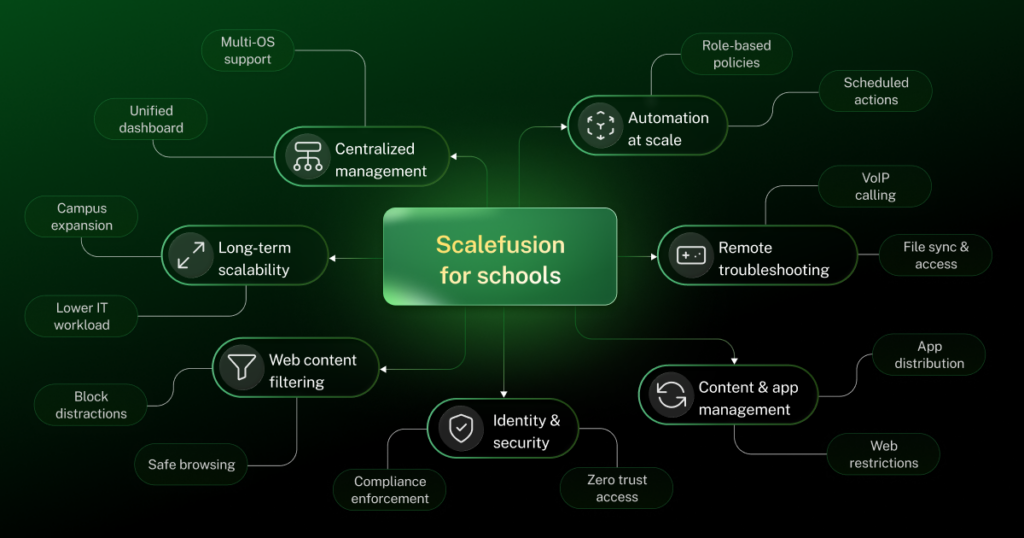
1. Centralized management across mixed environments
Most schools run multiple device types: Android tablets, Windows labs, Chromebooks, MacBooks for teachers, even digital signage. A unified dashboard lets IT teams manage everything together, rather than handling separate platforms.
2. Automation at scale
IT admins can create role-based policies, organize devices into groups, schedule tasks, and apply changes across thousands of devices with a few clicks. What would take days manually happens automatically.
3. Remote troubleshooting and faster resolution
When devices malfunction, IT can troubleshoot remotely through remote cast and control, resolving issues quickly without pulling students out of classrooms or waiting for on-site visits. This includes the ability to initiate VoIP calling for real-time guidance and remote file access or sync for direct diagnostics.
4. Simplified content and app management
Schools can distribute learning materials, manage app access, filter inappropriate content, and maintain consistent digital access across all managed devices.
5. Security, compliance, and Zero Trust access built into device management
Along with deployment and updates, schools also need to secure student data, restrict unauthorized access, and ensure devices remain compliant throughout their lifecycle.
Scalefusion combines endpoint management with Zero Trust access, compliance enforcement, and device security. Schools can secure access, enforce policies, and manage compliant devices from a single platform while reducing the need for separate management workflows.
6. Safe and focused web content filtering
Schools can use web content filtering to block inappropriate content, restrict access to distracting sites like social media and gaming during school hours, and help students stay focused on approved learning resources on educational resources. This also helps in meeting internet safety regulations.
7. Long-term scalability
As schools grow, add campuses, or expand programs, the management system grows with them without adding proportional IT overhead.
What does this mean for schools?
When large-scale device deployments are managed well, the benefits ripple across the entire institution.
Schools experience:
- Faster device rollouts during new semesters or expansions
- Reduced IT workload through centralized management and automation
- More consistent learning experiences across all classrooms
- Better visibility into device health, usage patterns, and compliance status
- Stronger data protection for students and institutions
- Easier expansion across new campuses or departments
- Reduced downtime and faster issue resolution
- Reliable continuity for remote and hybrid learning environments
The outcome:
IT teams shift from reactive to proactive management and educators get reliable technology that supports learning rather than interrupting it.
Finding your school’s right approach
There’s no universal deployment model. Some schools need mostly shared devices. Others run full 1:1 programs. Many operate hybrid environments with owned devices, Bring Your Own Device (BYOD) options, and shared resources all coexisting.
The right approach depends on your school’s specific situation:
| Consideration | What Schools Should Evaluate | Recommended Android Enterprise Approach |
|---|---|---|
| Shared vs. individual device usage | Will devices be shared among multiple students or assigned to individual users? | Use Dedicated Device Mode for shared devices and Fully Managed Devices for assigned 1:1 deployments. |
| BYOD vs. school-owned devices | Will students or teachers use personal devices, or will the school provide them? | Use Work Profiles for BYOD and Fully Managed or Dedicated Device modes for school-owned devices. |
| Multi-campus vs. centralized management | Do you need to manage devices across multiple campuses or from a single location? | Use Zero-touch Enrollment, centralized policy management, and device groups through a UEM platform like Scalefusion. |
| Compliance and security requirements | What security policies are needed to protect student and institutional data? | Enforce passcodes, encryption, remote lock/wipe, app restrictions, and compliance policies through Android Enterprise and UEM. |
| Device lifecycle and refresh planning | How will new devices be deployed and older devices replaced over time? | Use Zero-touch Enrollment and policy-based provisioning to simplify onboarding and maintain consistent configurations during refresh cycles. |
| Integration with existing educational platforms | Do devices need to work with your learning management systems, productivity tools, or identity providers? | Choose a UEM solution that supports integration with educational apps, identity management, and existing IT workflows. |
The key is choosing a management strategy that supports both your immediate deployment needs and your long-term operational sustainability. That means evaluating Android Enterprise compatibility alongside the capabilities of your UEM platform, ensuring both work together seamlessly.
Building sustainable digital learning at scale
Large-scale educational deployments demand far more than basic device shuffling. As schools expand digital learning across campuses, classrooms, and remote environments, operational complexity grows just as fast.
Android Enterprise provides the school-scale device management framework needed to securely deploy, configure, and manage Android devices at scale. A UEM solution like Scalefusion operationalizes that framework, adding centralized management, automation, remote support, and multi-device visibility.
Together, they create an ecosystem where IT teams can manage thousands of devices reliably, schools can maintain consistent learning environments, and educators get the stable technology they need to teach.
That’s what sustainable digital learning looks like at scale.

FAQs
1. What is Android Enterprise for schools?
Android Enterprise for schools is Google’s framework for securely deploying and managing Android tablets, smartphones, and dedicated devices at scale used by students, teachers, and staff. Through a compatible EMM platform, schools can configure devices, distribute approved apps, enforce security policies, separate school data, and manage large fleets centrally.
2. How does Android Enterprise help schools manage devices?
Android Enterprise helps schools manage devices by providing centralized control over enrollment, applications, Wi-Fi settings, permissions, security policies, and device restrictions. Schools can manage fully controlled institutional devices, dedicated classroom devices, and personal devices with separate work profiles, reducing manual configuration while protecting educational data and student privacy.
3. What is zero-touch enrollment for school Android devices?
Zero-touch enrollment allows school-owned Android devices to configure themselves automatically when first connected to the internet. Devices purchased through an authorized reseller can enroll in the school’s EMM, download required apps, and apply predefined Wi-Fi, security, and usage policies without IT staff manually setting up each device.
4. Can Android Enterprise support shared classroom tablets?
Yes, Android Enterprise can support shared classroom tablets when combined with an EMM that provides shared-device or user-authenticated enrollment. Schools can assign tablets to different students, control available apps, restrict device functions, and apply user- or group-specific settings while keeping the devices centrally managed between classroom sessions.
5. How does Scalefusion help schools use Android Enterprise?
Scalefusion helps schools use Android Enterprise by providing zero-touch and QR-code enrollment, managed Google Play app distribution, kiosk mode, web filtering, device restrictions, remote troubleshooting, location tracking, and shared-device management. IT teams can apply configurations to student tablets, classroom kiosks, staff phones, and other school-owned Android devices from one console.
6. What should schools consider before deploying Android devices at scale?
Before deploying Android devices at scale, schools should evaluate device ownership, Android versions, hardware compatibility, enrollment methods, Wi-Fi capacity, app requirements, content filtering, student privacy, security policies, technical support, and device replacement plans. They should also confirm zero-touch eligibility and test configurations on a small device group before full deployment.

