

You can block gaming websites by adding their domains to a browser or device blocklist, using parental controls, filtering gaming categories through DNS or a secure web gateway, or allowing access only to approved websites. For schools and workplaces, centrally managed filtering is usually more effective than blocking individual URLs one at a time.
Key Takeaways
- Individual devices: Built-in controls such as Microsoft Family Safety, Google Family Link, and Apple Screen Time can restrict specific gaming websites.
- Managed Chromebooks: IT admins can enforce URLBlocklist and URLAllowlist policies through Google Admin Console.
- Whole networks: DNS filtering or secure web gateways can block gaming categories instead of maintaining thousands of individual domains.
- Apps need separate controls: Blocking a website does not automatically prevent an installed game, launcher, or cloud-gaming app from running.
- Allowlisting is stricter: Schools or dedicated-purpose devices can block the entire web and permit only approved educational or business sites.

What Is the Best Way to Block Gaming Websites?
The best way to block gaming websites depends on how many devices you manage. For one personal device, a browser or operating-system restriction may be enough; for schools and workplaces, centralized category-based filtering combined with device policies provides broader coverage.
| Method | Best For | Coverage | Main Limitation |
|---|---|---|---|
| Browser URL blocklist | A few known sites | Specific browser | New or alternate domains may remain accessible. |
| Parental controls | Home and personal devices | Websites + some apps | Platform/account dependent. |
| Hosts file | Single Windows/Mac computer | Selected domains | Manual and easy for administrators to reverse. |
| Router/DNS filtering | Multiple devices | Entire network | Users may switch networks or use alternate DNS/VPNs. |
| Managed browser policy | Schools/workplaces | Managed browsers/devices | Requires device/browser management. |
| Secure web gateway | Organizations | Users, devices, browsers, networks | Requires centralized administration. |
The key distinction is URL filtering versus category filtering. A URL blocklist stops domains you already know about. Category-based filtering can automatically restrict sites classified as gaming, which reduces the need to continuously discover new game portals.
How to Block Gaming Websites on Chrome and Chromebooks
For an unmanaged personal Chrome browser, you can use a website-blocking extension. That works for basic self-control, but it is not a strong administrative control because the user may remove the extension or switch browsers.
For managed Chrome browsers and school Chromebooks, Google provides centralized URL policies. Administrators can:
- Sign in to Google Admin Console.
- Go to Devices > Chrome > Settings.
- Open Content > URL Blocking.
- Add gaming domains under Blocked URLs.
- Add approved exceptions where required.
- Apply the policy to the appropriate organizational unit or group.
- Verify the policy on a managed device using
chrome://policy.
Google supports both URLBlocklist and URLAllowlist, with up to 1,000 entries. An organization can also block * and allow only approved websites when a tightly controlled browsing environment is required. See Google’s Chrome Enterprise URL-blocking documentation for the current policy syntax and deployment options.
For school devices, allowlisting can be more maintainable than chasing dozens of newly created “unblocked games” domains.
How to Block Gaming Websites on Windows
On a family-managed Windows device, Microsoft Family Safety can block individual gaming websites.
Go to the family member’s profile, open Content filters, enable web filtering, and add the relevant domains to Blocked Sites. Microsoft also provides an Only use allowed websites option when stricter controls are needed. Microsoft’s Family Safety web-filtering guide
There is an important limitation: web filtering depends on supported browsers and the managed Microsoft account.
Organizations managing Windows fleets should therefore avoid relying solely on family-style controls. Browser policies, DNS filtering, endpoint management, or a secure web gateway provide more consistent enforcement.
How to Block Gaming Sites on Android, iPhone, and iPad
On supervised Android devices, Google Family Link lets parents block specific domains or switch Chrome to Only allow approved sites.
The current path is generally:
- Open Family Link.
- Select the child.
- Go to Controls > Google Chrome and Web.
- Open Blocked sites.
- Add the gaming website or domain.
Google notes that Family Link restrictions apply to Chrome and some Android apps, while alternate browsers or unsigned-in profiles can behave differently on certain platforms. Google’s Family Link Chrome controls
On iPhone and iPad, Apple’s Screen Time and family controls can restrict individual websites and apps. Website filtering and app restrictions should be configured together because blocking examplegame.com does not prevent the corresponding installed app from working.
How to Block Gaming Websites Across a School or Workplace Network
Schools and workplaces usually need more than a static list of gaming URLs. Users may encounter mirror domains, browser games hosted on general-purpose platforms, cloud-gaming services, or entirely new sites.
Use category-based DNS or web filtering
DNS filtering works by preventing selected domains or content categories from resolving. A filtering service can therefore apply one gaming policy across many devices instead of configuring every browser separately.
Cloudflare, for example, documents DNS filtering as a way for schools to restrict sites that affect student productivity, including gaming, social media, and streaming platforms. Cloudflare’s explanation of DNS filtering
Organizations can use the same model to separately block gambling websites, adult content, malware, or other categories required by their acceptable-use policy.
Pair website controls with app controls
Website filtering only addresses browser traffic. Steam, Roblox, Minecraft, Epic Games Launcher, cloud-gaming clients, and mobile games may use installed applications instead.
A stronger policy therefore combines:
- Gaming website/category filtering
- Application installation restrictions
- Game or launcher blocking
- Browser and extension controls
- User restrictions that prevent policy changes
- Logging to identify domains that were missed
That layered model is particularly useful for school Chromebooks, computer labs, shared workplace endpoints, and purpose-built devices.


Why Does Simple URL Blocking Sometimes Fail?
Blocking game.example.com does not necessarily block every hostname associated with a gaming service. A platform may use separate domains for authentication, content delivery, embedded games, regional sites, or cloud infrastructure.
Users may also switch browsers, connect through another network, install an app, or find a mirror site.
That is why the method should match the use case. Blocking five known domains? A URL blocklist is fine. Managing hundreds or thousands of devices? Category filtering and centralized device policy are far easier to maintain.
And always test the finished rule. Blocking too broadly can accidentally restrict educational games, coding platforms, or other legitimate resources used in classrooms.
Block Gaming Sites Effectively with Veltar’s Secure Web Gateway
Scalefusion Veltar approaches gaming site blocking at the endpoint layer, which avoids the weaknesses of network only or browser based filters. Once the secure web gateway policy is applied to a device, Veltar evaluates every outbound request across all apps, browsers, and networks.
Users cannot bypass restrictions by switching browsers, trying incognito mode, or connecting to mobile hotspots. It identifies gaming domains, gaming platforms hidden behind CDNs, and new or mirrored URLs used by popular game publishers. Since it categorizes requests in real time, Veltar’s SWG reliably blocks gaming sites that static lists typically miss. With unified policy delivery through Scalefusion UEM, IT teams apply the restriction once and maintain consistent enforcement across the entire device fleet.
This quick interactive demo walks you through the exact steps to block online gaming sites using secure web gateway policies in Veltar.
How to block online gaming sites with Veltar
Following is a step-by-step guide on how to block online gaming websites on Scalefusion Veltar
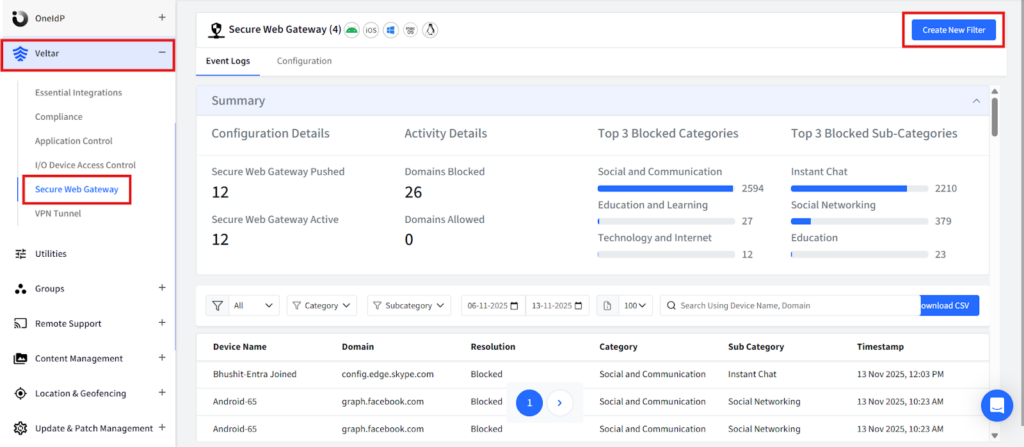
Step 1: Log in to your Scalefusion account and navigate to the Veltar section. Select Secure Web Gateway and click on ‘Create New Filter’ in the top right corner.
Step 2: Give this filter a unique name.
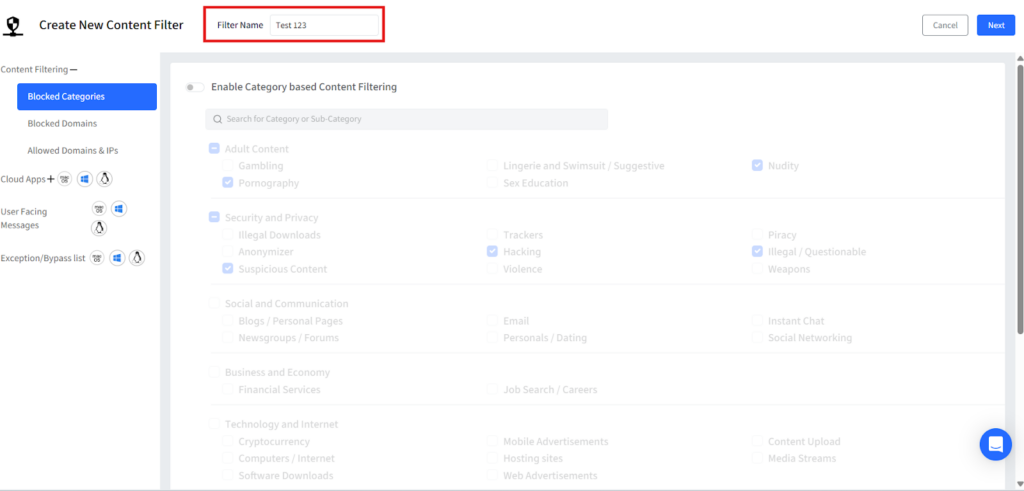
Step 3: Click on blocked categories from the left panel and a list of pre-built website categories will be displayed. Turn on the flag for “Enable Category based Content filtering”.

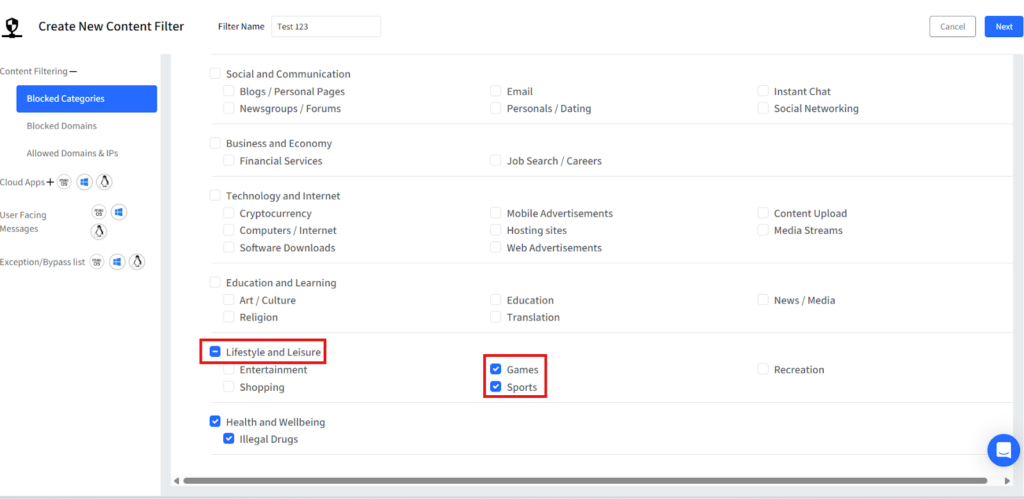
Step 4: Under the ‘Lifestyle and Leisure category’ category, select the options Games and another option Sports.
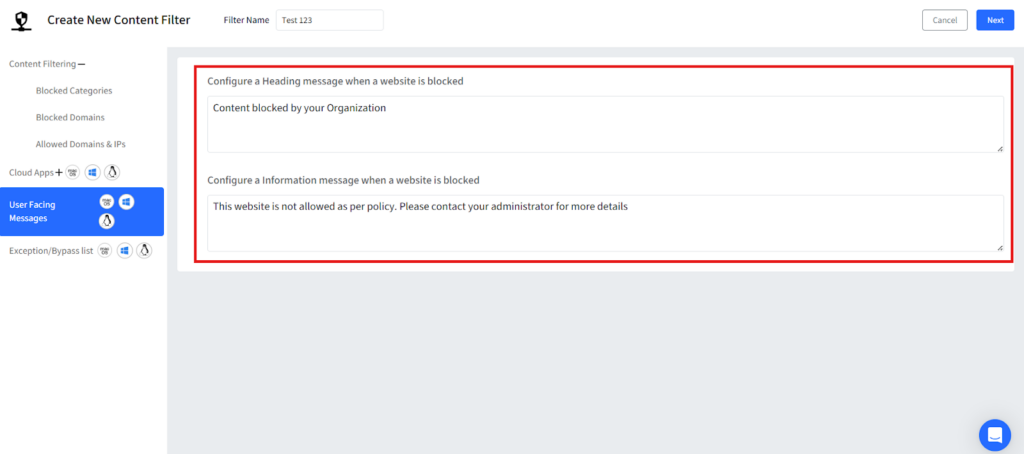
Step 5: Once the categories are selected, customize a message that will be displayed whenever a user tries to visit a gaming site and then save the filter.
Step 6: Once you save it, your filter will be displayed on the dashboard.
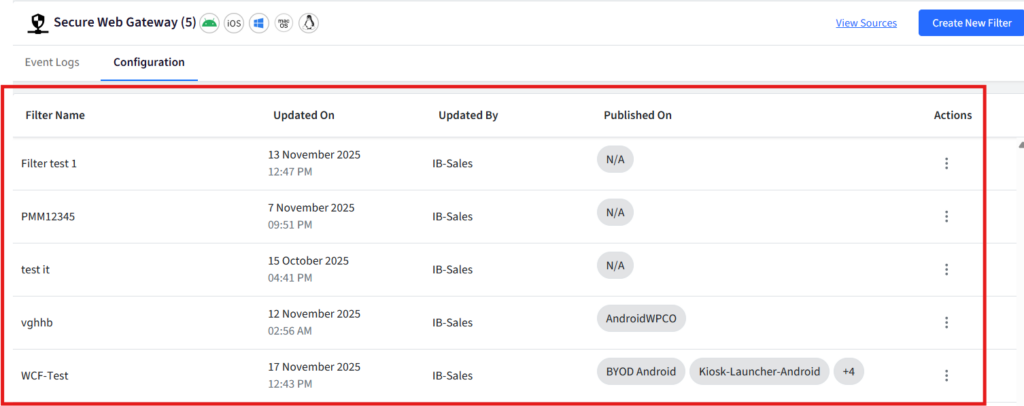
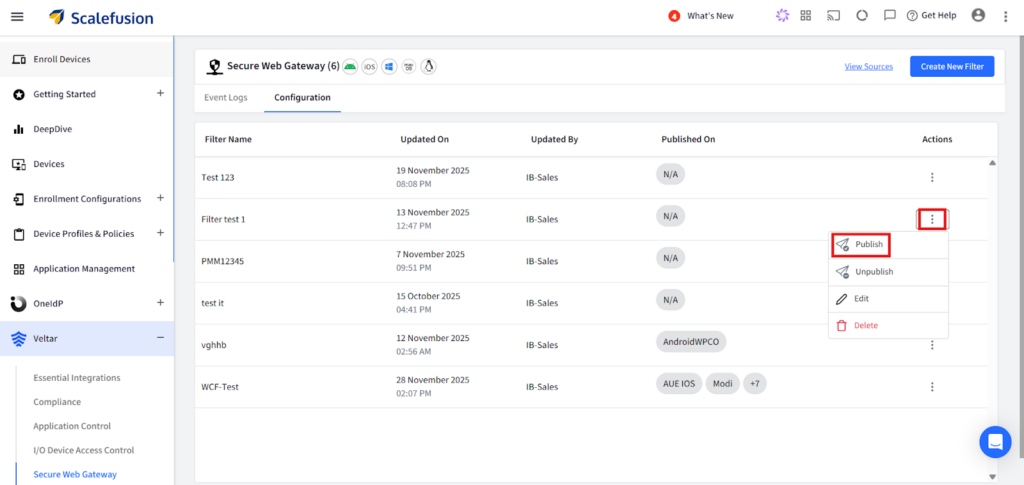
Step 7: Click on the three dots on the extreme right end of the filter configuration and click on publish from the drop down.
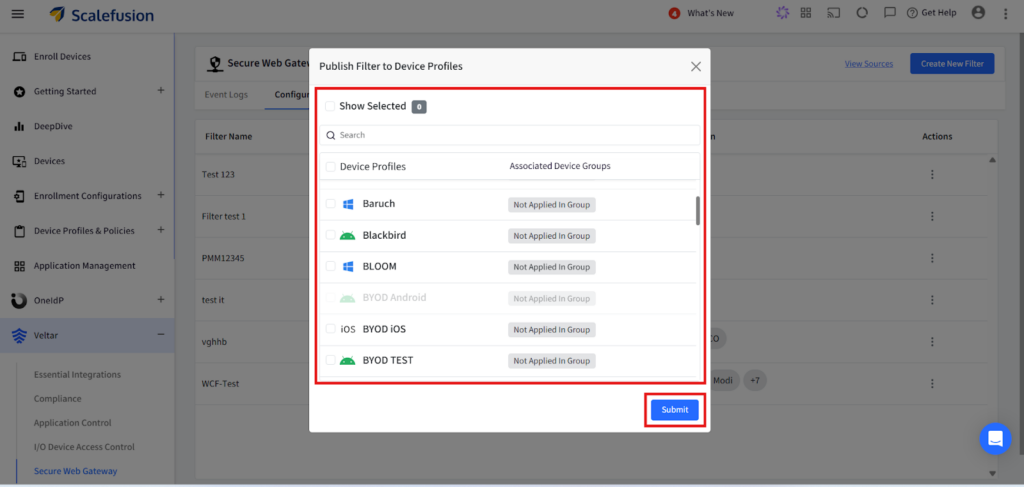
Step 8: Select the appropriate device profile on which you want to enforce the policy and apply this filter configuration.
Secure your web with a reliable Secure Web Gateway
Blocking online gaming sites is not only about reducing distractions but also about eliminating hidden security and compliance risks. Scalefusion Veltar provides a clean, unified, and device centric approach that keeps controls active in every browsing scenario. With Veltar’s secure web gateway solution, companies create a more focused, safer, and more manageable digital environment across all user devices.

FAQs
1. How do I block all gaming websites?
To block most gaming websites, use category-based DNS or secure web filtering and select the gaming category. On highly restricted school or workplace devices, another option is to block all websites by default and allow only approved domains.
2. How do I block game websites on Chrome?
Managed Chrome administrators can use the URLBlocklist policy through Google Admin Console. Individual users can use browser extensions, parental controls, or operating-system filtering, although those methods are generally easier to disable.
3. Why do schools block gaming websites?
Schools commonly block gaming websites to reduce classroom distractions, conserve network resources, enforce acceptable-use policies, and limit access to sites containing unwanted advertising, chat features, or inappropriate content.
4. Can users bypass a gaming website block by switching browsers?
They sometimes can if the restriction exists only inside one browser. Device-level, DNS-level, or secure web gateway policies provide stronger coverage because enforcement is not tied to a single browser extension or local blocklist.
5. Does blocking a gaming website also block the game app?
No. Website and application controls are separate. If a game has an installed desktop or mobile app, IT administrators or parents must restrict that application independently.

