

You can block ads on Android using browser controls, Private DNS, an ad-blocking browser, notification settings, or by removing apps that generate unwanted pop-ups. The right method depends on whether the ads appear on websites, inside apps, as notifications, or randomly across your phone.
Key Takeaways
- Browser ads: Chrome can block intrusive ads, pop-ups, and redirects, but it does not remove every advertisement.
- Device-wide filtering: Private DNS can block many advertising and tracking domains across browsers and apps.
- In-app ads: DNS filtering works for some apps, but first-party and embedded ads may still appear.
- Random full-screen ads: Ads appearing outside the app you are using can indicate an unwanted or adware-style application.
- Notification ads: Disable notification permissions for the offending website or app rather than installing another blocker.
How to Block Ads on Android Quickly
For most Android users, the easiest place to start is Private DNS or the browser’s built-in ad controls.
If the problem is limited to Chrome, disable intrusive ads, pop-ups, and redirects. If ads appear across several apps, DNS-level filtering can provide broader coverage. Random full-screen ads that appear on the home screen or over unrelated apps should be investigated as a possible unwanted-app problem rather than simply blocked.
Here is the practical difference:
| Method | Best For | Blocks Ads Across Apps? | Main Limitation |
|---|---|---|---|
| Chrome settings | Browser pop-ups and redirects | No | Doesn’t remove normal in-page ads. |
| Private DNS | Ad/tracker domains | Often | Can’t block every first-party ad. |
| Ad-blocking browser | Web browsing | No | Only works inside that browser. |
| Notification controls | Spam notifications | No | Only stops notification-based ads. |
| Remove unwanted apps | Random overlays/pop-ups | Yes, if app is the cause | Requires finding the offending app. |
| Paid/ad-free app version | Ads inside a specific app | That app only | May require subscription or purchase. |
| Scalefusion Veltar | Managed Android fleets, schools, workplaces | Broad endpoint-level filtering | Designed for centrally managed organizational devices |
1. Block Ads and Pop-Ups in Chrome
Chrome for Android includes controls for intrusive advertising, pop-ups, and redirects. These settings are useful when the problem mainly occurs while browsing websites.
To block intrusive ads in Chrome:
- Open Chrome.
- Tap the three-dot menu.
- Open Settings.
- Tap Site settings.
- Open Intrusive ads.
- Make sure intrusive ads are blocked.
- Return to Site settings.
- Tap Pop-ups and redirects.
- Keep pop-ups and redirects blocked.
Chrome’s protections are deliberately aimed at intrusive behavior rather than removing every advertisement from every website.
If one website keeps sending advertising notifications, don’t confuse that with browser ads. Open the site’s permissions and disable its notification access instead. Google’s Chrome documentation specifically recommends removing notification permission from sites sending unwanted alerts.
2. Block Ads on Android Using Private DNS
Private DNS is one of the simplest ways to block many ads across Android without modifying every app individually. An ad-filtering DNS provider refuses to resolve known advertising and tracking domains, preventing some ad resources from loading.
Android includes Private DNS controls natively. Google’s documented path is generally:
- Open Settings.
- Select Network & internet.
- Tap Private DNS.
- Choose Private DNS provider hostname.
- Enter the hostname provided by your chosen DNS provider.
- Tap Save.
Menu names can vary slightly between Samsung, Pixel, OnePlus, Motorola, Xiaomi, and other Android manufacturers.
Google recommends keeping Private DNS enabled because it protects DNS queries when supported. However, Google also clarifies that Private DNS protects DNS requests and responses rather than every type of network traffic.
Ad-filtering DNS providers can add another layer by refusing requests to known advertising domains. For example, AdGuard documents DNS filters that block requests to advertising and tracking domains.
What Private DNS Cannot Block
Private DNS isn’t a magic “remove every ad” switch.
It works best when an advertisement comes from a separate advertising domain. If the advertising and the requested content come from the same service or domain, DNS filtering cannot easily distinguish between them.
That means you may still see:
- YouTube advertising
- Instagram sponsored posts
- Facebook sponsored content
- ads embedded directly into some games
- first-party promotions
- sponsored search results
This limitation is often missing from simpler Android ad-blocking guides.
3. Use an Ad-Blocking Browser
Another straightforward option is to use a browser with built-in ad and tracker blocking.
Browsers such as Brave include integrated protections against many third-party ads, trackers, and pop-ups. This removes the need to configure a separate browser extension for normal web browsing.
Firefox for Android is another option because it supports selected browser extensions, including content-blocking extensions. Android Authority currently recommends this route as an alternative because Chrome for Android doesn’t provide the same traditional extension model as desktop Chrome.
The obvious limitation: browser-level blocking works inside that browser. It won’t automatically remove ads from unrelated Android apps.
4. Stop Ads Appearing as Notifications
Some “ads” aren’t web advertisements at all. They’re notifications sent by apps or websites that were previously granted notification permission.
If an app is responsible:
- Long-press the notification.
- Open its notification settings.
- Disable the unwanted notification category or all notifications for that app.
You can also go through:
Settings > Notifications > App notifications
The exact path varies by Android version and manufacturer.
For browser notifications, revoke permission for the specific website rather than disabling all browser notifications.
This gives you a cleaner result: important alerts stay enabled while promotional categories disappear.
5. Remove Apps Causing Random Pop-Up Ads
If ads suddenly appear on your home screen, lock screen, or over completely unrelated apps, the problem may not be normal advertising.
It can be caused by an unwanted app with excessive notification or overlay permissions.
Google recommends troubleshooting persistent unwanted ads by restarting Android in Safe Mode and removing recently installed applications one at a time until the behavior stops. Google also recommends keeping Play Protect scanning enabled.
Start by reviewing apps you installed shortly before the ads appeared, particularly apps that don’t have an obvious reason to display over other applications.
Also check:
Settings > Apps > Special app access > Display over other apps
If an unfamiliar application has overlay permission, investigate it before leaving that access enabled.
A key distinction here: installing another ad blocker won’t necessarily solve adware. Removing the application generating the advertisement does.
6. Turn Off Android Ad Personalization
Android also provides controls over how advertising interests are used.
Depending on your Android version, look under:
Settings > Privacy > Ads
or
Settings > Security & privacy > More privacy settings > Ads
You may find controls related to ad topics, app-suggested ads, and ad measurement.
Turning these features off can reduce personalization and cross-app advertising signals. It does not mean Android will stop displaying all ads. Google’s documentation describes these settings as controls over how advertisers choose or measure ads rather than as an ad blocker.
That distinction matters. Privacy controls and ad blocking solve different problems.Which Android Ad-Blocking Method Should You Use?
7. Block Ads on Managed Android Devices with Scalefusion Veltar
Following is a step-by-step process that covers in detail how to block ads on Android devices
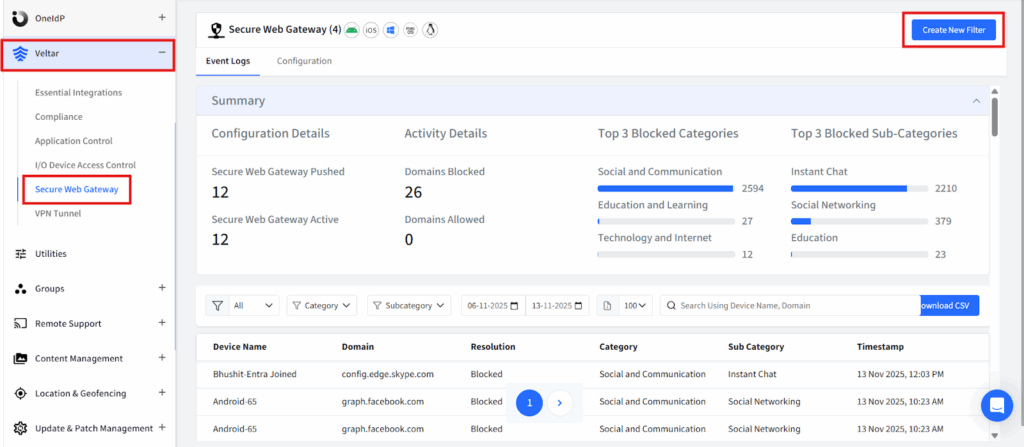
Step 1: Log in to your Scalefusion account and navigate to the Veltar section. Select Secure Web Gateway and click on ‘Create New Filter’ in the top right corner.
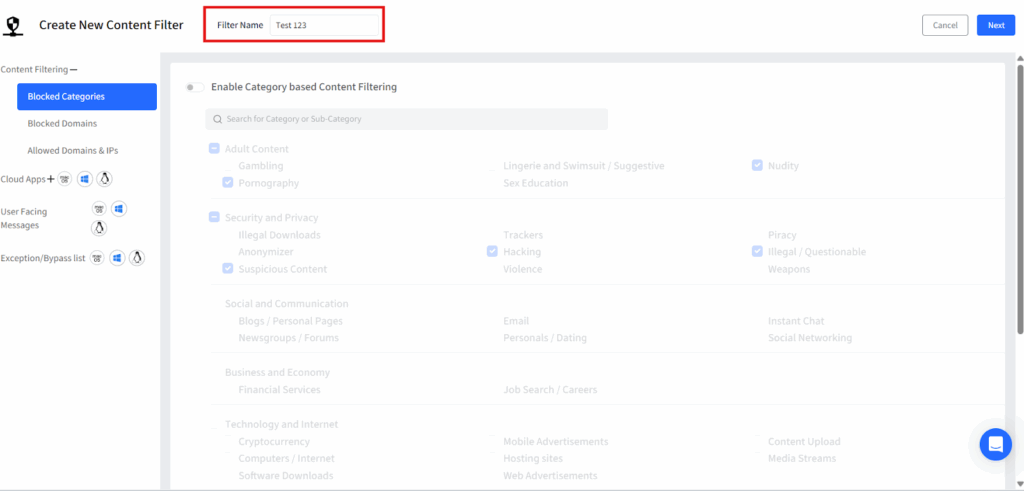
Step 2: Give this filter a unique name.
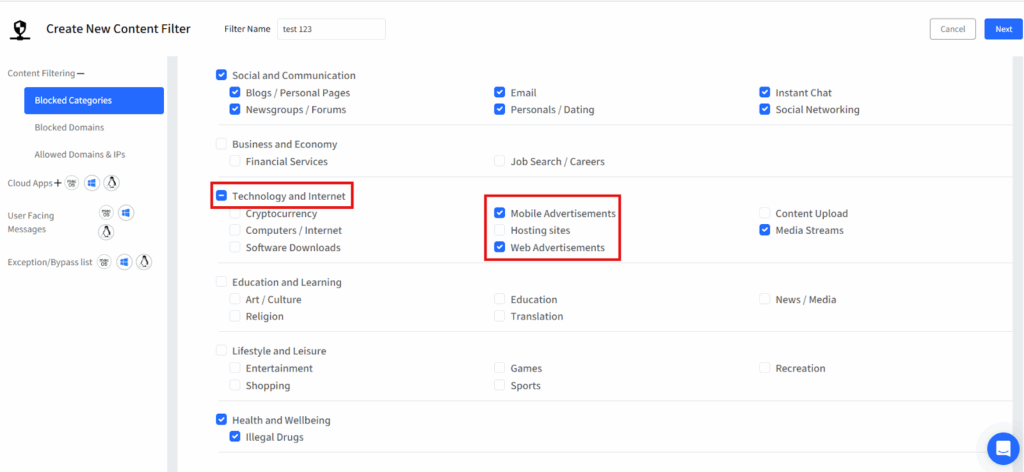
Step 3: Click on blocked categories from the left panel and a list of pre-built website categories will be displayed. Turn on the flag for “Enable Category based Content filtering”.
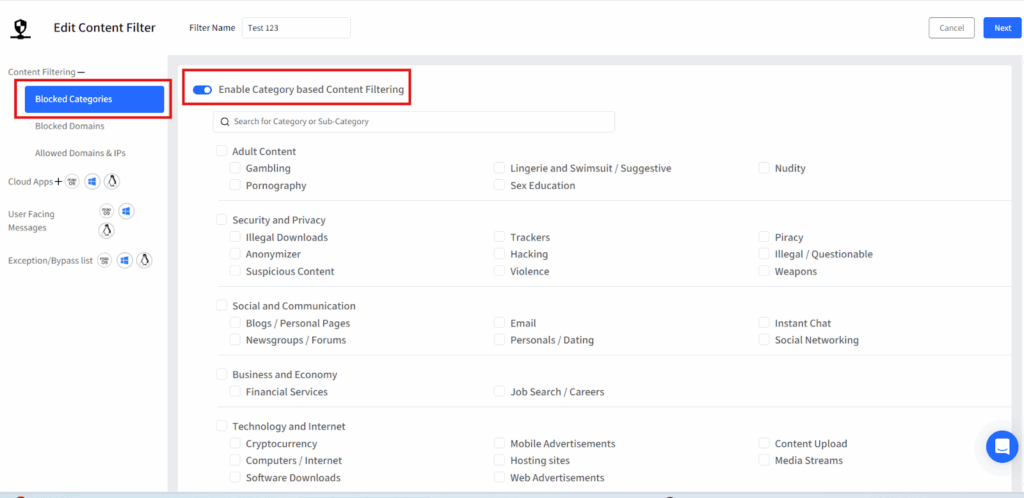
Step 4: Select the ‘Technology and Internet’ category and under that select ‘Mobile Advertisements’ and ‘Web Advertisements’ subcategories.
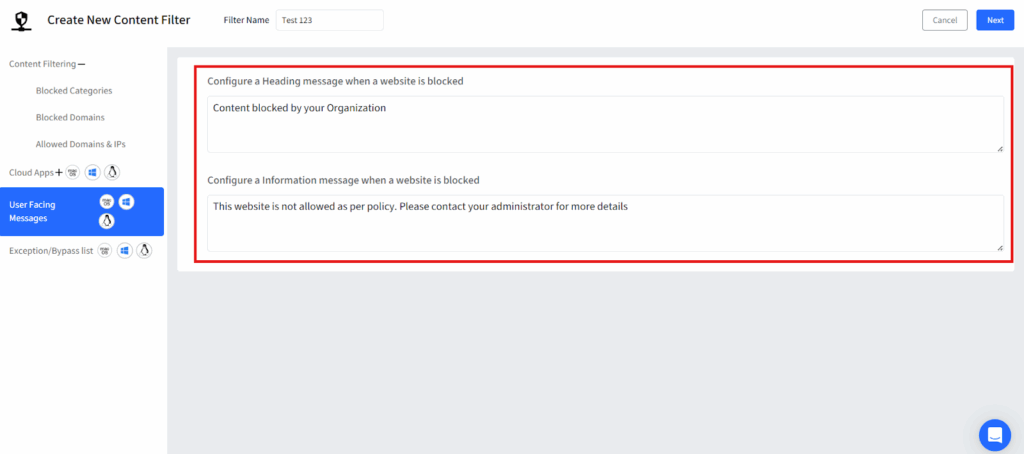
Step 5: Once the categories are selected, customize a message that will be displayed whenever a user sees an ad on a web page and then save the filter.
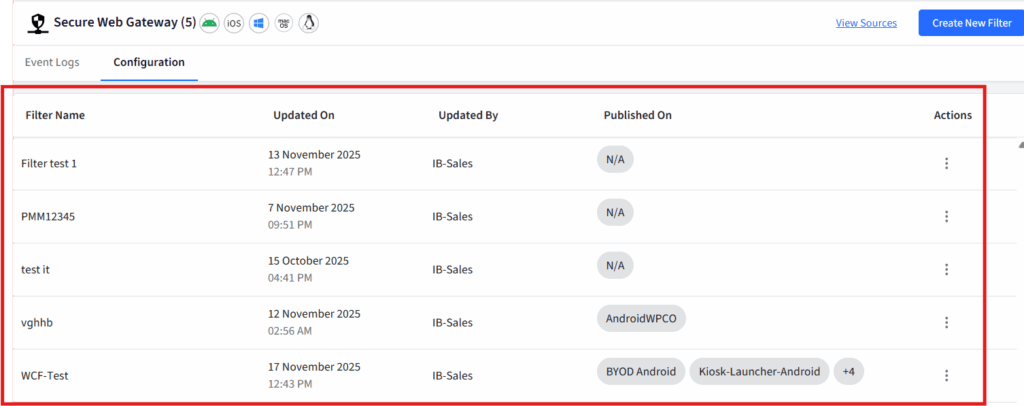
Step 6: Once you save it, your filter will be displayed on the dashboard.
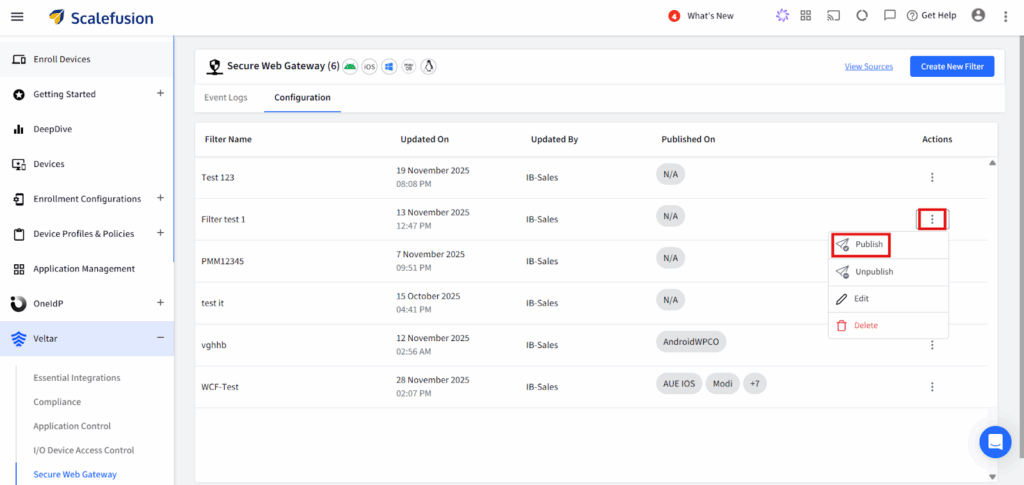
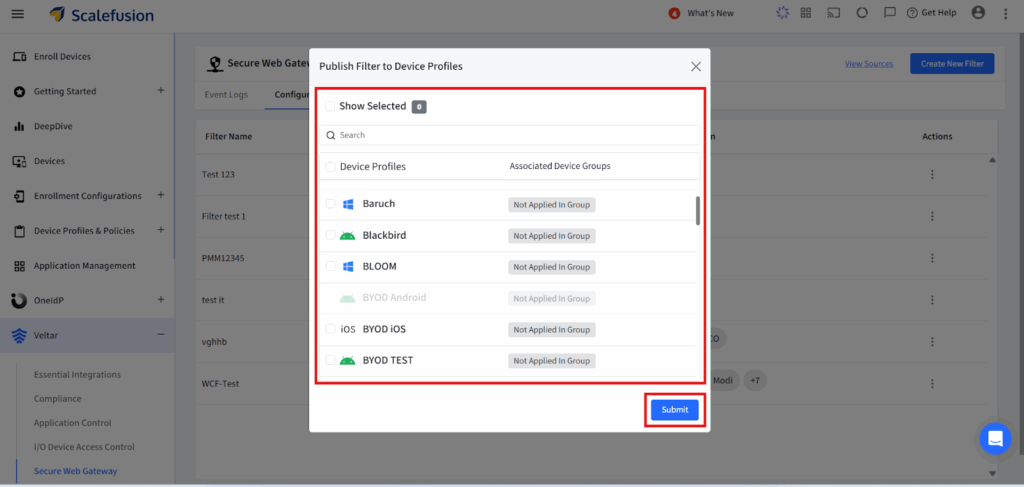
Step 7: Click on the three dots on the extreme right end of the filter configuration and click on publish from the drop down.
Step 8: Select the appropriate device profile on which you want to enforce the policy and apply this filter configuration.
Which Android Ad-Blocking Method Should You Use?
Start with the location of the ad.
Ads only appear while browsing Chrome?
Use Chrome’s intrusive-ad and pop-up controls.
Ads appear across several apps and websites?
Consider an ad-filtering Private DNS service.
You mainly want an ad-free browsing experience?
Use a browser with integrated content blocking or compatible extensions.
Ads arrive through notifications?
Disable the offending notification permission.
Ads suddenly appear over the home screen or unrelated apps?
Investigate recently installed applications, overlay permissions, and Play Protect.
You simply don’t want personalized advertising?
Change Android’s ad-privacy settings.
This source-first approach usually works better than installing multiple blockers and hoping one catches everything.
Can Businesses and Schools Block Ads on Managed Android Devices?
Organizations should approach Android advertising differently from individual users.
On company-owned, school-owned, kiosk, or frontline devices, the goal usually isn’t merely “remove annoying ads.” IT teams often want to prevent distracting websites, malicious redirects, unauthorized browsers, risky apps, and inappropriate web content at the same time.
Centralized Android device management can help administrators enforce browser policies, application allowlists, web restrictions, managed configurations, network settings, and notification rules consistently rather than configuring every phone manually.
Google’s Chrome enterprise controls, for example, include policies for pop-ups and URL blocking on managed Android environments.
How Scalefusion Veltar’s secure web gateway blocks ads on Android more effectively
Scalefusion Veltar blocks ads on Android by filtering web requests directly at the endpoint. Since the secure web gateway solution operates at the device level, it intercepts tracking scripts, advertising URLs, pop ups, and redirect domains across all apps and browsing environments. This approach ensures consistent protection even when users switch networks, browse in incognito mode, or install alternative browsers.
Veltar relies on real-time domain categorization rather than static blocklists. It identifies ad networks, tracking pixels, analytics scripts, and content delivery networks that push advertisements across Android apps and web content. This helps block both visible ads and hidden trackers that traditional ad blockers often fail to detect.
As part of the Scalefusion UEM ecosystem, Veltar enforces these controls through a unified policy. IT teams apply the rule once, and it remains active across all managed Android devices without extra configuration. Monitor blocked advertising traffic through logs and confirm that the browsing environment is more secure and distraction free.
Block ads with Veltar. Create a safe and distraction-free web environment
Veltar offers a consistent and reliable solution for IT teams to manage secure, distraction-free Android environments. It achieves this by combining robust content filtering with device-level controls, ensuring ads remain blocked on all managed Android devices without requiring any user action.
This powerful approach results in several key benefits: cleaner browsing experiences, optimized bandwidth performance, and minimized exposure to malicious ad networks. Since Veltar is built on Scalefusion UEM, it supports scalable deployment and real-time policy updates, making it ideal for various settings, including classrooms, staff device fleets, and enterprise endpoints.


FAQs
1. How do I block all ads on my Android phone?
There is no single Android setting that reliably blocks every type of advertisement. Private DNS can block many advertising domains, while browser blockers handle web ads and notification controls stop promotional alerts. Ads embedded directly into apps or served from the same domains as content may still appear.
2. Can I block ads on Android without installing an app?
Yes. Android’s built-in Private DNS setting can use an ad-filtering DNS provider without requiring a traditional ad-blocker app. Chrome also includes built-in controls for intrusive ads, pop-ups, and redirects. Private DNS availability and menu locations can vary slightly by device.
3. Why am I suddenly getting pop-up ads on my Android phone?
Random pop-up ads appearing outside your browser may be generated by an installed application rather than a website. Google recommends removing suspicious or recently installed applications, testing the phone in Safe Mode, and confirming that Google Play Protect scanning is enabled.
4. Does Private DNS block all ads on Android?
No. Private DNS mainly blocks requests to known advertising or tracking domains. It cannot reliably remove advertisements delivered from the same domains or infrastructure as the content you requested, which is why some social-media, streaming, and in-app ads may remain.
5. Does turning off personalized ads stop ads?
No. Android’s ad-privacy settings affect the information used to select or measure advertising. Turning personalization features off does not remove advertisements themselves.

