

The best iOS MDM solutions help businesses remotely enroll, configure, secure, monitor, and manage iPhones and iPads from a central platform. These solutions allow IT teams to deploy apps, enforce security policies, manage OS updates, restrict device settings, support BYOD or corporate-owned devices, and protect business data across distributed Apple device environments.
Key Takeaways
The best iOS MDM solution helps organizations centrally enroll, secure, configure, and support business iPhones and iPads while reducing manual IT work and protecting corporate data.
- Match the Solution to Your Environment: Apple-only organizations may prioritize deeper Apple-specific controls, while businesses with mixed device fleets should consider an MDM platform that supports multiple operating systems.
- Prioritize Automated Enrollment: Integration with Apple Business enables zero-touch enrollment, allowing organizations to deliver preconfigured and policy-compliant iPhones and iPads directly to employees.
- Evaluate Essential Management Features: A capable iOS MDM should support centralized app deployment, security restrictions, remote device actions, kiosk mode, content distribution, device grouping, and inventory management.
- Strengthen Security and Compliance: Passcode enforcement, encryption, VPN configuration, remote lock and wipe, compliance monitoring, and detailed reporting help protect sensitive business information across managed Apple devices.
- Test Before Making a Decision: Organizations should use free trials to enroll real devices, deploy applications, test policies, simulate lost-device scenarios, and evaluate usability, scalability, pricing, integrations, and vendor support.
Best iOS MDM by use case
| Use case | Best fit | Why |
|---|---|---|
| Mixed device fleets (iOS + Android + Windows + macOS) | Scalefusion | Single console across operating systems, with optional identity and endpoint security add-ons |
| Apple-only enterprise with deep customization needs | Jamf Pro | Native Apple workflows, custom scripting, and mature patch management |
| MSPs and remote/hybrid Apple fleets | Addigy | Cloud-native monitoring built for distributed teams without on-prem infrastructure |
| Security- and compliance-driven environments | Iru (formerly Kandji) | Prebuilt security templates and automated drift remediation |
| Small teams, education, or tight budgets | Mosyle | Free tier available; lightweight core feature set |
Apple devices have become very popular and they are everywhere. iPhones and iPads are now standard tools across sales teams, retail floors, healthcare staff, field engineers, and executives. What started as “bring your own iPhone” has turned into enterprise-wide Apple deployments.
And that scale changes everything. When hundreds or thousands of iOS devices handle business email, customer data, files, and internal apps, managing them manually is not an option. One lost iPhone can expose sensitive data. One outdated iPad can become an attack point. One misconfigured device can violate compliance rules.
This is exactly where iOS MDM solutions come in.
With the right iOS device management strategy, IT teams can enroll devices remotely, enforce policies, deploy apps, lock rogue devices, and protect enterprise data without touching each phone physically. In short, modern businesses need professional iOS MDM software to stay secure, compliant, and operational.
In this guide, we will compare the 5 best iOS MDM Solutions in 2026 so you can choose the right platform based on features, pricing, and scale. If you manage iPhones and iPads today or plan to this year, this blog will help you make the right call.
Why do enterprises need iOS MDM?
An iPhone is not just a phone anymore. It’s a work device, a data vault, and sometimes an access key to internal systems. Without centralized control, IT teams face four major problems:
1. Security risks grow every day: Lost phones, jailbroken devices, unauthorized apps, and public Wi-Fi usage all expose business data. Without iOS MDM solutions, IT teams have no way to enforce strong passwords, block risky apps, or wipe compromised devices.
2. Compliance is difficult to manage manually at scale: GDPR, HIPAA, SOC 2, ISO, and industry-specific rules require continuous logging, encryption, and data protection. Reliable iOS device management solutions allow admins to enforce encryption, track compliance, and generate audit reports automatically.
3. App management becomes chaotic: Without enterprise controls, users install anything such as games and unsafe file-sharing tools. With iOS mdm software, IT can push approved apps, block unapproved ones, and manage updates silently.
4. IT support does not scale: When devices break, freeze, or misbehave, walking each employee through fixes becomes painful. Modern iOS MDM solutions allow remote troubleshooting, resets, Wi-Fi updates, and device commands without any phone calls or site visits.
In short, if iPhones and iPads are part of your business stack, ignoring MDM for iPhones and iPads increases security, productivity, and compliance risk to security, productivity, and compliance.
9 Key features to look for while choosing an iOS MDM
Before choosing the best iOS MDM, it’s important to understand what separates a basic tool from a reliable enterprise solution. The right platform should simplify device setup, improve security, and reduce the daily workload for IT teams. Below are the most important features to evaluate when selecting from modern iOS MDM solutions.
- Apple Business and Automated Device Enrollment: This is the foundation of any serious iOS device management setup. With Apple Business and Automated Device Enrollment (ADE), Apple’s current term for what was formerly called DEP, devices can be enrolled automatically the moment they are turned on for the first time. There is no need for IT to manually configure each device or collect phones before handing them out. This is especially important if your organization ships devices directly to employees or supports remote teams. Without this integration, setup becomes slow, error-prone, and hard to control. With it, every iPhone and iPad starts life as a company-managed device from day one.
- App management: App control is the backbone of secure iOS device usage. A good iOS MDM software should allow IT teams to decide exactly which apps can be installed on corporate devices. This includes pushing required work apps, blocking unapproved downloads, updating apps automatically, and removing applications when they are no longer needed. Without app management, employees may install personal or unsafe apps that expose company data. With proper control, only trusted apps handle business information, keeping devices clean and predictable.
- Security policies: Security controls should not depend on user behavior alone. An effective iOS MDM solution should allow you to enforce strong passcodes, encryption, network settings, and system restrictions. IT teams should be able to configure VPN access, Wi-Fi rules, camera permissions, AirDrop usage, and data-sharing limits centrally. Instead of relying on employees to do the right thing, the system ensures that every device follows the same security standards automatically.
- Remote actions: Remote control is not a luxury, it’s a necessity. A reliable iOS device management solution must allow administrators to lock a lost phone, wipe it if stolen, reboot devices, reset configurations, and locate lost devices from a single dashboard. When devices are spread across offices, cities, or countries, physical access is not always possible. Remote actions help resolve incidents faster; response still depends on the device’s connectivity, check-in schedule, and enrollment mode.
- Kiosk mode: Not all devices should be used freely. Kiosk mode allows iPhones and iPads to run only specified applications. This is useful for retail counters, warehouses, support desks, logistics teams, and any environment where devices need to stay dedicated to one job. With kiosk mode, users cannot install apps, change settings, or browse freely. Devices become purpose-built tools instead of general-use smartphones.
- Reporting and compliance visibility: If you don’t have visibility, you don’t have control. Your iOS device management platform should provide dashboards and reports that show device health, policy violations, software versions, and user activity. This visibility is critical for audits, troubleshooting, and compliance reporting. Without reporting, issues stay hidden until they become incidents. With reporting, problems surface early and get fixed faster.
- User and device group management: Managing one device manually is easy. Managing hundreds is impossible without structure. The best iOS MDM solutions allow IT teams to organize devices by teams, locations, or roles. Policies can then be applied to entire groups at once instead of one device at a time. This approach reduces mistakes, saves time, and ensures consistency across the organization.
- Integration and automation: An iOS MDM should not function as a standalone tool. Look for solutions that integrate with identity systems, support ticketing tools, and security platforms. Automation features allow repetitive tasks like onboarding, policy enforcement, and reporting to run without manual input. The more your MDM connects with your existing systems, the simpler device management becomes over time.
- Supervised Mode and Managed Apple Accounts: Supervised Mode unlocks deeper restrictions and controls than standard enrollment and is typically applied automatically through Automated Device Enrollment. Pair it with Managed Apple Accounts to keep corporate app and data access tied to the organization rather than a personal Apple ID — useful for shared-device and kiosk deployments, and for cleanly separating work and personal use on BYOD devices.
iOS MDM solutions: Side-by-side comparison
| Solution | Best For | Key Differentiator | Main Limitation | Multi‑OS Support | Starting Price |
|---|---|---|---|---|---|
| Scalefusion | Growing businesses with mixed devices | Unified platform with optional identity (OneIdP) and endpoint security (Veltar) add-ons | Annual billing only, 10-device minimum — no monthly option | ✅ iOS, Android, Windows, macOS | From $2/device/month |
| Jamf Pro | Apple-only orgs needing deepest Apple integration | Apple-native workflows, custom scripting, patch management | No published pricing at any tier — every plan is quote-only | Apple-first; lightweight Android management via Jamf for Mobile | Quote-based |
| Addigy | MSPs and remote/hybrid teams | Cloud-native, live monitoring, automated OS updates | The published $8.25 rate is per Mac — iPhone and iPad management is a separate, quote-only line | ❌ Apple only | $8.25 per Mac/month published; iOS quote-only |
| Iru (formerly Kandji) | Security- and compliance-driven environments | Prebuilt security templates, automated compliance enforcement | No published pricing — quote-only | Apple, Windows, Android | Quote only — no published price |
| Mosyle | Small-to-medium businesses & education | Lightweight, budget-friendly, free tier available | Paid tiers require 30 licences minimum and annual billing — under 30 devices, the free tier is the only option | ❌ Apple only | From $1/device/month (free tier available) |
How we evaluated these iOS MDM solutions
We compared these five platforms against ten criteria that matter most for managing iPhones and iPads in a business setting:
- Apple Business / ADE support — zero-touch enrollment quality and setup speed
- Supervised Mode depth — how many restrictions and controls are available on supervised devices
- App lifecycle management — deployment, licensing (Apps and Books), updates, removal
- iOS restriction and policy depth — passcode, VPN, Wi-Fi, camera, AirDrop, and data-sharing controls
- Remote commands — lock, wipe, Lost Mode, reboot, and their reliability across connectivity states
- Compliance reporting — audit-readiness, dashboards, and drift detection
- Integrations — identity providers, ticketing, and security tooling
- Multi-OS support — whether the platform also manages Android, Windows, or macOS
- Pricing transparency — published pricing vs. custom-quote-only
- Support and scalability — documented SLAs and fit for growing device fleets
We also enrolled test devices where possible, reviewed each vendor’s public documentation and pricing pages, and cross-checked feature claims against vendor changelogs. This list is not a paid or sponsored ranking.
Top 5 iOS MDM solutions in 2026
1. Scalefusion
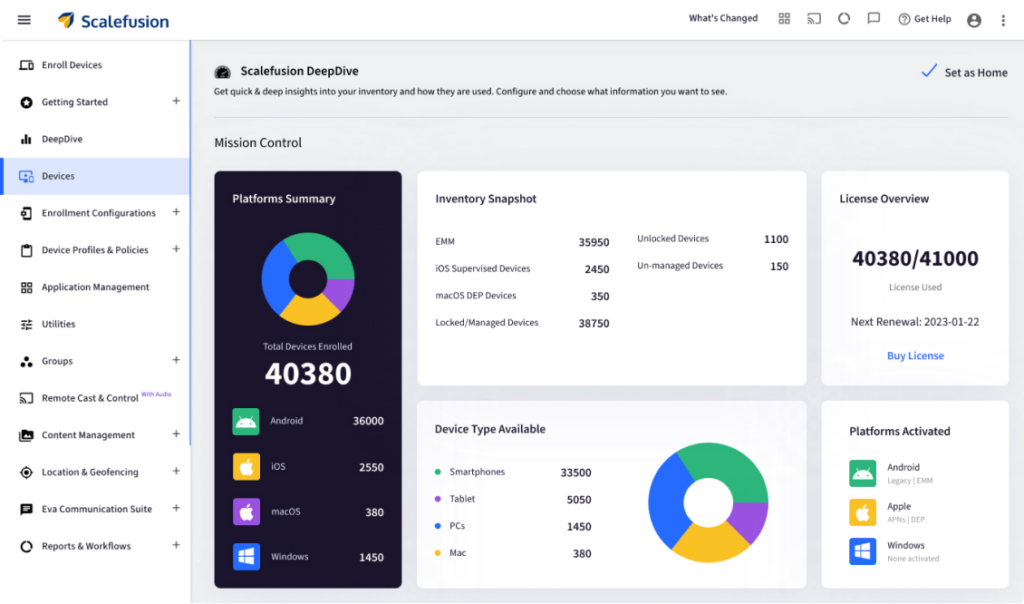
Scalefusion is a modern and flexible device management platform that works across multiple operating systems, not only iOS, but also Android, Windows, and macOS. This makes it ideal for heterogeneous device fleets, which is common in enterprises where different teams use different devices. Scalefusion is built with scalability in mind: as your organization grows, it remains simple to manage devices centrally without needing to juggle multiple MDM tools. It also supports optional add-ons such as identity management and endpoint security, which means that over time, you can evolve from just managing devices to building a unified device + identity + security infrastructure, without switching platforms.
Because of its clean interface and unified dashboard, Scalefusion lowers the learning curve for IT teams. Day-to-day operations, onboarding, app deployment, enforcing policies, and troubleshooting are streamlined. For organisations that expect growth, device diversity, or need to bring together different device types under one roof, Scalefusion offers long-term flexibility and control.
Key features:
- Zero-touch enrollment via Apple Business (Automated Device Enrollment): When devices come fresh out of the box, they automatically enroll in Scalefusion once powered on. This simplifies onboarding, especially for remote or distributed teams. It removes the need for manual configuration or physical transfer of devices, making device provisioning fast and consistent across all deployments.
- App deployment and management through Apps and Books: IT teams can deploy both free and paid apps using Apple’s App Store and Apps and Books (Apple’s app and licence distribution service, formerly the Volume Purchase Program, now part of Apple Business), push updates silently without user intervention, and control which app versions are allowed. This helps keep license usage organized, simplifies bulk deployment, and keeps devices running approved app versions consistently.
- Centralized policy enforcement: It allows IT to enforce required security and network policies across all iOS devices. Whether you need to standardize VPN settings, restrict certain system functions, enforce password complexity, or block risky features, everything is controlled from one dashboard. This reduces risk and ensures corporate compliance without depending on individual device users.
- Kiosk mode for single or multi-app setups: For use cases where devices must serve a dedicated purpose, for example, customer check-in kiosks, POS terminals, field device for delivery staff, or frontline staff tablets, Scalefusion’s kiosk mode locks the device down so only specified apps are available, preventing unintended usage or tampering.
- Remote troubleshooting and control tools: From a central console, administrators can perform device actions like reboot, lock, wipe, or reset configuration. This is crucial when devices are distributed or users are remote. It minimizes downtime by addressing issues without requiring physical access.
- Location tracking and geofencing: Where permitted, IT can track device location and set geofencing rules. This helps in asset management, ensuring devices remain within allowed zones, or triggering policies (like lockdown or alerts) when devices move out of permitted boundaries.
- Content management: For enterprises that share sensitive documents via corporate devices, Scalefusion allows secure distribution and control of documents. It helps ensure that sensitive files stay within managed devices and stay within managed devices under IT-defined sharing controls.
- Identity and access management add-ons: Scalefusion can be used for identity and access management with its add-on, Scalefusion OneIdP, enabling user-based device and access policies. This helps tie device management with user authentication and authorization, which is essential for enterprises needing unified identity + device control.
- Endpoint security integration: Instead of only controlling device configuration, Scalefusion can be extended to provide endpoint security with its add on: Scalefusion Veltar, adding protections like business VPN, web content filtering, compliance monitoring and automation, which is useful if endpoints hold sensitive enterprise data or access critical systems.
Pricing: Scalefusion plans start at $2 per device per month with a 14-day free trial with full feature access. (Pricing checked: July 2026)


2. Jamf Pro
Jamf Pro is widely recognized as one of the most Apple-centric MDM solutions. It is built specifically for managing Apple hardware, including iPhones, iPads, and Macs, and is optimized to leverage Apple’s ecosystem deeply. Because of this tight integration, Jamf Pro offers strong, Apple-native controls for organizations that stay entirely within the Apple ecosystem. It is particularly popular with organizations that standardize on Apple devices: corporate offices with Mac and iPhone, creative teams, educational institutions using iPad fleets, or companies needing granular Apple-specific controls and policies.
For organizations that do not mix operating systems and want to stay within the Apple ecosystem, Jamf Pro reduces complexity and leverages Apple-first workflows to full effect. Its long track record, frequent updates (keeping pace with new iOS versions), and strong support community make it a reliable choice.
Key features:
- Native Apple workflows and configuration profiles: Because Jamf is Apple-native, it supports the full spectrum of configuration profiles and Apple’s device policies. This allows administrators to define comprehensive settings, from network and VPN configurations to restrictions on hardware features, matching Apple’s best practices.
- Application management: Administrators can deploy business apps remotely, push updates without user intervention, and control which app versions are allowed. This ensures that all devices run the same approved software, reduces user friction, and avoids version mismatches or outdated apps.
- Patch management and OS updates: Jamf Pro automates OS updates and patches for both iOS and macOS devices, helping devices stay on secure, supported versions. This reduces vulnerability windows and ensures compliance, especially important for enterprises.
- Compliance and reporting tools: Jamf offers reporting dashboards that highlight device compliance status, update history, security posture, and configuration drift. These reports are useful for audits, internal monitoring, and ensuring policy adherence.
- Custom scripting and automation capabilities: For advanced setups, Jamf enables running custom scripts and automating repetitive tasks. This is particularly helpful for specialized workflows, customized configuration, or integration with other IT tools.
- Security automation and monitoring: Jamf Pro can monitor security risks, enforce restrictions, and automatically remediate devices, for example, enforce encryption, disable risky features, and ensure devices meet defined compliance standards without manual intervention.
Pricing: Jamf does not publish per-device pricing. Every business plan, for both Mac and mobile, routes to a sales enquiry. (Checked: 12 August 2026)
Comparing directly? Jamf Pro alternatives and competitors
3. Addigy
Addigy is a cloud-native MDM solution, built specifically for managing Apple devices in distributed, remote, or hybrid work environments. Because it does not rely on on-premise infrastructure, Addigy is well-suited for Managed Service Providers (MSPs), remote teams, and companies with employees spread across multiple locations. Its design philosophy emphasizes automation, visibility, and ease-of-use, which makes it attractive for small IT teams or organizations that do not have a dedicated Apple-specialist staff.
Addigy strives to minimize hands-on management. Its interface is lean and built around the principle of “set it and forget it.” Once policies and configuration are defined, Addigy continuously monitors devices and flags configuration drift. This reduces operational overhead, especially for teams managing large fleets across different geographies.
Key features:
- Live device monitoring: Addigy maintains a real-time overview of all managed devices, their online/offline status, OS versions, security settings, and potential issues. This helps admins detect and respond to problems as soon as they occur.
- Policy enforcement across devices: Whether it is security settings, network setup, or restrictions, Addigy applies policies consistently across all devices, making sure there is no drift and all endpoints follow company-wide standards.
- Application lifecycle management: IT teams can push new apps, update existing ones, or remove them entirely, ensuring that devices always have the right software, and outdated or unsafe apps are removed quickly.
- Automated OS updates: Addigy can schedule OS updates and patches, reducing the need for manual intervention. This helps keep devices current and minimizes vulnerability exposures.
- Real-time alerts and compliance workflows: When a device deviates from defined settings, for example, missing patch or insecure configuration, Addigy sends alerts so admins can take action immediately. Built-in compliance workflows help manage audit readiness and security posture.
Pricing: Addigy publishes $8.25 per Mac per month for Apple MDM and $16 per Mac per month for its Security Suite. That rate is per Mac; iOS and iPadOS management is quoted separately. (Checked 11 August 2026)
4. Iru (formerly Kandji)
Iru is built with security and compliance automation in mind. It is especially popular among organizations that prioritize device hardening, regulatory compliance, and requiring minimal day-to-day administration. Once you define configuration blueprints, devices are continuously monitored for compliance, with automated alerts and remediation for configuration drift.
This makes Iru particularly suited for security-sensitive environments, such as finance, healthcare, or enterprises dealing with regulated data. For teams managing purely Apple fleets and wanting straightforward, secure, and hands-off device management, Iru offers a strong balance between ease-of-use and robust protection.
Key features
- Prebuilt security templates: Iru provides ready-made templates covering common enterprise security standards. These templates reduce the burden on IT teams by embedding best practices, which is useful if you lack specialized Apple security expertise.
- Automated compliance enforcement: Once a template is applied, Iru continuously monitors devices and corrects drift. If a device configuration changes or becomes non-compliant, the system automatically remediates it or alerts administrators.
- Blueprint-based app deployment and configuration: Instead of managing each device individually, administrators can define “blueprints” that specify which apps, settings, and policies apply based on department, role, or user group. When a device joins a blueprint group, it inherits all configurations automatically.
- Device health monitoring and diagnostics: Iru keeps track of device health, battery status, storage, OS version, and security status, and alerts if any device becomes unhealthy or misconfigured. This helps preempt issues before they impact productivity.
- Conditional rules and automated workflows: For example, you can set a rule like “if OS goes out of date, block access to corporate email until updated,” or “if device leaves assigned geofenced area, lock it.” Such rules let admins enforce security without manual checks.
Pricing: Iru does not publish pricing. Plans for iPhone, iPad and Mac are quote-only via iru.com/pricing. (Checked 12 August 2026)
5. Mosyle
Mosyle focuses on delivering straightforward, easy-to-use iOS MDM capabilities with minimal complexity. It is popular among small-to-medium businesses, educational institutions, and organizations that want basic control without paying for enterprise-grade bulk features. For teams that do not need advanced security add-ons or identity integrations, Mosyle presents a cost-effective and simple way to bring iOS devices under management.
Its strength lies in delivering core device control, app deployment, configuration enforcement, and remote wipe/lock, packaged in a lightweight and budget-friendly platform. For many smaller organizations, that is all that is needed.
Key features:
- Basic app deployment and management: Administrators can push required business or education apps to devices, ensure install compliance, and manage updates centrally.
- Policy enforcement for core settings: This includes enforcing password rules, Wi-Fi configuration, restricting certain device features, and maintaining a baseline security posture across the fleet.
- Apple Business / Automated Device Enrollment support: Mosyle supports zero-touch enrollment when devices are fresh out of the box, which eases device onboarding.
- Remote lock and wipe: If a device is lost or decommissioned, admins can lock or wipe it to prevent unauthorized access to corporate data.
- Inventory and device tracking: Mosyle maintains a basic inventory of devices, making it easier to track who has which device, and monitor device status.
Pricing: Mosyle Business is free for up to 30 devices. Paid plans start around US $1.00 per device/month. (Pricing checked: July 2026)
Choose the right iOS MDM software for your enterprise
Apple devices are now business tools and unmanaged business tools become business risks. Whether you operate a small team or thousands of corporate-owned devices, iOS MDM software is a practical necessity for most organizations managing business-owned or BYOD iPhones and iPads.
All the platforms listed above qualify as strong iOS MDM solutions. The real difference comes down to how well they fit your organization’s future. Some tools focus exclusively on Apple. Others give you flexibility across operating systems. Some are security-first, some are identity-driven, and some prioritize usability.
But Scalefusion stands out if you don’t want to rebuild your stack later. Its support for multiple OS platforms, along with built-in options for identity and endpoint protection, makes it easier to grow without switching platforms every year. Instead of running separate tools for device control, authentication, and security, Scalefusion lets you unify them gradually.
That said, choosing the best MDM for iPhones and iPads can’t be decided on specs alone.
Every enterprise works differently and the smart move is simple:
- Use free trials
- Enroll real devices
- Test policies
- Try app deployment
- Simulate lost devices
- Evaluate support response time
Most providers in this list offer free trials or live demos; check each vendor’s current offer, since trial length and device limits vary. Use whichever is available to test real devices before committing. Simulate real-life use cases and choose based on usability, scalability, support, and not just marketing claims.

FAQs
1. What is iOS MDM?
iOS MDM (mobile device management) is software that lets IT teams remotely enroll, configure, secure, monitor, and manage iPhones and iPads from a central dashboard. It covers app deployment, security policy enforcement, OS update management, and remote actions like lock and wipe.
2. Which iOS MDM solution is best for enterprises?
It depends on your device mix. Apple-only enterprises that want the deepest native controls typically choose Jamf Pro. Organizations managing iOS alongside Android, Windows, or macOS often prefer a multi-OS platform like Scalefusion so they can manage all devices from one console.
3. What is the difference between iOS MDM and Apple Business?
Apple Business — the platform that replaced Apple Business Manager on 14 April 2026 — is Apple’s own portal for purchasing devices and apps and enabling zero-touch enrollment (Automated Device Enrollment). An iOS MDM platform connects to Apple Business to actually apply policies, deploy apps, and manage devices day to day. Apple Business alone doesn’t provide ongoing device management.
4. Does iOS MDM require Supervised Mode?
Not always, but Supervised Mode unlocks significantly more control, including stricter app and content restrictions, and is required for many advanced management features. Devices enrolled through Automated Device Enrollment are typically supervised automatically.
5. Can iOS MDM manage BYOD iPhones?
Yes, most iOS MDM platforms support BYOD enrollment, usually through a lighter management profile that separates work data from personal data rather than taking full device control. Enforcement is typically less restrictive than on corporate-owned, supervised devices.
6. Can iOS MDM remotely wipe lost devices?
Yes. Remote lock, Lost Mode, and remote wipe are standard features across the platforms compared here. Response depends on the device having connectivity, and an offline device will act on the command the next time it reconnects.

