If your team uses five, ten, or fifty web apps, asking users to sign in separately to every tool gets messy fast. People forget passwords. IT teams chase reset tickets. Security teams lose visibility into who has access to what.
Web SSO solves that problem by letting users sign in once and access multiple browser-based applications without entering credentials again for every app.
In this guide, we’ll break down what Web SSO means, how it works in a browser, which protocols support it, how organizations implement it, and what security practices matter before you roll it out.
Key Takeaways
- Web SSO (Single Sign-On) lets users access multiple browser-based applications after authenticating once through a central identity provider.
- Common Web SSO protocols include SAML 2.0 and OpenID Connect (OIDC), while OAuth 2.0 is primarily used for authorization.
- Web SSO can reduce repeated logins, simplify authentication management, and support controls such as MFA, Conditional Access, and session policies.
- For stronger access control, organizations can combine Web SSO with device-aware and contextual access policies.
- Scalefusion OneIdP supports standards-based SSO for work applications and can connect authentication decisions with supported device and endpoint signals.
What Is Web SSO?
Web SSO, or Web Single Sign-On, is an authentication method that lets users access multiple web applications with one login session. In plain language, it means one browser login for many web apps.
Instead of every web app asking for a separate username and password, Web SSO uses a central identity provider to authenticate the user. Once the user is verified, connected applications trust that identity and allow access based on the user’s permissions.
The user signs in once. The identity provider confirms who they are. Other connected web applications accept that confirmation instead of asking for another password.
The “web” part matters because this type of SSO is built for browser-based applications, websites, SaaS platforms, customer portals, partner portals, and internal web tools.
A simple example: an employee signs in once through the company’s identity provider. After that, they can open Microsoft 365, Salesforce, Zendesk, an HR portal, and an internal dashboard without logging in again each time.
Web SSO vs SSO vs Web Application SSO
SSO is the broad concept. It means one authentication event gives a user access to multiple systems.
Web SSO is a specific type of SSO for applications accessed through a browser.
Web Application SSO is often used interchangeably with Web SSO, but it usually refers more specifically to business web apps like CRM, helpdesk, HR, collaboration, finance, and SaaS tools.
Here is the practical difference:
| Term | Meaning |
|---|---|
| SSO | Broad single sign-on across multiple systems |
| Web SSO | SSO for browser-based apps and websites |
| Web Application SSO | SSO for business web apps and SaaS tools |
| Enterprise SSO | Often includes legacy or desktop applications too |
In real-world conversations, Web SSO and Web Application SSO often mean the same thing. The important point is this: users authenticate once, and connected web apps rely on that trusted login.
Web SSO vs password vaulting
Web SSO is also different from password vaulting.
A password vault stores credentials and may autofill them when a user opens an app. The app still receives a username and password.
Web SSO works differently. The app does not need the user’s password. Instead, it trusts an identity provider through a standard authentication protocol such as SAML or OpenID Connect.
Password vaulting can reduce typing. Web SSO reduces credential sprawl.
Why Organizations Use Web SSO
Organizations use Web SSO because web apps have become the default workplace. Most teams now rely on a mix of SaaS platforms, internal portals, cloud dashboards, and partner systems.
Without Web SSO, access becomes fragmented.
Users remember too many passwords. Admins manage access app by app. Security policies get applied inconsistently. Offboarding becomes risky because one missed account can remain active after an employee leaves.
Web SSO gives IT and security teams one place to manage authentication across many apps.
Reduce password fatigue and repeated logins
Every extra password creates friction.
Users either forget passwords, reuse weak ones, or store them somewhere they shouldn’t. None of those outcomes help security.
With Web SSO, users sign in once and move between approved apps with less interruption. It is easier for employees, and it cuts down on common support issues like password resets and account lockouts.
Centralize authentication and app access
Web SSO gives IT teams a common authentication layer across connected applications. Instead of every application maintaining a separate login experience, authentication can be handled through a central identity provider.
When the identity platform also supports application assignments, groups, and provisioning, IT teams can coordinate access as users join, change roles, or leave.
That central coordination is especially useful for companies with many SaaS apps, remote teams, contractors, or regulated workflows.
Improve security with one policy layer for authentication
Web SSO can strengthen security when it is implemented well.
Instead of depending on each app’s separate login settings, organizations can often apply controls such as MFA, Conditional Access, risk-based authentication, and session policies from the identity layer.
That means stronger protection without forcing every app to solve authentication on its own.
How Web SSO Works in a Browser
Web SSO works through a trust relationship between the application and the identity provider.
The web app does not authenticate the user directly. It asks the identity provider to do it. Once the user is verified, the identity provider sends back proof that the user is legitimate.
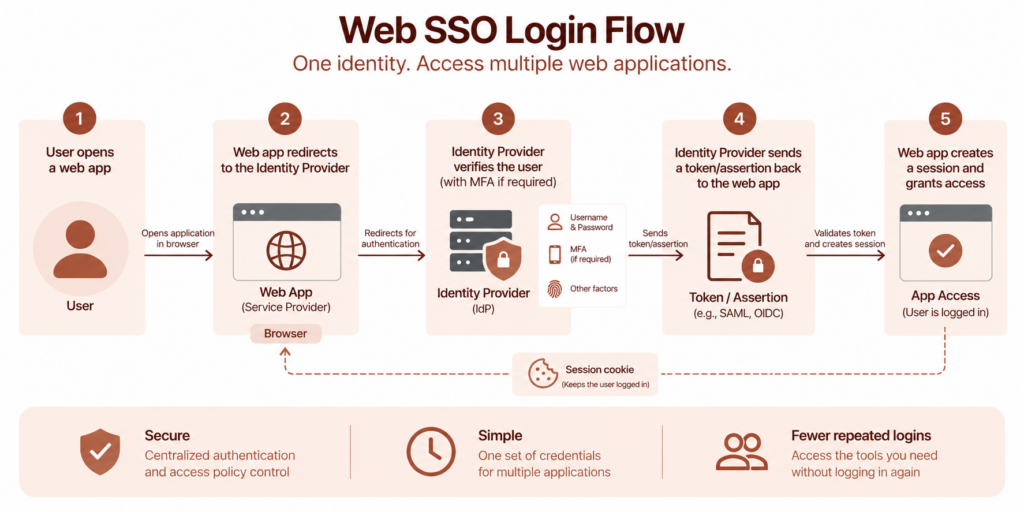
Key actors: user, browser, service provider, identity provider, and session
A typical Web SSO flow includes five main parts:
- User: The person trying to access a web application.
- Browser: The user’s gateway to the web app and the identity provider.
- Service Provider: The web application the user wants to access, such as a SaaS app or internal portal.
- Identity Provider: The system that authenticates the user and issues identity proof.
- Session: The authenticated state that lets the user continue accessing apps without logging in again every time.
Step-by-step login and redirect flow
Here is how the process usually works:
- The user opens a protected web application.
- The application checks whether the user already has a valid session.
- If there is no session, the app redirects the browser to the identity provider.
- The user signs in at the identity provider.
- The identity provider verifies the user, often with MFA.
- The identity provider sends the browser back to the application with an authentication response.
- The application validates the response and starts a session for the user.
- When the user opens another connected app, that app can also rely on the identity provider’s existing session.
The user experiences this as one login. Behind the scenes, there are redirects, tokens, cookies, and trust checks doing the work.
Tokens, cookies, sessions, and single logout
Tokens and cookies are often mentioned together, but they do different jobs.
A token or assertion carries proof of authentication from the identity provider to the application. Depending on the protocol, this might be a SAML assertion or an OIDC ID token.
A cookie usually helps maintain the user’s browser session. It tells the identity provider or application that the user has already authenticated.
Session lifetime controls how long the login remains valid. Shorter sessions reduce risk but can create more login prompts. Longer sessions improve convenience but need stronger safeguards.
Single logout (SLO) is designed to end related sessions across participating SSO systems. It sounds simple, but in practice it can be tricky because different apps and protocols handle sessions differently.
Web SSO Protocols, Identity Providers, and Provisioning
Web SSO depends on standards. These standards let identity providers and applications communicate securely without custom integrations for every app.
SAML, OIDC, OAuth 2.0, and WS-Fed: when each fits
SAML is widely used in enterprise SSO. It is common for established SaaS apps, internal web apps, and organizations with traditional identity infrastructure.
OpenID Connect, or OIDC, is a modern authentication layer built on OAuth 2.0. It is commonly used for newer web apps, mobile-friendly apps, and developer-friendly integrations.
OAuth 2.0 is mainly an authorization framework. It helps one system access resources on behalf of a user. On its own, OAuth 2.0 is not the same as authentication, but OIDC adds the authentication layer.
WS-Fed is often found in Microsoft-heavy environments and older federation setups.
In practice, start with the protocols supported by the application and identity provider. SAML remains common across enterprise SaaS, while OIDC is widely used in newer web and mobile application architectures.
The protocols also differ in how they handle authentication, authorization, tokens, application compatibility, and implementation. For a more detailed side-by-side comparison of SAML and OAuth 2.0, see SAML vs. OAuth 2.0.
Identity providers, directories, and account stores
The identity provider handles authentication, but it usually depends on a user directory or account store.
That directory may be Microsoft Entra ID, Active Directory, Google Workspace, LDAP, or another identity source.
The directory stores users and groups. The identity provider uses that information to authenticate users and apply access rules.
This separation matters because SSO is not just about login convenience. It is also about keeping identity data accurate and access decisions consistent.
Where SCIM and user provisioning fit in
SCIM helps with user provisioning.
While SSO handles authentication, SCIM helps create, update, and deactivate user accounts across applications.
For example, when a new employee joins, SCIM can help provision their account in approved apps. When they leave, SCIM can help remove access.
SSO answers: “Is this user authenticated?”
SCIM helps answer: “Should this user have an account here?”
Both are important for clean identity management.
Web SSO Implementation Options
There is no single Web SSO architecture that fits every environment. The right option depends on your apps, identity sources, security needs, and whether you’re dealing with modern SaaS or older internal systems.
Native application federation for modern web apps
For modern web apps, native federation is usually the cleanest option.
The app supports SAML or OIDC. You configure trust between the app and the identity provider. Users are redirected to the IdP for login, and the app accepts the authentication response.
This approach is common for SaaS applications and modern internal apps.
Reverse proxy and agent-based approaches for protected or legacy apps
Legacy web apps may not support SAML or OIDC directly.
In those cases, organizations may use a reverse proxy or an agent-based approach.
A reverse proxy sits in front of the application and controls authentication before requests reach the protected app.
An agent-based approach installs a component on the application server or web server to intercept access requests and enforce authentication.
These methods can be useful, but they require careful planning. Legacy apps often have hardcoded URLs, unusual session behavior, or older authentication patterns.
AD FS and directory-backed Web SSO designs
Some organizations use AD FS or directory-backed federation designs, especially when they already have Microsoft identity infrastructure.
In these environments, Web SSO may be tied to Active Directory, federation services, and claims-aware applications.
This can work well for organizations with existing AD investments, but it also requires ongoing maintenance, certificate management, and careful configuration.
Security Best Practices for Web SSO
Web SSO can improve security, but it also raises the stakes. If one login gives access to many apps, that login needs strong protection.
Use MFA, risk-based authentication, and conditional access
MFA should be standard for Web SSO, especially for sensitive applications.
Risk-based authentication can add more context. For example, the system may ask for extra verification if a user signs in from a new location, unknown device, or unusual network.
Conditional access helps enforce rules such as:
- Allow access only from trusted devices
- Require MFA for high-risk apps
- Block access from unmanaged endpoints
- Apply stricter controls for admin accounts
Secure tokens, cookies, session lifetime, and browser storage
Token and session handling can make or break SSO security.
Use secure cookies. Limit token lifetime. Avoid storing sensitive tokens in unsafe browser storage. Make sure redirect URLs are validated. Review session timeout settings for both convenience and risk.
The goal is not to make users log in constantly. The goal is to prevent one stolen token or abandoned session from becoming an open door.
Add device-aware access where endpoint trust matters
Identity alone is not always enough.
A user may have the right credentials, but what if they are signing in from an unmanaged laptop, a shared device, or a non-compliant endpoint?
Device-aware access adds another layer. It checks whether the device is trusted before allowing access to business apps.
For organizations managing remote teams, frontline devices, BYOD programs, or regulated data, this can be the difference between “the login was correct” and “the access was actually safe.”
Common Web SSO Use Cases
Web SSO is used anywhere users need secure access to multiple browser-based resources.
Employee access to SaaS and internal web apps
This is the most common use case.
Employees need access to email, collaboration tools, CRM, HR systems, ticketing tools, analytics dashboards, and internal portals.
Web SSO gives them one login path while giving IT centralized control.
Customer, partner, and vendor portals
Web SSO is also useful outside the employee base.
Customers may need access to billing, support, account settings, or product dashboards. Partners may need access to deal registration, training, or shared resources. Vendors may need limited access to procurement or project portals.
In each case, Web SSO reduces login friction while keeping access controlled.
Legacy application and reverse proxy scenarios
Many organizations still rely on older web applications that were not built for modern federation.
A reverse proxy or access gateway can help bring these apps into a Web SSO model without rewriting the entire application.
This can be especially valuable during cloud migration or identity modernization projects.
Web SSO Implementation Checklist
A good Web SSO rollout starts before configuration. The planning work matters.
Define apps, users, identity sources, and access policies
Start with a clear inventory.
- Which apps need SSO?
- Which users need access?
- Where are identities stored?
- Which groups map to which apps?
- Which apps need stricter access controls?
This prevents the rollout from becoming a series of one-off app integrations.
Choose protocol and architecture
Choose SAML, OIDC, WS-Fed, reverse proxy, or agent-based implementation based on what each app supports.
For modern SaaS apps, SAML or OIDC is usually the right path. For legacy apps, you may need proxy-based protection or a different access strategy.
Test login, logout, session expiry, and rollback
Do not only test whether login works.
Test what happens when:
- A user logs out
- A session expires
- A user is removed from a group
- A certificate expires
- An app is misconfigured
- The identity provider is unavailable
Also define a rollback plan. SSO touches access, and access failures can stop work quickly.
Troubleshooting Common Web SSO Issues
Even well-planned SSO deployments can run into issues. Most problems come from mismatched settings, expired certificates, browser behavior, or session handling.
Redirect loops and callback or ACS URL mismatches
Redirect loops often happen when the service provider and identity provider disagree about where the user should be sent after authentication.
In SAML, check the ACS URL. In OIDC, check redirect URI settings. These values usually need to match exactly.
Certificate, clock skew, and token validation errors
SAML and OIDC rely on trust.
If certificates expire, tokens are signed incorrectly, or server clocks drift too far apart, authentication can fail.
Check certificate validity, token signatures, issuer values, audience values, and time synchronization.
Cookie, browser privacy, and logout propagation problems
Browsers increasingly restrict third-party cookies and cross-site tracking behavior. This can affect some SSO flows.
Logout can also be inconsistent if applications maintain their own sessions after the identity provider session ends.
Test across browsers, private browsing modes, managed devices, and real user environments before assuming the flow is stable.
How Scalefusion Helps Implement Secure Web SSO
Web SSO is not only about helping users sign in faster. It is also about giving IT better control over authentication and access context.
Scalefusion OneIdP enables Single Sign-On for work applications while connecting application access with identity and endpoint context.
OneIdP for SSO across work applications
Users can access assigned work applications through Single Sign-On, reducing the need to manage separate credentials for every app.
IT teams can configure SSO applications in OneIdP, assign access to users or groups, define session settings, and apply Conditional Access policies.
SAML and OIDC-based SSO configuration for SaaS and web apps
OneIdP supports standards-based SSO configurations using SAML 2.0 and OpenID Connect (OIDC), including configuration options for OIDC/OAuth 2.0-based services.
That matters because most modern SaaS and enterprise web apps already support these standards. Instead of building custom authentication flows, teams can connect apps through trusted SSO protocols.
Conditional SSO with managed-device and endpoint trust signals
This is where the setup becomes especially useful.
A user’s identity is important, but the device they use matters too. OneIdP can apply Conditional Access to SSO so application access can depend on conditions beyond user credentials.
For managed endpoints, Extended Access Policies (XAP) can evaluate supported signals such as device compliance, OS update status, location, IP address, and application status before OneIdP allows or blocks access.
For companies with distributed teams, shared devices, or strict data protection needs, that context is valuable.
Bringing identity, access, and endpoint management together
Web SSO works best when it is part of a broader access strategy.
OneIdP connects Web SSO with endpoint-management context, giving IT teams a way to coordinate application authentication and supported device-aware access controls.
The result is a cleaner experience for users and stronger control for IT teams.
Explore Scalefusion OneIdP to configure SSO for work applications and apply identity- and device-aware access controls.
FAQs
1. What is Web SSO?
Web SSO is a browser-based single sign-on method that lets users access multiple web applications after signing in once through a central identity provider.
2. Is Web SSO the same as SSO?
Not exactly. SSO is the broader concept. Web SSO is a specific form of SSO for websites, SaaS apps, portals, and browser-based business applications.
3. What is the difference between Web SSO and Web Application SSO?
Web SSO is the broader term for browser-based single sign-on. Web Application SSO usually refers to SSO for enterprise web apps and SaaS tools. In many cases, people use the two terms interchangeably.
4. How does Web SSO work?
A user tries to access a web app. The app redirects the user to an identity provider. The identity provider authenticates the user and sends proof of authentication back to the app. The app validates that response and grants access.
5. What protocols are used for Web SSO?
Common Web SSO authentication protocols include SAML, OpenID Connect (OIDC), and WS-Federation. OIDC is built on OAuth 2.0, which primarily provides authorization rather than authentication.
6. Is Web SSO secure?
Web SSO can be secure when configured correctly. Strong security depends on MFA, secure token handling, proper session controls, trusted redirect URLs, conditional access, and regular access reviews.
7. What is the difference between SAML and OIDC for Web SSO?
SAML is an XML-based protocol commonly used for enterprise SSO. OIDC is a modern authentication protocol built on OAuth 2.0 and commonly uses JSON Web Tokens. SAML is often preferred for established enterprise apps, while OIDC is often preferred for modern apps.
8. Can Web SSO work with Active Directory?
Yes. Web SSO can work with Active Directory through federation services, identity providers, or directory integrations. Many organizations use AD or Microsoft Entra ID as part of their Web SSO architecture.