Apple Business is Apple’s free platform for running Apple devices in an organization. It handles device enrollment, app and content distribution, Managed Apple Accounts, and — new since April 2026 — device management built in by Apple, so smaller Apple-only teams can configure and secure devices without a separate MDM. It replaced Apple Business Manager, Apple Business Essentials and Apple Business Connect.
Key Takeaways
Apple Business brings device enrollment, identity management, app distribution, employee productivity tools, and customer-facing brand management into a unified platform for organizations using Apple devices.
- Consolidate Apple Business Operations: Apple Business replaces Apple Business Manager, Apple Business Essentials, and Apple Business Connect, bringing device, employee, application, and business-presence management into one account.
- Automate Device Enrollment: Automated Device Enrollment allows company-owned iPhones, iPads, Macs, and Apple TVs purchased through Apple or authorized resellers to configure themselves during initial setup.
- Centralize Identity and App Management: Managed Apple Accounts, Entra ID and Google Workspace federation, volume purchasing, and managed app distribution help IT teams control employee access and application lifecycles.
- Choose Enrollment Based on Ownership: Organizations can use device-assigned or user-assigned enrollment for corporate devices and account-driven User Enrollment to protect business data without compromising privacy on BYOD devices.
- Extend Management for Complex Environments: Apple Business supports foundational Apple-only management, while organizations needing cross-platform control, advanced compliance, remote troubleshooting, and deeper security can integrate it with a dedicated UEM solution.
Most companies running Apple devices have, at some point, juggled three separate Apple portals. One for enrolling devices. One for managing them. One for how the business shows up on Maps. Different logins, different workflows, different places to go wrong.
Apple Business changes that. Announced in March 2026 and launched on April 14, it replaces Apple Business Manager, Apple Business Essentials, and Apple Business Connect with a single platform. One place to manage devices, employees, apps, and customer presence across Apple services.
What is Apple Business?
Apple Business is a free, unified platform that consolidates device management, employee productivity tools, and customer-facing brand presence into one account. It’s available in 200+ countries and regions, and replaces the three separate Apple business products that came before it.
Here’s what those three products were, and what has changed:
- Apple Business Manager: Device enrollment, app purchasing, and user management.
- Apple Business Essentials: MDM + IT management (US-only subscription).
- Apple Business Connect: Maps presence, brand profiles, place cards.
Apple Business vs Apple Business Manager: What actually changed?
Apple Business Manager was the backbone of Apple device management for years. It handled device enrollment via ADE, Managed Apple Accounts, and let IT buy and distribute apps at scale. But it had real gaps: no built-in MDM, no productivity tools, and no customer presence features. Organizations needed separate subscriptions and separate platforms to fill those gaps.
Apple Business closes most of them:
- Built-in MDM is now included — Small and mid-sized organizations no longer need another Apple MDM subscription just to enforce a passcode policy or push a configuration profile, though growing enterprises often evaluate the best Apple MDM platforms for deeper cross-platform compliance and automation.
- Productivity tools are built in – Business email, calendar, and directory services with a custom domain are now native to the platform, not add-ons.
- Brand and Maps presence is unified – What used to live in Apple Business Connect, including place cards, business profiles, and customer actions, is now managed in the same dashboard where you enroll devices.
- Availability expanded – Apple Business Manager was already global, but Apple Business Essentials was US-only. Apple Business removes that restriction.
What Apple confirmed: Apple Business Connect data — locations, place cards, photos, organization and account details — migrates automatically, and Apple Business Essentials customers stopped being charged the monthly management fee after 14 April. Apple has published no equivalent guidance for Apple Business Manager accounts specifically, and no migration guide. If you ran on Apple Business Manager, check your organization’s state directly at business.apple.com rather than assuming. More on what changed, and what everything is called now.
Core components of Apple Business
1. Built-In Mobile Device Management (MDM)
Apple Business includes MDM natively. Organizations can configure, manage, and secure Apple devices without a separate MDM subscription, though the built-in MDM is designed for foundational needs.
What’s covered:
- Blueprints: Pre-built configuration templates for different device types and user groups. Create one Blueprint for sales iPhones, another for engineering Macs, and devices get the right settings automatically on enrollment.
- Device configurations: Push Wi-Fi, VPN, certificates, passcode policies, FileVault settings, and OS update schedules from a single interface.
- Zero-touch deployment: Devices purchased through Apple or authorized resellers arrive ready to use. Employees turn them on, sign in, and they’re configured. IT doesn’t need to be in the room, or even the same country.
- Remote management: Lock or wipe devices remotely. Useful when a device is lost or an employee leaves.
- Admin API: Larger organizations can automate device, user, and audit data management programmatically.
Note: Zero-touch deployment requires devices to be purchased through Apple or an Apple Authorized Reseller and assigned to your MDM server before shipping.
2. Managed Apple accounts and identity
Managed Apple Accounts are company-controlled accounts that keep work data and personal data cryptographically separate on the same device. Unlike personal Apple IDs, these belong to the organization. When an employee leaves, access is revoked cleanly.
Apple Business supports automated account creation and federation with:
- Microsoft Entra ID (formerly Azure AD)
- Google Workspace
Employees sign in with their existing company credentials. No one manages a personal Apple ID for work access, and IT has full control over the account lifecycle from one place.
Custom roles allow administrators to define exactly what different team members can see and do inside the platform.
3. Productivity tools
Apple Business introduces native email, calendar, and directory services tied to a custom business domain. Organizations can bring an existing domain or purchase a new one through the platform.
What’s included:
- Business email with custom domain
- Calendar with delegation and shared scheduling
- Company directory with user groups and personalized contact cards
The companion Apple Business app lets employees install work apps, look up colleague contact information, and submit support requests from their devices.
Note: Email, calendar, directory, and the companion app require iOS 26, iPadOS 26, or macOS 26.
4. App management and distribution
Through Apple Business, IT teams can purchase apps in volume and push them to specific users, groups, or devices without requiring employees to use a personal Apple ID or visit the App Store themselves.
This covers:
- Volume purchasing through Apple’s App Store for Business
- Custom and internal app distribution
- App assignment by user, device, or group
Apps can be reassigned when devices change hands, which is especially useful in shared-device environments like retail or healthcare.
5. Business presence on Apple Maps and beyond
This is where Apple Business moves well outside traditional MDM territory. Brand management tools from Apple Business Connect are now part of the same platform where IT manages devices.
What organizations can manage:
- Brand profiles: Business name, logo, and key details across Apple Maps, Wallet, and other Apple services.
- Rich place cards: Photos, hours, location details, and descriptions that appear in Maps, Safari, Spotlight, and Siri results.
- Showcases and custom actions: Highlight promotions, new products, or seasonal offers directly on the place card. Add actions like Order Food, Reserve a Table, or direct customers to a specific URL.
- Location insights: Data on how customers find and interact with the business listing on Maps.
- Branded communications: Business branding in the Mail app and in Wallet for tracked orders
- Tap to Pay on iPhone: Brand logo and name appear on the payment screen when accepting payments.
Starting summer 2026, businesses in the US and Canada can place ads in Apple Maps that appear during relevant searches and in the new Suggested Places feature.
Device enrollment methods in Apple Business
Enrollment determines the level of control IT has over a device. Apple Business supports four methods:
| Method | Device ownership | Control level | Best for |
|---|---|---|---|
| ADE (User-assigned) | Company-owned | Full supervision | Assigned corporate devices |
| ADE (Device-assigned) | Company-owned | Full supervision | Shared devices, kiosks |
| Account-driven Device Enrollment | Company-owned | Full supervision | User-initiated corporate enrollment |
| Account-driven User Enrollment | Employee-owned (BYOD) | Partial (work/personal split) | BYOD programs |
Automated Device Enrollment (ADE) is the most common method for corporate fleets. Devices ordered through Apple or authorized resellers get linked to the organization’s account automatically. When an employee turns on the device for the first time, enrollment happens at setup.
For BYOD environments, Account-driven User Enrollment gives IT visibility and control over work data while leaving personal apps, photos, and content completely separate and private.
Organizations with complex enrollment needs or mixed-OS environments often connect Apple Business to a dedicated MDM like Scalefusion to extend these workflows across Android, Windows, and other platforms.

How to set up Apple Business
Setting up Apple Business isn’t complicated, but the flow matters. Here’s how it actually comes together, step by step.
Step 1. Create and verify your organization
Start at business.apple.com and sign up using your company details. Apple will verify your business before granting full access, typically using your D-U-N-S number and a verification contact.
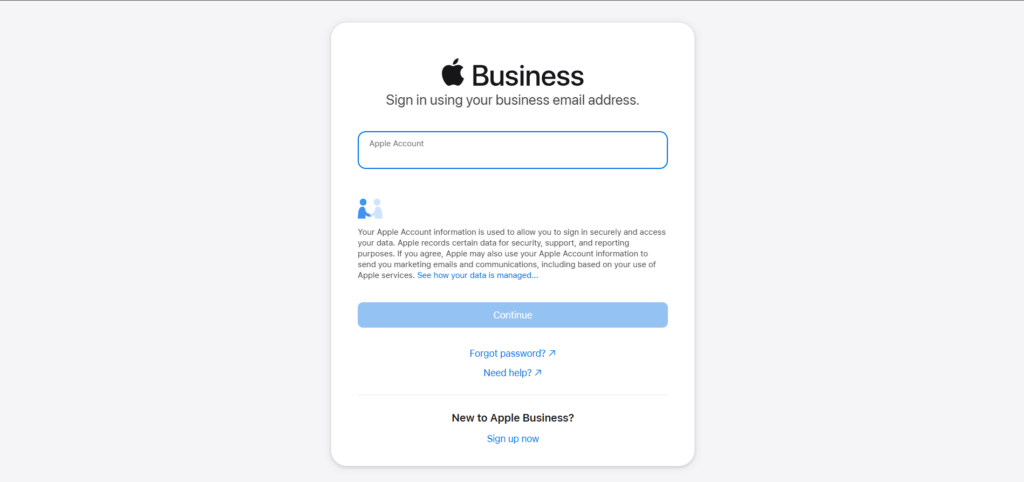
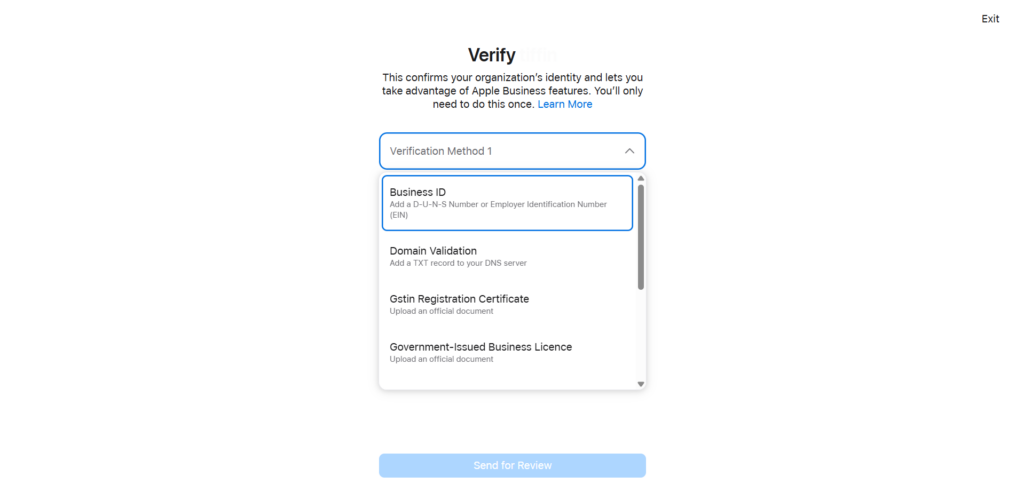
Once approved, your Apple Business account becomes active.
Step 2. Add your domain and enable sign-in
Next, add your company domain under Settings and verify it using a DNS record.
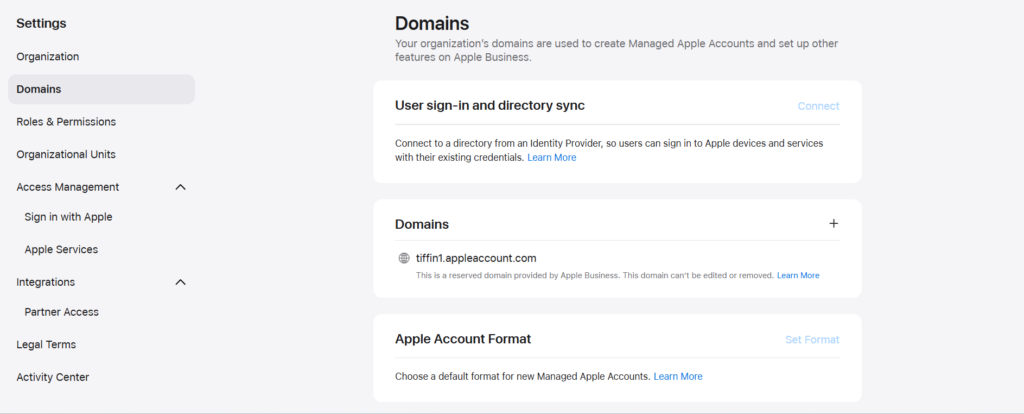
This step unlocks Managed Apple Accounts and allows you to connect your identity provider, so employees can sign in using their existing work credentials.
Step 3. Connect your identity provider
You can integrate Microsoft Entra ID or Google Workspace to enable federated authentication.
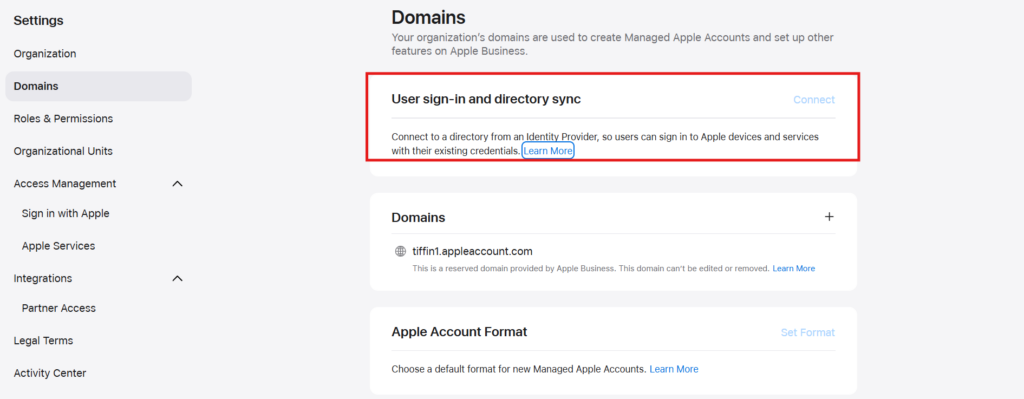
Once connected, employee accounts are created and managed automatically, removing the need to handle Apple IDs separately.
Step 4. Link your device supplier
To bring devices into Apple Business, you need to connect your purchasing channel.
Add your Apple Customer Number if you buy directly from Apple, or your reseller’s ID if you purchase through a partner. This ensures that any devices you purchase are automatically available for enrollment.
Step 5. Set up device management
Apple Business includes a built-in device management service, but you can also connect a third-party MDM like Scalefusion.
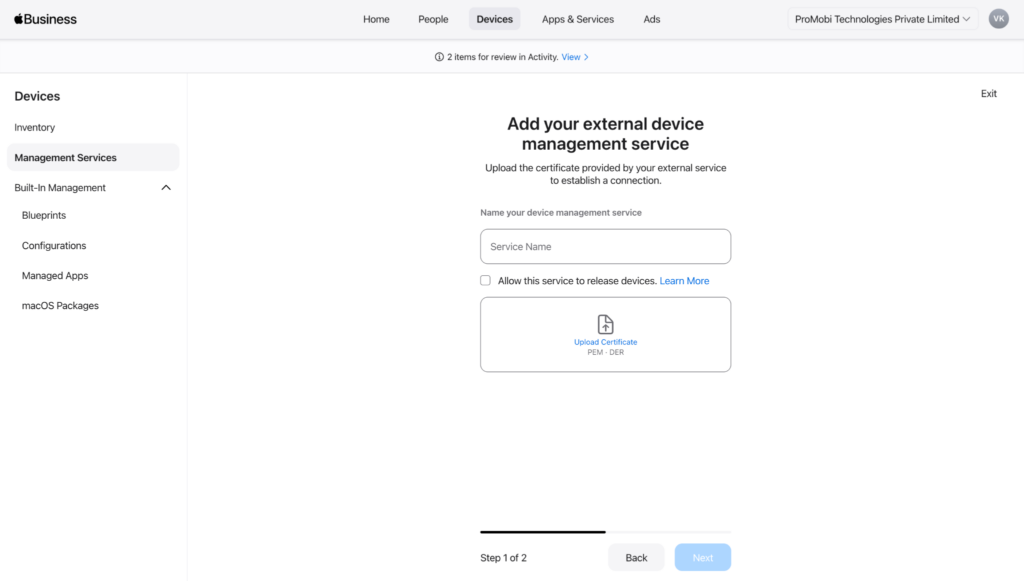
This is done by linking Apple Business with your management platform using a secure Service Token and push certificate. Once connected, the platform can send commands, configurations, and apps to devices remotely.
Step 6. Assign devices for enrollment
From your device inventory, assign devices to your chosen management service.
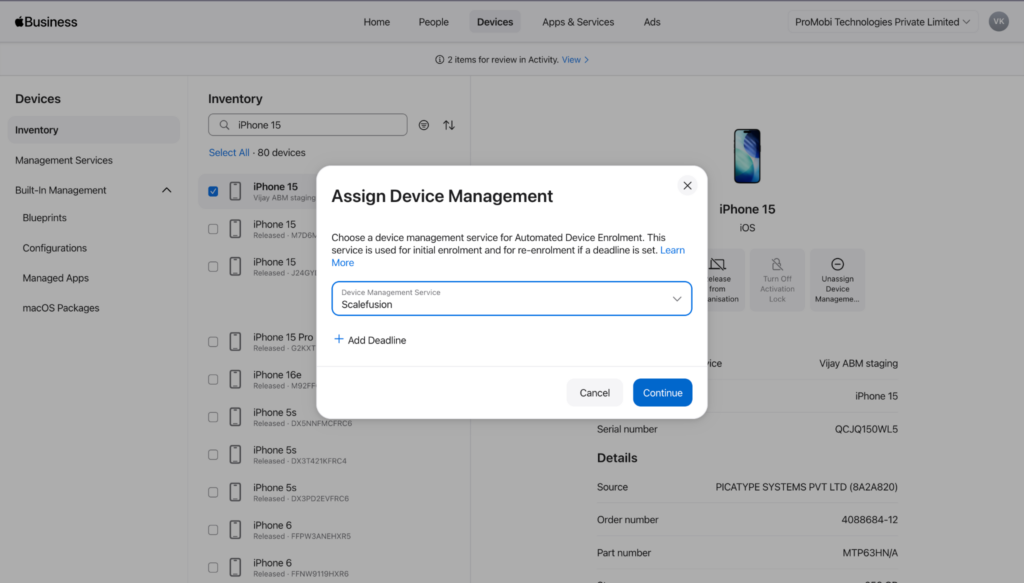
For devices purchased through Apple or authorized resellers, this enables Automated Device Enrollment, meaning they automatically configure themselves when turned on.
Step 7. Define configurations and policies
Create configuration sets that define how devices should behave.
This includes things like Wi-Fi access, VPN settings, passcode rules, certificates, and restrictions. You can group these into Blueprints and apply them to specific users or devices.
Step 8. Enroll devices
Devices can be enrolled in a few ways, depending on ownership:
- New or reset company devices enroll automatically during setup
- Existing or personal devices can be enrolled using account-based sign-in
- Devices not purchased through Apple can be added using Apple Configurator
Once enrolled, devices become fully managed.
Step 9. Organize users and access
Set up users, assign roles, and group them based on teams or functions.
This helps control who can manage devices, apps, and settings, and ensures policies are applied consistently across the organization.
Step 10. Deploy apps and content
Add apps from the App Store or your internal catalog and assign them to users or devices.
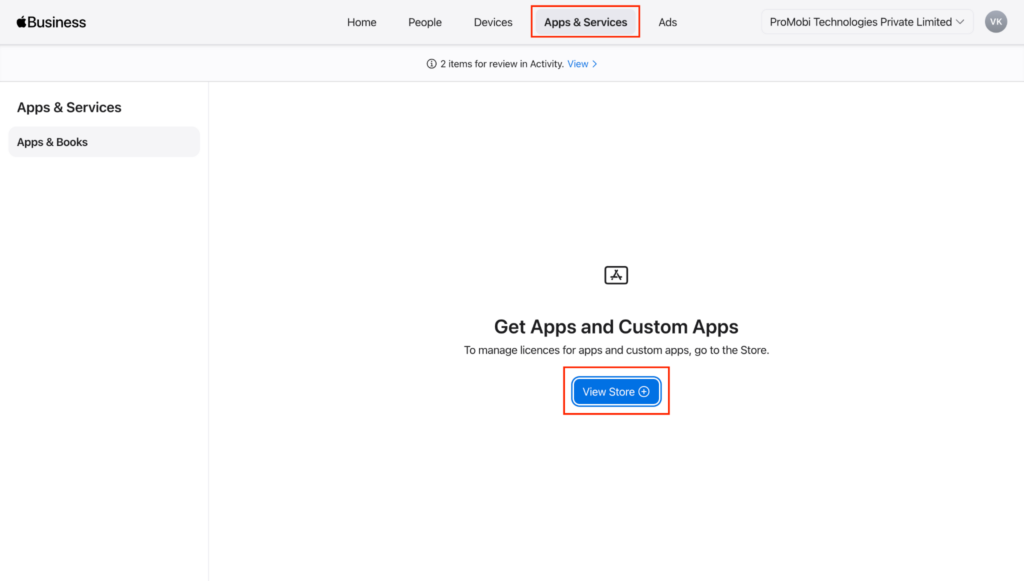
Apps can install automatically or be made available on demand, depending on how you configure them.
Step 11. Set up your business presence
Finally, configure your business profile by adding locations, branding, and customer-facing details.
This powers how your business appears across Apple services like Maps, helping customers discover and interact with you.
12. Monitor and manage devices
Once everything is in place, you can manage devices remotely — pushing updates, locking or wiping lost devices, and maintaining overall visibility into your fleet.
Where Apple Business works well, and where it hits a ceiling
Apple Business is genuinely well-suited to what it targets: organizations running Apple devices that need clean, native device management with minimal overhead.
It’s a strong fit when:
- The entire fleet is Apple (iPhone, iPad, Mac, Apple TV)
- Basic MDM controls are sufficient for compliance requirements
- The IT team is lean and needs a low-maintenance setup
- Apple Maps visibility matters for the business
The limits show up when:
- Your environment includes non-Apple devices – Android, Windows, Linux, and ChromeOS devices: none of these are within Apple Business’s scope.
- Compliance requirements go beyond baseline – Apple Business covers foundational controls well but lacks automated compliance monitoring, real-time enforcement when a device drifts out of policy, endpoint data loss prevention for I/O devices, and file transfer paths.
- Remote IT support is a real need – There is no remote terminal or screen sharing in Apple Business. If a device is having issues, the options are limited to remote lock, wipe, or command pushes.
- Identity needs are more advanced – The federation with Entra ID and Google Workspace is solid for basic SSO, however, conditional access policies, just-in-time privilege management, and device-aware authentication based on security posture are outside what Apple Business offers.
- Third-party app patching is required – Apple Business manages the App Store ecosystem cleanly, but cannot keep third-party apps up to date across the entire fleet.
- Need a complete MDM solution for business – Apple Business supports provisioning well, but advanced management, cross-platform control, and centralized endpoint administration still require a dedicated MDM solution.
How Scalefusion works with Apple Business
For organizations that need to go further, Scalefusion integrates directly with Apple Business and extends its capabilities without replacing what it does well.
The integration is straightforward: connect Apple Business to Scalefusion using the Service Token, and Scalefusion becomes the management layer across your full device fleet, Apple and otherwise.
Here is what that adds:
| Capability | Apple Business | Apple Business + Scalefusion |
|---|---|---|
| Platform coverage | Apple only | Apple, Android, Windows, Linux, ChromeOS |
| Remote support | Remote lock/wipe only | Remote terminal, screen cast, live troubleshooting, VoIP calling |
| Compliance | Manual, policy-based | Automated, real-time enforcement |
| Security depth | Baseline controls | DLP, USB controls, data exfiltration prevention |
| Identity and access | Basic federation | Conditional access, JIT admin, device-aware authentication, device authentication, enhanced SSO, custom domain |
| App patching | Apple ecosystem | Third-party apps across all platforms |
Apple Business handles ADE, blueprints, and brand presence. Scalefusion takes over on unified device management, endpoint compliance, cross-platform management, security enforcement, and remote operations.
How to connect Apple Business with Scalefusion
Once Apple Business is set up, this is the separate exchange that hands device management over to Scalefusion. It starts in the Scalefusion dashboard, not in Apple Business.
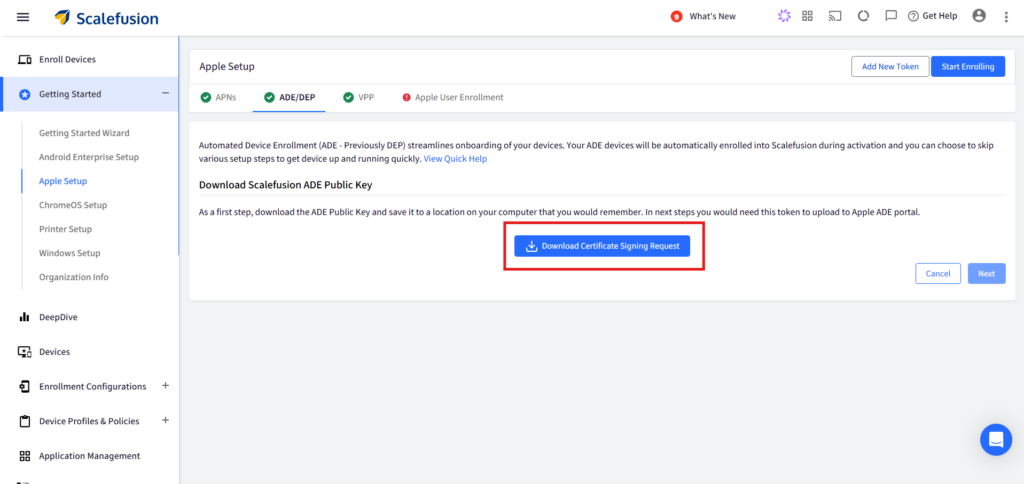
Step 1: In your Scalefusion dashboard, download the Apple ADE public key (.pem) from the Apple MDM or DEP configuration section. This key is required to establish trust between Scalefusion and Apple Business.
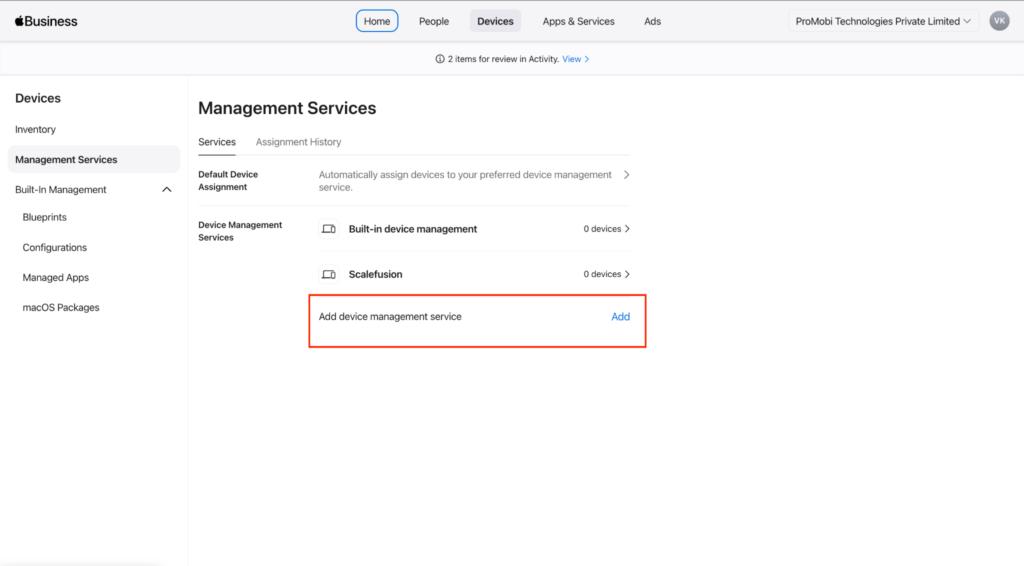
Step 2: In Apple Business, go to Devices → Management Services and add a new device management service for Scalefusion.
Step 3: Upload the public key (.pem).
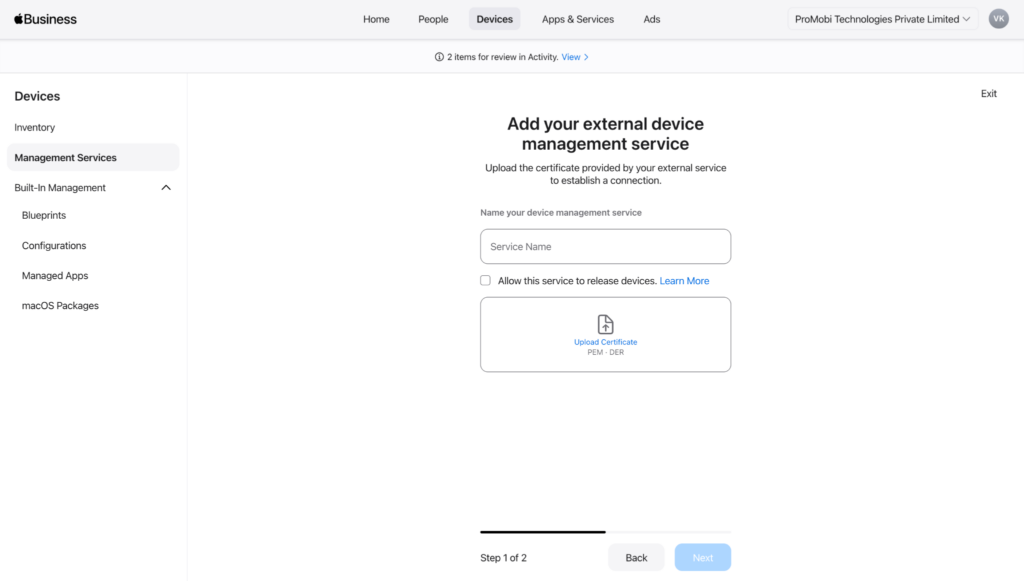
Step 4: Apple will generate a Service Token (formerly called a server token), which you need to download.
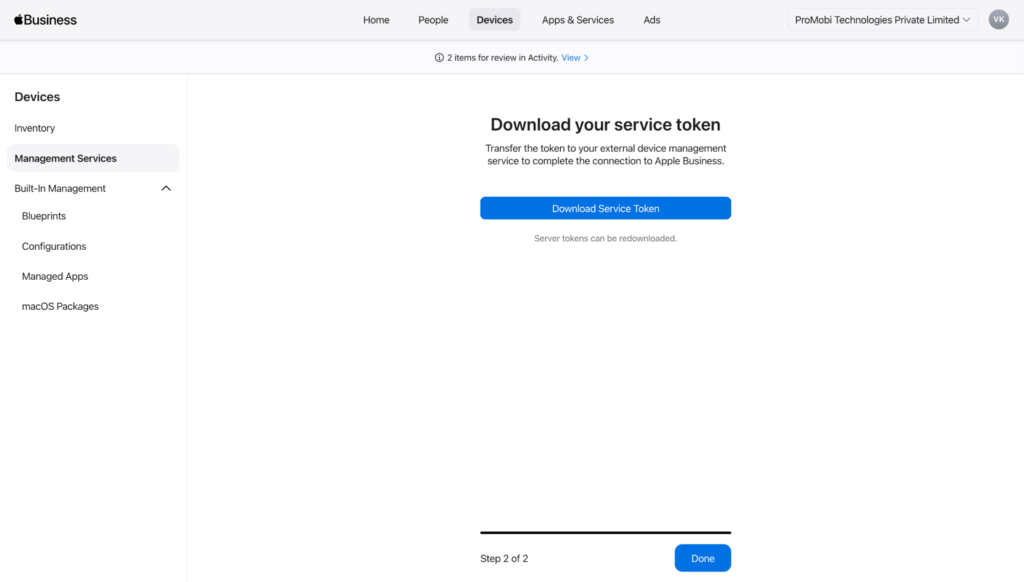
Step 5: Back in the Scalefusion dashboard, upload the Service Token to complete the connection between Apple Business and Scalefusion.
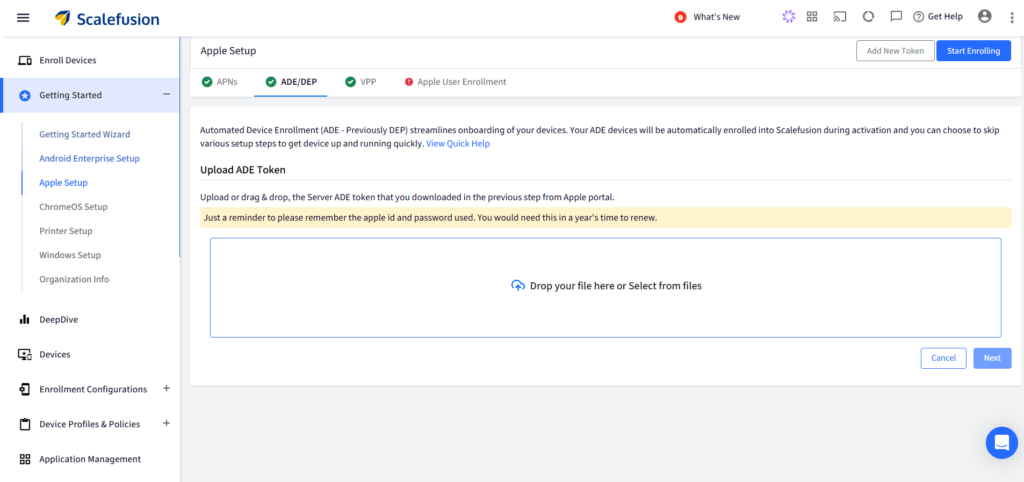
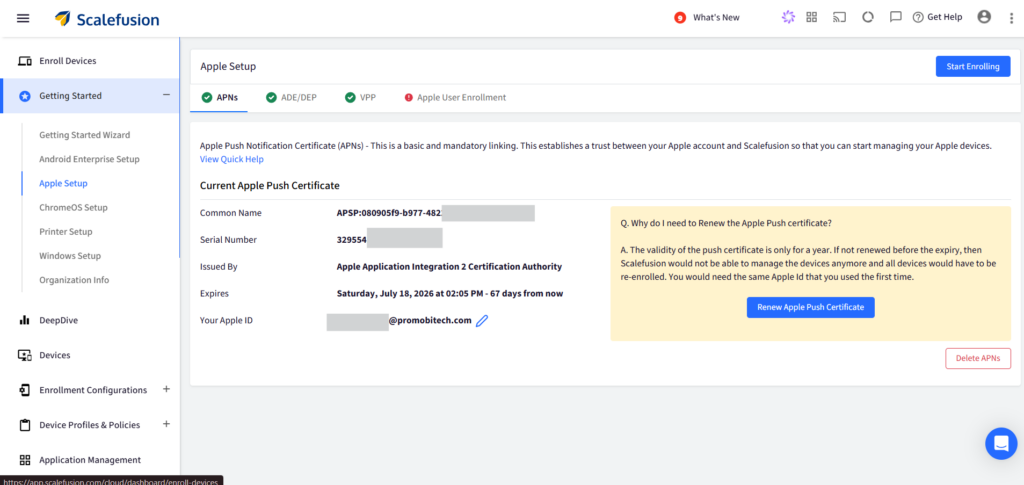
Step 6: Ensure the APNs certificate is configured in Scalefusion. This is mandatory for device communication, as all commands, app installs, and policy updates are delivered through Apple Push Notification service.
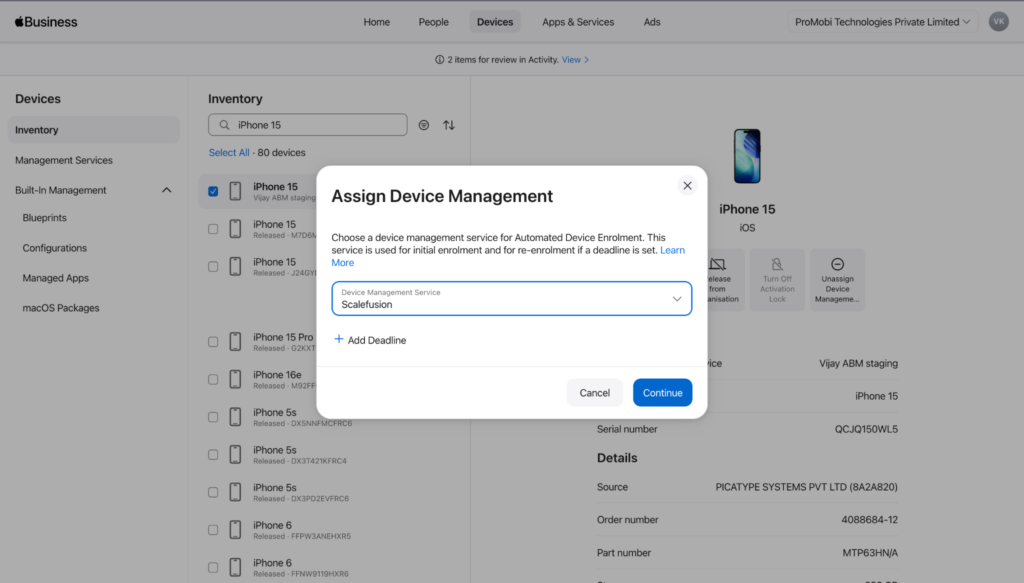
Step 7: In Apple Business, assign your devices to the Scalefusion management service from the device inventory. Devices purchased through Apple or an authorized reseller will appear automatically and can be assigned individually or in bulk.
Step 8: In Scalefusion, create and configure device profiles for your Apple devices. These define policies, app assignments, network settings, and restrictions that will be applied during enrollment.
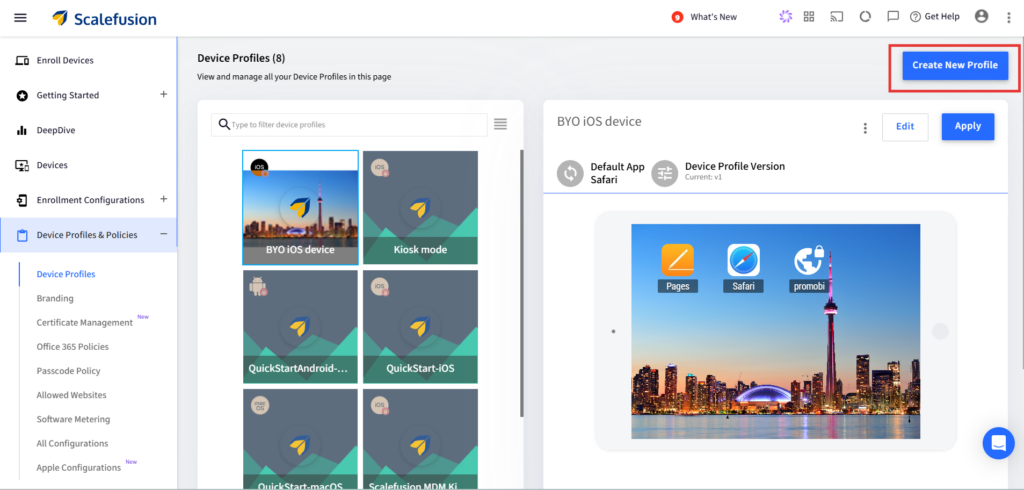
Step 9: Devices enrolled through Automated Device Enrollment will automatically enroll into Scalefusion during setup and receive the assigned configurations.
Step 10: Existing devices must be enrolled separately using the appropriate method (such as account-driven enrollment or Apple Configurator), depending on ownership and current enrollment status.
Best practices for IT teams using Apple Business
- Federate with your identity provider from day one – Managing Managed Apple Accounts manually at scale creates an ongoing maintenance problem. Connecting Entra ID or Google Workspace at setup means new employee accounts are created automatically and deprovisioned cleanly when someone leaves.
- Use Blueprints for every device category – Sales iPhones, engineering Macs, shared retail iPads, contractor devices: each one should have its own Blueprint. Consistency at enrollment prevents configuration drift and makes troubleshooting significantly easier.
- Separate BYOD with User Enrollment – Apple’s BYOD enrollment model is well designed. Work data stays in a managed container, and personal data stays private. Make sure employees understand how it works before rollout.
- Claim your Maps presence early – Business locations need to be claimed before ads on Maps become available this summer. Even without ads, a complete place card with accurate hours, photos, and actions directly improves how the business appears across Maps, Siri, Spotlight, and Safari.
- Layer in a dedicated MDM if your fleet is growing or mixed – Apple Business covers the Apple-native experience well. The moment your requirements include compliance reporting, cross-platform management, or remote support depth, pairing it with Scalefusion closes those gaps without disrupting what’s already working.
Pricing and availability
Apple Business is free in 200+ countries. Optional paid add-ons for US customers:
- Additional iCloud storage: From $0.99 per user per month, up to 2TB
- AppleCare+ for Business: From $6.99 per device per month, or $13.99 per user per month for up to three devices
The companion app, business email, calendar, and directory features require iOS 26, iPadOS 26, or macOS 26.
Why teams pair Scalefusion with Apple Business
Apple Business is a well-considered platform for organizations living inside Apple’s ecosystem. Enrollment is clean, Blueprints simplify device setup, and having brand management alongside Apple device management in one account is genuinely useful.
For organizations with more complex environments, stricter compliance requirements, or a fleet that extends beyond Apple, the platform is a strong foundation. It just needs the right layer on top.

FAQs
1. Is Apple Business enough for enterprise device management?
No, Apple Business covers the fundamentals well for Apple-first organizations, especially around enrollment, basic policy management, and Managed Apple Accounts. However, enterprises require mixed-device environments, advanced compliance requirements, remote troubleshooting needs, or deeper security workflows that need to be often paired with a dedicated UEM solution like Scalefusion for broader operational control.
2. What happens if my organization uses Android or Windows devices alongside Apple?
Apple Business only manages Apple ecosystems. Organizations running Android, Windows, Linux, or ChromeOS devices need an additional endpoint management layer to maintain unified visibility, security policies, and compliance workflows across the entire fleet.
3. Does Apple Business support advanced compliance and security enforcement?
Apple Business includes foundational device management controls, but advanced requirements such as real-time compliance enforcement, device risk monitoring, USB restrictions, endpoint DLP, and context-aware conditional access workflows usually require a more unified endpoint management platform such as Scalefusion.
4. Can IT teams remotely troubleshoot devices with Apple Business?
No, Apple Business supports core administrative actions like remote lock and wipe. For live troubleshooting, remote terminal access, screen sharing, unattended support, or operational debugging at scale, organizations often integrate with a dedicated remote management solution.
5. Does Apple Business support third-party application updates and patching?
Apple Business handles App Store distribution and Apple ecosystem app management well, but it does not provide comprehensive third-party application patch management across operating systems. Organizations often rely on additional endpoint management tools for broader patching workflows.
6. Is Apple Business suitable for large-scale or distributed deployments?
Not entirely on its own. Apple Business simplifies deployment with features like Automated Device Enrollment (ADE) and Blueprints, making it easier to provision Apple devices remotely. However, as organizations scale across regions, teams, and multiple operating systems, limitations around cross-platform management, advanced compliance enforcement, remote support, and centralized operational visibility become more apparent.
7. Can Apple Business replace a traditional MDM completely?
For smaller Apple-only environments with straightforward management needs, it can cover a significant portion of day-to-day device administration. Organizations requiring cross-platform support, deeper automation, granular policy enforcement, or enterprise-grade remote operations generally continue using a dedicated MDM/UEM platform alongside Apple Business.