

Android-based smart classes have gained widespread adoption across several educational institutes. This comes as a result of their accessibility and ease of use, which have solidified their position as a useful digital learning solution in classrooms and across campuses.
However, when schools deploy shared Android TVs across classrooms, IT admins need centralized control over apps, content, and device usage so they can maintain consistent learning environments without manual intervention.
What is Android TV?
Android TV is Google’s operating system for smart TVs, set-top boxes, digital media players, and soundbars. It can transform the traditional TV experience by offering users a dynamic and interactive viewing experience.
As an integral part of the Android ecosystem, Android TV comes with the Google Play Store built in, providing access to a wide range of apps, games, streaming services, and live TV content through supported apps. It also provides built-in access to Google Assistant for voice search and smart home control and Google Cast for streaming content from compatible devices.
Features of Android TV for schools
Android TV offers key features that set it apart, turning any classroom into a centralized, advanced learning hub.
- Interactive classrooms: Android TV supports multimedia apps and screen casting, allowing teachers to display videos, presentations, and student work directly on classroom screens.
- Ease of use: Built on the Android OS, Android TV offers a familiar interface for users accustomed to Android devices, reducing user friction by making it easier to navigate apps and access content.
- Access to apps library: Having built-in access to the Google Play Store allows teachers to download various popular learning apps and services such as YouTube Kids.
- Integrated Google Assistant: Supported Android TV devices come pre-installed with Google Assistant, which enables voice search for educational content, quick navigation, and hands-free operation.
- Digital signage: Android TV devices can be used to display school announcements, timetables, event schedules, campus maps, and emergency notifications through compatible digital signage applications.
Also read: Android TV Kiosk mode: How to turn Android TV into Digital signage
Benefits of Android TV in classrooms
Android TV provides substantial benefits for a classroom, enhancing the experience for teachers and students alike.
- Enables flexibility and accessibility: The accessibility of learning platforms and apps on Android TV devices helps seamlessly integrate smart classes into schools. Teachers can tailor each session for a more engaging and understandable lesson for the entire class.
- Enhances collaboration: Android TV devices support screen casting through Google Cast, allowing students to share presentations and projects from compatible devices on classroom screens.
- Reduces hardware dependency: Wireless content sharing minimizes the need for cables and adapters, creating a cleaner, more organized classroom setup.
- Enables centralized IT management: With a compatible mobile device management solution, IT admins can centrally configure Android TV devices and apply policies to maintain consistent settings and device behavior across classrooms.
- Reduces hardware costs: Android TV devices support wireless content sharing from compatible devices, reducing the need for dedicated casting or additional hardware.
Need for Android TV management
Setting up the hardware is only the first step toward creating a smart classroom with Android TV. These devices are powerful tools that require comprehensive management to ensure that they remain aligned with the school’s internal policies while also remaining secure to prevent their misuse by students.
Managing Android TV devices through a unified endpoint management (UEM) solution allows IT admins to have a centralized view of all the devices on the campus and configure them as per each unique use case. Whether deployed as classroom displays, conference room screens, or digital signage across campus, these devices can be monitored and managed according to their specific requirements.
Apart from centralized management, a UEM solution also enforces configured restrictions such as app access controls, kiosk mode, and network settings to reduce the risk of Android TV device misuse.
How Scalefusion helps set up Android TV for schools
Scalefusion offers seamless Android TV management that grants IT admins centralized control over key Android TV settings and configurations. From initial device enrollment to retirement, Scalefusion supports key stages of Android TV management, including:
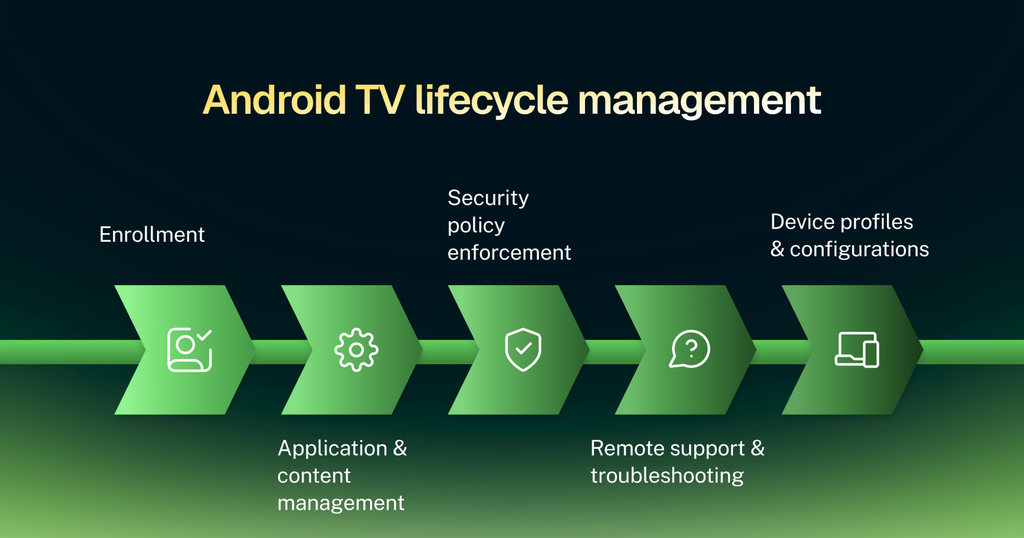
Enrollment
Scalefusion allows IT admins to enroll compatible Android TV devices and bring them under centralized, hassle-free management, saving time and resources.
Using supported enrollment methods, IT admins can onboard Android TVs, assign device profiles, and apply predefined configurations. This helps schools standardize classroom TV deployments and reduce repetitive setup tasks across multiple devices.
Also read: Android Device Enrollment Methods and how it works
Application and content management
Scalefusion allows IT admins to take charge of every app running on Android TV. IT admins can:
- Silently install and update apps over the air
- Manage apps remotely
- Create custom app catalogs with their unique configurations
- Allow and block access to certain apps and websites
Security policy enforcement
Depending on the Android TV model and OEM support, IT admins can configure:
- Access restrictions and passcodes
- Lost mode and remote wipe
- Wi-Fi configurations
- Data encryption
Remote support and troubleshooting
Scalefusion lets IT admins access Android TV devices remotely and troubleshoot them instantly to minimize device downtime. This ensures:
- No disruptions to operations
- Lower IT overheads
- Remote administrative actions
- Remote device power off and restart
- App installation/uninstallation via remote commands
Device profiles and configurations
Scalefusion provides support for creating custom device profiles and groups to adapt Android TVs to various use cases, such as digital signage, digital notice boards, interactive displays, and dedicated kiosks. IT admins can also generate in-depth reports for device usage, permitted users, and device health.
Scalefusion’s Kiosk Mode ensures that only the right apps and content stay on display. It supports:
- Single-App Kiosk Mode
- Multi-App Kiosk Mode
- Custom Branding
Elevate your classrooms with Android TV
Android TVs are undeniably a valuable addition to classrooms and an integral part of bridging the gap between traditional and smart, technology-enabled teaching methods. They help create a learning experience that is best suited for a diverse range of students with their unique learning needs.
This is further enhanced when paired with a comprehensive UEM solution such as Scalefusion that offers seamless Android TV management. IT admins can configure allowed apps, restrict access to unauthorized content, and apply kiosk configurations based on various use cases.
For schools deploying Android TV devices across multiple classrooms, centralized management helps maintain consistent configurations and reduce manual IT effort.


FAQs
1. How can Android TV be used in schools to create smarter classrooms?
Android TV can help schools create smarter classrooms by displaying educational videos, digital lessons, presentations, and interactive learning content on a large screen. Teachers can use compatible educational apps and screen-casting tools to make lessons more visual and engaging. Schools should check app compatibility, connectivity requirements, and available teaching features before deployment.
2. How can schools manage and secure multiple Android TVs across classrooms?
Schools can manage multiple Android TVs through a compatible Mobile Device Management (MDM) solution that supports the specific TV devices and Android versions they use. Depending on device and platform compatibility, IT administrators may be able to configure settings remotely, manage applications, restrict device usage, and monitor device status from a centralized dashboard. Solutions such as Scalefusion can help schools manage supported Android devices, subject to model and feature compatibility.
3. Can Android TVs be used for digital signage and school announcements?
Yes, Android TVs can be used for digital signage to display school announcements, class schedules, event updates, cafeteria menus, and other campus information. With compatible digital signage software, school administrators can schedule content and update multiple displays remotely. Schools should verify that their TVs support the chosen signage application and that the solution meets their content management and security requirements.

