RADIUS, short for Remote Authentication Dial-In User Service, is a client-server protocol for centralized network-access authentication, authorization, and accounting—collectively known as AAA. A Wi-Fi access point, VPN gateway, switch, or other network access device sends a request to a RADIUS server. The server can allow the connection, reject it, or request more information. If access is approved, it can return attributes that help define the session. Separate accounting exchanges can record the session lifecycle.
Despite its historical name, RADIUS is now widely used for enterprise Wi-Fi, VPN access, and network infrastructure rather than dial-up services.
Key Takeaways
- RADIUS is a protocol for centralized authentication, authorization, and accounting (AAA) of network access.
- How it works: Network devices send authentication requests to a RADIUS server, which accepts, rejects, or challenges them.
- Common uses: Enterprise Wi-Fi, VPN access, and network-device administration, with security depending on authentication methods and transport protection.
What is the RADIUS protocol?
RADIUS lets access points, VPN gateways, switches, and other network access devices consult a central server for authentication and authorization decisions. The access device then controls the connection and applies the supported settings returned by the server.
RADIUS does not create user identities or directly configure an endpoint. It carries AAA information between the network access device and the RADIUS server. The server may evaluate a local identity database or consult an external directory or identity service.
What authentication, authorization, and accounting mean
The three AAA functions answer different questions:
- Authentication: Is the user or device presenting an acceptable identity and credential?
- Authorization: If authenticated, what access should the connection receive?
- Accounting: What happened during the resulting session?
Authorization is more than a yes-or-no decision. An Access-Accept response can contain attributes describing session limits or other policy-related settings. The resulting access depends on whether the network access device understands and enforces those attributes. RADIUS does not guarantee that every access point, switch, or VPN gateway supports the same policies.
Accounting is a separate message stream. An accounting record documents session activity, but it is not, by itself, proof that the original access request was properly authorized.
Endpoint, RADIUS client, server, and identity source
A typical deployment has four roles:
- Endpoint or supplicant: The laptop, phone, tablet, or other system requesting network access.
- Network access device: The access point, wireless controller, VPN gateway, switch, or network access server controlling the connection.
- RADIUS client: Usually the network access device. It sends RADIUS requests on behalf of the endpoint. The employee’s laptop or phone is not normally the RADIUS client.
- RADIUS server: The system that evaluates the request, applies policy, and returns a response.
- Identity source: An optional directory, database, certificate authority-related service, or identity platform consulted by the RADIUS server.
Calling the network access device the RADIUS client can initially be confusing. The term describes its relationship with the RADIUS server, not its relationship with the end user.
How RADIUS authentication works
A basic RADIUS exchange starts when the network access device sends an Access-Request to the server. Under RFC 2865, the server answers with Access-Accept, Access-Reject, or Access-Challenge.
From Access-Request to a decision
- The endpoint attempts to connect to a protected network or service.
- The network access device gathers the relevant identity or authentication data.
- Acting as a RADIUS client, the access device sends an Access-Request to the configured RADIUS server.
- The server validates the request and applies authentication and access policies. It may consult an external identity source.
- The server returns one of three primary responses:
– Access-Accept: The request is approved, potentially with authorization attributes.
– Access-Reject: The request is denied.
– Access-Challenge: More information or another authentication exchange is required. - If a challenge is returned, the access device and endpoint may participate in additional request-and-response exchanges before a final decision.
An Access-Challenge is not automatically an MFA prompt. It is a general challenge-response mechanism that can support several authentication workflows.
How authorization attributes affect access
An Access-Accept can contain attributes that the RADIUS client uses when establishing the session. Depending on the deployment and device support, these may relate to session duration, filtering, or another locally defined policy outcome.
The server’s response and the access device’s enforcement are separate steps. If the access device does not recognize an attribute, or its local configuration does not apply that attribute, the expected policy may not take effect. RFC 3580 describes RADIUS usage in IEEE 802.1X environments, but implementations still differ in the attributes they support.
What accounting records capture
RADIUS accounting uses Accounting-Request and Accounting-Response packets. After service begins, the RADIUS client can send Accounting-Request packets with the Acct-Status-Type attribute set to one of these values:
- Start: Indicates that service has begun.
- Interim-Update: Reports the state of an active session at configured intervals.
- Stop: Indicates that the session has ended.
A valid Accounting-Request is acknowledged with an Accounting-Response. Depending on the RADIUS client and configuration, accounting records may include a session identifier, connection duration, termination information, and traffic counters. Interim updates are optional, and their frequency is deployment-specific.
Annotated RADIUS access and accounting flow
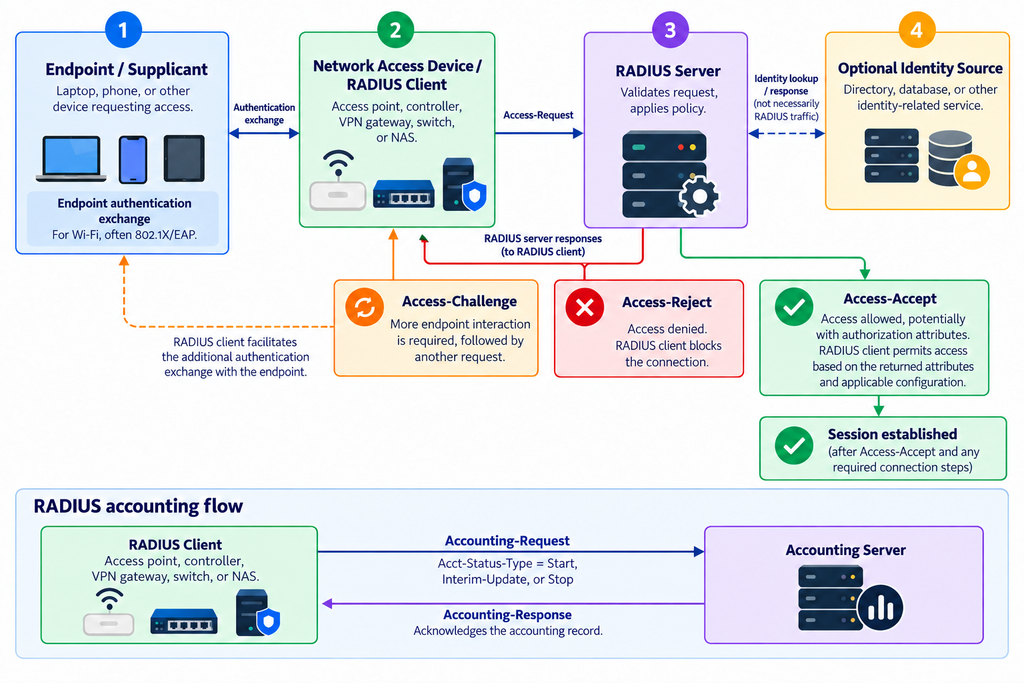
The Access-Request and response messages are part of the RADIUS access protocol. Identity lookups, group mappings, certificate checks, and policy rules are environment-specific. Accounting is a related lifecycle stream sent by the RADIUS client during or after service delivery.
Where RADIUS is used
RADIUS is commonly used where a network access device needs a centralized decision about a user or device connection. Common use cases include enterprise Wi-Fi, remote-access VPNs, and access to network infrastructure.
Enterprise Wi-Fi: 802.1X, EAP, and RADIUS
In an enterprise Wi-Fi deployment, 802.1X, the Extensible Authentication Protocol (EAP), and RADIUS perform distinct roles:
- IEEE 802.1X controls access at the network edge through the endpoint, authenticator, and authentication server roles.
- EAP carries the authentication conversation used by the selected EAP method.
- RADIUS carries EAP and access-control information between the authenticator, such as an access point or controller, and the RADIUS server.
RFC 3579 defines RADIUS support for EAP, including the use of EAP-Message attributes. RADIUS is part of the back-end exchange; it is not a replacement for 802.1X or EAP.
Worked enterprise Wi-Fi example
Example status: The 802.1X, EAP, and RADIUS flow below is source-backed protocol behavior. The employee-network authorization result is illustrative and depends on local policy and access-device support.
Consider an employee connecting a managed laptop to a protected corporate SSID:
- The laptop joins the SSID and begins an 802.1X authentication exchange with the access point.
- EAP messages pass between the laptop and the access point.
- The access point, acting as the RADIUS client, places relevant EAP data into an Access-Request and sends it to the RADIUS server.
- The RADIUS server evaluates the selected authentication method and applicable policy. It may consult an identity source.
- If more interaction is required, the server returns Access-Challenge and the exchange continues.
- The server ultimately returns Access-Accept or Access-Reject.
- After an Access-Accept, the access point establishes the connection and applies supported authorization attributes.
- If accounting is enabled, the access point sends Accounting-Request packets with Acct-Status-Type set to Start, optional Interim-Update, and Stop as appropriate.
Illustrative policy, not mandatory RADIUS behavior: An organization might configure its RADIUS server to accept a valid certificate associated with an employee identity and return attributes intended to place that connection in an employee network segment. A failed certificate check could result in Access-Reject. This outcome requires compatible policy configuration and access-device support; RADIUS does not mandate employee segments or VLAN assignment.
Endpoint preparation is separate from the RADIUS deployment. Managed Android devices may need the correct enterprise Wi-Fi configuration and, in certificate-based deployments, suitable identity and trusted certificates. Scalefusion documents deployment of enterprise Wi-Fi configurations through Android Device Profiles and selection of uploaded identity and trusted certificates. After confirming the SSID, authentication method, server-trust requirements, and certificate format with the network team, an administrator can distribute the approved Android Wi-Fi profile and selected certificates through Scalefusion rather than configuring each device manually. Verify the intended EAP method, Android management mode, certificate format, and network interoperability. Scalefusion is not the RADIUS server or identity service in this architecture.
VPN access and network-device administration
A VPN gateway can act as a RADIUS client, forwarding a user’s access request to a central RADIUS server. This allows an organization to apply centrally managed authentication and authorization policies instead of maintaining a separate identity database on each gateway.
RADIUS can also authenticate administrators connecting to switches, routers, and other network infrastructure. However, TACACS+ is often considered when the main requirement is granular network-device administration, including command-oriented authorization and accounting. RADIUS and TACACS+ are not necessarily mutually exclusive; an organization may use them for different access scenarios.
Which RADIUS authentication method should you choose?
RADIUS transports authentication information, but it does not make every authentication method suitable for every endpoint or access service. Start with the access scenario, credential model, and support across the endpoint, network access device, and RADIUS server.
| Access scenario | Credential type | Method family to evaluate | Compatibility question | Main operational trade-off |
|---|---|---|---|---|
| Enterprise Wi-Fi on managed devices | Device or user certificate | Certificate-based EAP | Do the endpoint, authenticator, and RADIUS server support the selected EAP method and certificate requirements? | Strong credential model, but certificates must be issued, deployed, renewed, trusted, and revoked correctly. |
| Enterprise Wi-Fi on mixed or user-managed devices | Username and password | Password-based EAP supported by the complete stack | Can every endpoint validate the authentication server correctly and use the required method? | Easier initial credential distribution, but password resets, secure client configuration, and credential-exposure risks require attention. |
| Interactive VPN access | Password, certificate, or an MFA-backed identity | VPN-supported RADIUS authentication or MFA flow | Can the VPN client and gateway handle the selected challenge or non-interactive flow? | User interaction may be practical, but challenge handling and outage behavior must be tested. |
| Service or device connection without an interactive user | Usually a certificate or another managed machine credential | Non-interactive method supported by the endpoint and server | Can credentials be rotated without manual intervention, and does the client support the method? | Automation improves scalability, but lifecycle failures can affect many devices at once. |
| Network-device administration | Administrator credential, potentially with MFA | RADIUS or TACACS+, depending on authorization requirements | Is login-level access sufficient, or is granular command authorization and accounting required? | RADIUS may fit centralized login; TACACS+ may better fit command-oriented administration. |
For a certificate-based approach, confirm that the organization can operate the entire certificate lifecycle. Successful initial enrollment is not enough; renewal, revocation, trust changes, expiration, and device replacement must also work.
For password-based methods, do not evaluate only the RADIUS server. The endpoint’s configuration, server-validation behavior, selected EAP method, access point or VPN gateway, and identity source all affect the security and reliability of the result.
When to consider MFA for network access
MFA may be suitable for interactive VPN access or administrator access where users can respond to a prompt. It is often less straightforward for background connections, headless devices, and Wi-Fi clients expected to reconnect without user interaction.
An organization may be able to add MFA through a RADIUS-compatible MFA service or a RADIUS proxy placed in the authentication path. That does not mean the change is transparent. Verify:
- Whether the access device supports the required challenge flow
- Whether the selected EAP or VPN authentication method is compatible
- How non-interactive clients behave
- What happens when the MFA service or proxy is unavailable
- Whether retries could cause repeated prompts
- How the original RADIUS server and identity source remain involved
Test these behaviors with the actual access device, client, RADIUS server, and MFA service before rollout.
How secure is RADIUS?
RADIUS security depends heavily on the transport, authentication method, configuration, and exposure of the client-to-server path. A shared secret alone should not be treated as full connection encryption.
What shared secrets protect—and what they do not
Classic RADIUS over UDP uses a shared secret in packet-authentication mechanisms and in the historic MD5-based obfuscation of the User-Password attribute. Under RFC 2865, the secret should be difficult to guess.
These mechanisms do not provide modern confidentiality for the entire RADIUS packet stream. The shared secret is not equivalent to protecting all traffic with a current transport-security protocol. It also creates an operational dependency: a mismatch between the secret configured on the RADIUS client and server can prevent successful communication.
For classic RADIUS deployments:
- Use strong, unpredictable secrets.
- Avoid reusing one secret across unrelated clients where the products permit individual client definitions.
- Restrict which source addresses can send RADIUS requests.
- Keep RADIUS traffic on controlled networks rather than exposing it broadly.
- Limit and monitor access to authentication and accounting logs.
- Plan server redundancy and test failover.
Protecting the client-to-server connection
Where both ends support it, RADIUS over TLS or DTLS can add transport-layer confidentiality and integrity. RFC 6614 defines the historic RADIUS/TLS approach, commonly associated with RadSec, while RFC 7360 defines RADIUS over DTLS. Product support, certificate requirements, ports, and failover behavior vary, so compatibility must be verified on both the RADIUS client and server.
RFC 9765 defines the experimental RADIUS/1.1 profile. It uses Application-Layer Protocol Negotiation with TLS 1.3 or later and removes legacy MD5-based RADIUS packet mechanisms after both sides negotiate RADIUS/1.1. Do not assume it works with existing infrastructure unless every relevant component explicitly supports it.
Transport protection does not replace secure endpoint authentication or correct authorization policy. It protects the RADIUS connection between participating systems; it does not resolve weak endpoint credentials, expired certificates, incorrect access rules, or compromised identity records.
How to plan and test a RADIUS deployment
A dependable deployment requires more than installing a server. Administrators must align RADIUS client definitions, identity data, authentication methods, authorization policy, accounting, network reachability, and failure behavior.
Choose the server location, identity source, and failure behavior
Place the RADIUS service where every authorized network access device can reach it through controlled network paths. If multiple sites depend on the service, determine whether they will use central servers, distributed servers, or proxies. The design should account for link and server failures.
Define the identity source before writing access policies. Confirm which records identify users, devices, or administrators; how groups or roles are resolved; and how disabled, expired, or revoked credentials are handled.
Decide explicitly what should happen when no RADIUS server is available. Do not rely on assumptions about fail-open or fail-closed behavior. The result is controlled by the access device and its configuration and may differ across Wi-Fi, VPN, and administrative-access systems.
Deployment and testing checklist
For classic RADIUS over UDP, the registered ports are UDP/1812 for authentication and UDP/1813 for accounting. Other transports and product configurations can use different ports.
Use this checklist before production rollout:
- Confirm the IP address or hostname of each RADIUS server.
- Define every access point, controller, switch, VPN gateway, or NAS that will act as a RADIUS client.
- Verify that client and server definitions use the correct source address.
- Match the shared secret on both sides for classic RADIUS, or configure the required certificates and credentials for protected transports.
- Verify UDP/1812 for authentication and UDP/1813 for accounting where classic RADIUS/UDP is used.
- Check routing, firewall, and access-control rules in both directions.
- Confirm the selected authentication or EAP method across the endpoint, access device, and server.
- Verify identity records, group mappings, certificate trust, and policy conditions.
- Review policy order so that a broader rule does not override the intended rule.
- Confirm that the access device supports the authorization attributes the server returns.
- Enable and validate accounting if session records are required.
- Test a known-valid identity and verify the expected access result.
- Test an intentionally invalid or unauthorized identity and confirm rejection.
- Verify the resulting network segment, session limit, filter, or other policy outcome where configured.
- Check for Accounting-Request packets with Acct-Status-Type set to Start, Interim-Update, and Stop, plus corresponding Accounting-Response packets, as applicable.
- Make a RADIUS server unavailable and verify timeout, retry, alternate-server, and user-facing behavior.
- If TLS or DTLS is used, test certificate trust, expiry handling, name validation, negotiation, and failover.
Capture logs from both the RADIUS server and the network access device during testing. A server log may explain why a policy rejected a request, while the access-device log can show whether the request was sent, a response arrived, and returned attributes were applied.
Why RADIUS authentication fails
RADIUS failures usually fall into three groups: no usable response, an explicit rejection, or an accepted connection with the wrong authorization result. Identifying the group prevents unnecessary credential resets when the actual problem is routing or policy order.
| Symptom | Checks to perform |
|---|---|
| Request times out | Verify server availability, routing, firewall rules, source address, RADIUS client definition, port and transport selection, and retry settings. Check the shared secret because some integrity failures may appear to the client as no usable response. For TLS or DTLS, inspect certificate-validation and negotiation logs. |
| Server reports an unknown RADIUS client | Confirm that the server has a client definition for the source address actually used by the access point, controller, gateway, or proxy. Check network address translation and controller-managed access-point designs. |
| Credentials are rejected | Confirm the selected authentication or EAP method, user or device identity record, password state, certificate validity and trust, and applicable access policy. Check system time where certificate validation is involved. |
| Access-Challenge loops or cannot be completed | Verify that the endpoint and access device support the challenge flow, that state information is preserved between requests, and that an MFA or proxy component is not expecting unsupported interaction. |
| Access is accepted but the wrong policy is applied | Review request attributes, rule order, identity group or role lookup, and the attributes in the Access-Accept. Confirm that the network access device supports and enforces those attributes. |
| Authentication works but accounting is missing | Verify that accounting is enabled separately, that the accounting server and port are configured, and that UDP/1813 or the documented alternative is permitted. Check whether the client sends Accounting-Request packets with the expected Acct-Status-Type values and receives Accounting-Response packets. |
| Authentication works on some devices but not others | Compare endpoint profiles, selected methods, certificate chains, trust settings, software versions, and identity formats. Do not assume all clients implement the same EAP or challenge behavior. |
| Access fails only during server maintenance or link outages | Check retry timers, alternate-server configuration, proxy dependencies, and the network access device’s behavior when every server is unavailable. |
FAQs
1. What does RADIUS stand for?
RADIUS stands for Remote Authentication Dial-In User Service. The name reflects its dial-up origins, but the protocol is now commonly used for enterprise Wi-Fi, VPN access, and other centralized network-access decisions.
2. Is RADIUS the same as LDAP?
No. RADIUS handles network-access authentication, authorization, and accounting exchanges. LDAP is a protocol for accessing directory services, as defined by RFC 4511. A RADIUS server may consult an LDAP-accessible directory, but the protocols perform different roles and are not interchangeable.
3. What is the difference between RADIUS and TACACS+?
RADIUS is commonly used for user and device access to Wi-Fi, VPNs, and other network services. TACACS+ is commonly considered for network-device administration when granular authorization and command accounting are priorities. RFC 8907 documents TACACS+ and its separation of authentication, authorization, and accounting functions.
4. Can you add MFA without replacing an existing RADIUS server?
Sometimes. A RADIUS-compatible MFA service or proxy can be inserted into the authentication path while the existing server or identity source remains in use. Compatibility depends on the access device, authentication method, challenge handling, MFA product, and failure behavior. Test interactive and non-interactive clients before deployment.