

The best WSUS alternatives help businesses manage Windows updates more flexibly by automating patch deployment, improving visibility, supporting remote devices, and reducing the manual effort required to keep endpoints secure. These solutions are useful for IT teams that need centralized patch management, third-party application updates, compliance reporting, scheduling controls, and better support for distributed Windows environments beyond what traditional WSUS provides.
Key Takeaways
The best WSUS alternatives help IT teams automate patching, manage remote and cross-platform endpoints, update third-party applications, and maintain security and compliance from a centralized console.
- Look Beyond Windows-Only Patching: Modern alternatives should support Windows, macOS, Linux, servers, and third-party applications, making them better suited to today’s diverse endpoint environments.
- Prioritize Automation: Automated patch detection, approvals, deployment, scheduling, deferrals, and remediation help reduce manual effort and close known vulnerabilities more quickly.
- Support Remote and Cloud Devices: Cloud-based patch management enables IT teams to update off-network, hybrid, and remote endpoints without relying on corporate networks or VPN connectivity.
- Evaluate Visibility and Compliance: Real-time patch status, failure reports, audit logs, vulnerability insights, and compliance dashboards help administrators identify exposed devices and demonstrate policy adherence.
- Choose According to Your IT Model: UEM platforms suit organizations seeking unified device and patch management, while RMM, vulnerability-driven, or on-premises tools may better serve MSPs, security teams, or Windows-centric environments.
For more than a decade, Windows Server Update Services (WSUS) has been a core part of enterprise patch management. It helped IT teams distribute Windows updates internally, control approvals, and keep systems compliant.
In September 2024, Microsoft officially announced that WSUS would no longer receive new feature investments. While delivery for existing Windows update for business will continue for now, the message is clear: WSUS is no longer evolving.
At the same time, enterprise environments have become more complex than WSUS was ever designed for. Modern IT teams manage remote workers, cloud workloads, mixed operating systems, and hundreds of third-party applications. Manual approvals, Windows-only patching, and limited automation are no longer enough.
Patch management is no longer just about Windows updates. It’s about closing vulnerabilities fast, maintaining compliance, and keeping every endpoint secure.
That’s why many organizations are now actively searching for reliable WSUS alternatives.
In this guide, we will explain why companies are moving away from WSUS, what to look for in a modern replacement, and the 7 best alternatives to WSUS in 2026.
Why are organizations moving away from WSUS?
WSUS served its purpose well in traditional, on-prem Windows environments. But its limitations are becoming harder to ignore. Here are the key reasons why organizations are moving away from WSUS:
- No future development: With Microsoft ending active innovation, WSUS will not gain support for modern workflows, cloud environments, or advanced automation. Over time, this creates technical debt and operational risk.
- Windows-only focus: WSUS patches Microsoft products only. It cannot manage macOS, Linux, mobile devices, or most third-party applications. In mixed environments, this forces IT teams to use multiple tools.
- Manual approvals and slow workflows: Patch approvals in WSUS are often manual and time-consuming. Delays increase exposure to known vulnerabilities and make it harder to meet compliance timelines.
- Limited automation and reporting: WSUS offers basic reporting and limited visibility into patch health. Tracking compliance across hundreds or thousands of endpoints becomes difficult.
- Poor support for remote and cloud devices: WSUS works best inside corporate networks. Remote employees, cloud-based systems, and off-network devices are difficult to manage.
What to look for in a WSUS alternative?
Replacing WSUS is not just about finding another Windows patching tool. A modern solution should support how IT actually works in 2026. Here are the most important capabilities to look for:
- Automated OS and third-party patching: The platform should automatically deploy operating system updates and third-party application patches without constant manual approvals.
- Cloud and hybrid support: It must manage on-prem, remote, and cloud-based endpoints equally well.
- Cross-platform coverage: Support for Windows, macOS, Linux, and sometimes mobile devices is essential in mixed environments.
- Centralized dashboard and reporting: IT teams need real-time visibility into patch status, failures, and compliance across all devices.
- Flexible scheduling and deferrals: Maintenance windows, update deferrals, and staged rollouts help prevent business disruption.
- Security and vulnerability visibility: Modern tools should link patching to vulnerability management and show which systems are exposed.
- Scalability: As fleets grow, the tool must handle thousands of endpoints without becoming hard to manage.
With these criteria in mind, let’s explore the best WSUS alternatives available in 2026.
Top WSUS Alternatives for patch management in 2026
1. Scalefusion UEM
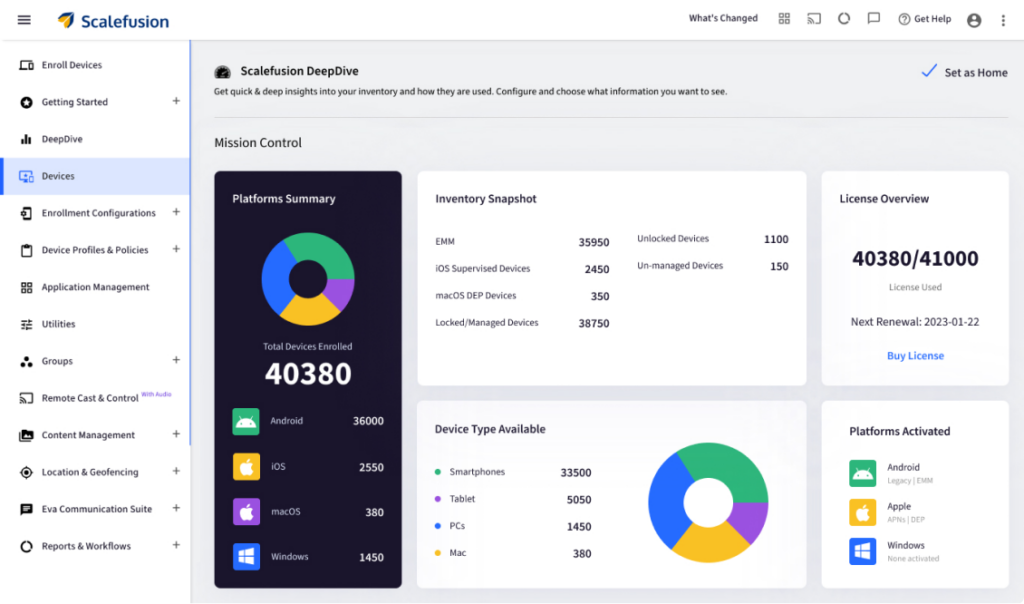
Scalefusion UEM stands out as one of the most complete replacements for WSUS in modern IT environments. Instead of acting as a standalone patching tool, Scalefusion combines patch management capabilities with full unified endpoint management in a single platform. This approach matters because patching does not happen in isolation. Devices need enrollment, monitoring, compliance tracking, and remote support alongside updates. Scalefusion handles all of this from one centralized console. Scalefusion supports Windows 11, Windows 10, legacy Windows versions, and Windows servers. It also extends beyond Windows, covering macOS, Linux, Android, iOS, and ChromeOS, something WSUS could never do.
Key capabilities include:
- Centralized patch management for Windows workstations and servers
- Automated operating system and third-party application updates
- Scheduling, deferrals, and maintenance windows to prevent downtime
- Real-time patch status monitoring and compliance dashboards
- Detailed audit logs and patch reports for regulatory requirements
- Security patching mapped to vulnerabilities
- Bulk patch deployment across large device fleets
- Server patch management alongside endpoints
What makes Scalefusion especially attractive as a WSUS replacement is that patching becomes part of a broader endpoint management strategy. IT teams manage updates, device policies, remote troubleshooting, and compliance from the same interface.
Why choose Scalefusion over WSUS:
- Simple dashboard with a low learning curve
- One platform for patching, device management, and monitoring
- True multi-OS support beyond Windows
- Enterprise-grade support with 24/6 availability
- Affordable pricing that scales with your environment
For organizations moving away from WSUS and looking for a future-proof solution, Scalefusion offers one of the smoothest transitions.
Move from WSUS to Smarter Patch Management
Manage patches, secure devices, and streamline IT operations.
2. ManageEngine Patch Manager Plus
ManageEngine Patch Manager Plus is a well-known patch management platform designed for enterprises managing Windows, macOS, and Linux endpoints. It supports over 900 third-party applications and offers both cloud and on-prem deployment models. This makes it a flexible option for organizations that are not yet fully cloud-native. The platform focuses heavily on automation. It can detect missing patches, test them, deploy updates, and generate compliance reports with minimal manual work.
Key capabilities include:
- Automated detection and deployment of OS and third-party patches
- Cross-platform patching for Windows, macOS, and Linux
- Compliance tracking and vulnerability dashboards
- Both cloud and on-prem options
Patch Manager Plus is a strong choice for organizations that want a dedicated patch management tool with wide application support and mature workflows.
3. Atera
Atera is best known as a cloud-based Remote Monitoring and Management (RMM) platform built for managed service providers, with patch management included as part of its broader IT operations suite. It gives IT teams centralized visibility into Windows workstations and servers and automates the deployment of operating system and application patches across managed environments. Because it runs entirely in the cloud, Atera is especially well suited for distributed and remote teams, allowing administrators to manage updates from anywhere without relying on on-prem infrastructure.
Key capabilities include:
- Automated Windows OS and application patching
- Centralized reporting and patch summaries
- Built-in remote monitoring and diagnostics
- Ideal for MSPs managing multiple client environments
Atera is best suited for service providers and IT teams that want patching bundled with remote support and monitoring.
4. Automox
Automox is a cloud-native patch management and configuration platform built for modern, distributed environments. Unlike WSUS, Automox was designed from the start for cross-platform and remote work. It supports Windows, macOS, and Linux, along with third-party software patching. Automox uses automation policies and workflows to enforce patch compliance without manual intervention. It also integrates vulnerability data into patching decisions.
Key capabilities include:
- Cross-platform OS patching from a cloud console
- Automated third-party application updates
- Policy-driven deployment and enforcement
- Server patch management and compliance reporting
Automox works well for organizations that want a pure cloud patching platform with strong automation and security integration.
5. Kaseya VSA
Kaseya VSA is a full RMM platform that includes built-in patch management for operating systems and third-party applications across both endpoints and servers. Because patching is tightly integrated with monitoring, scripting, and automation, IT teams can design workflows that automatically detect missing updates, deploy patches, and trigger remediation or alerts when issues occur. This unified approach reduces manual effort, improves response times, and helps maintain consistent patch compliance across large and distributed environments.
Key capabilities include:
- Automated OS and application patch deployment
- Custom patch schedules and approval workflows
- Vulnerability scanning and remediation
- Detailed analytics and reporting
Kaseya VSA is often used by MSPs and large IT teams that need patching combined with full remote management.
6. SecPod SanerNow Patch Management
SecPod SanerNow takes a vulnerability-driven approach to patch management by combining asset discovery, continuous vulnerability scanning, and automated patch deployment into a single platform. Instead of treating patching as a standalone task, it helps IT teams identify which devices and applications are most at risk and prioritize the most critical updates first. This risk-based approach improves patch efficiency, reduces the window of exposure, and helps organizations maintain stronger security and compliance across complex IT environments.
Key capabilities include:
- Automated vulnerability detection and patching
- Continuous asset monitoring
- Cross-platform support for Windows, macOS, and Linux
- Customizable patch policies and audit reports
SanerNow is a good fit for security-focused organizations that want patching tightly integrated with vulnerability management.
7. PDQ Deploy
PDQ Deploy is a popular on-premises tool used to deploy Windows updates, third-party patches, and custom scripts across enterprise devices. It works especially well in traditional Windows environments, where IT teams need reliable control over on-network endpoints and prefer keeping patch management in-house. The platform offers powerful scheduling, package deployment, and deep PowerShell automation, making it easy to automate routine maintenance tasks and configuration changes. However, PDQ Deploy remains primarily Windows-focused and relies heavily on local network connectivity, which makes it less suitable for organizations with remote workforces or cloud-first strategies.
Key capabilities include:
- Automated deployment of Windows and third-party patches
- Centralized scheduling and deployment history
- Extensive PowerShell integration
- Simple interface for Windows-centric teams
PDQ Deploy is ideal for smaller or mid-sized IT teams managing mostly on-prem Windows systems.
Choose the right alternative to WSUS wisely
WSUS played an important role in enterprise patch management, but its time is coming to an end. With Microsoft no longer investing in its future and modern IT environments becoming more distributed and complex, relying on using WSUS alone creates growing security and operational risks.
Modern patching platforms must support remote work, cloud infrastructure, mixed operating systems, and third-party applications, all with automation, visibility, and scalability built in.
When evaluating a WSUS replacement, focus on:
- Automation and policy-based patching
- Cross-platform and third-party support
- Real-time visibility and compliance reporting
- Scalability and ease of management
Before making a final decision, take advantage of free trials and pilot deployments. Test how well the platform fits your workflows, how intuitive the interface feels, and how reliably it handles patch deployment at scale.
The right WSUS alternative will not only reduce vulnerabilities. It will simplify IT operations and prepare your organization for future growth.


FAQs
1. What does the deprecation of WSUS mean?
WSUS deprecation means Microsoft will no longer add new features or enhancements to Windows Server Update Services. While existing functionality will continue to work, WSUS will not evolve to support modern cloud, remote, or cross-platform patching needs.
2. Can we use WSUS for cloud-native patch management?
Not effectively. WSUS is designed mainly for on-premise networks and depends on devices being connected to the corporate network or VPN. It does not natively support internet-based patching, remote users, or cloud-only environments, which makes modern cloud-native patch management difficult without additional tools.
3. What are WSUS limitations?
WSUS is limited to Windows environments and does not support macOS, Linux, or mobile devices. It relies heavily on manual approvals and on-prem infrastructure, offers basic reporting, and lacks automation for third-party application patching. It is also difficult to manage remote or cloud-based endpoints, making it less effective for modern, distributed workforces.
4. How do MDM and UEM solutions simplify the entire patch management process?
MDM and UEM platforms centralize patch management across all devices and operating systems from a single dashboard. They automate OS and third-party app updates, schedule deployments, track compliance in real time, and support remote and cloud-based devices. This reduces manual effort, improves visibility, and ensures consistent patching across the entire device fleet.
5. What is Microsoft Endpoint Configuration Manager?
Microsoft Endpoint Configuration Manager (formerly SCCM) is an enterprise management platform used to deploy software, manage devices, and control updates across Windows endpoints and servers. It offers advanced patch management, application deployment, and reporting capabilities, but typically requires complex on-prem infrastructure and higher administrative effort compared to modern cloud-based tools.
6. What is the difference between WSUS and SCCM?
WSUS is a basic patch distribution tool focused only on Windows updates, while SCCM is a full endpoint management platform that includes patching, software deployment, inventory, and compliance management. SCCM provides far more automation and control than WSUS, but it is more complex to deploy and maintain, and often requires significant infrastructure and licensing investment.

