

The best web content filtering solutions help organizations control internet access by blocking harmful, inappropriate, distracting, or non-compliant websites across user devices and networks. These tools allow IT teams to enforce browsing policies, protect users from web-based threats, improve productivity, support compliance, and create safer digital environments for schools, businesses, remote teams, and shared devices.
Key takeaways
The best web content filtering solutions in 2026 help organizations control web access, reduce cyber risks, and enforce safer browsing policies across devices.
- Security First: Web content filtering tools block malicious, phishing, and inappropriate websites before users can access them, reducing exposure to malware and data compromise risks.
- Policy-Based Control: Modern filtering solutions allow IT teams to create granular browsing policies based on users, departments, device types, categories, and network conditions.
- Remote Workforce Support: Cloud-based web filtering platforms secure hybrid and remote employees consistently, even when devices operate outside corporate office networks.
- Key Evaluation Criteria: Businesses should compare solutions based on threat intelligence, SSL inspection, reporting, application visibility, zero trust integration, and ease of centralized management.
- Top Solutions Compared: Leading web content filtering solutions in 2026 include Cisco Umbrella, Zscaler, Forcepoint, DNS Filter, WebTitan, and Scalefusion Veltar.
Staying safe online is no longer just an IT task, it’s a business survival strategy. As remote and hybrid work becomes the new normal, companies are juggling cybersecurity threats, productivity challenges, and compliance requirements all at once. In fact, over 90% of cyberattacks begin with phishing emails or malicious links, and the global average cost of a data breach reached USD 4.88 million in 2024.[1] Hence, managing what users can access on the internet has become more difficult than ever.
That’s exactly where web content filtering solutions play an important role.
Businesses rely on web filtering solutions to protect sensitive information, block malware websites, prevent phishing attacks, and maintain a productive working environment. When used correctly, the web content filtering solutions act as the first checkpoint for every web request, keeping harmful, risky, or distracting content out.
This guide breaks down the 10 best web content filtering solutions in 2026, helping you choose the right one for your organization.
What is Web Content Filtering?
Web content filtering is the process of controlling which websites users can access. Organizations deploy web content filtering solutions to block harmful, dangerous, or inappropriate content from entering their network.
These tools work in several ways:
- DNS filtering: Stops threats before the website even loads
- Pattern-based domain blocking: Blocks domains that match known malicious or suspicious patterns.
- URL filtering: Blocks specific URLs
- Category filtering: Filters groups of websites such as gambling, malware, adult content, or social media
- SSL/HTTPS inspection: Detects threats inside encrypted traffic
- Real-time threat intelligence: Keeps filters updated against new attacks
Companies use web filtering solutions for three core reasons:
- Security: Prevents malware, ransomware, phishing, and malicious websites
- Productivity: Blocks distracting websites and apps
- Compliance: Helps organizations meet industry regulations
With remote and hybrid teams becoming the norm, cloud-based web content filtering solutions are now essential. They ensure consistent protection whether the user is at home, on public Wi-Fi, or inside the office.
Compare the best web content filtering solutions
Every web content filtering solution uses a different approach to secure internet access. The table below compares the leading solutions based on their ideal use case, filtering layer, deployment model, strengths, limitations, and pricing.
| Solution | Best for | Filtering layer | Key strength | Limitation | Pricing |
|---|---|---|---|---|---|
| Scalefusion Veltar | Organizations managing distributed, cross-platform device fleets | Endpoint and web-layer filtering | Unified device management and web filtering with granular policies | May offer more capabilities than smaller teams require | Starts at $3/device/month (billed annually)* |
| DNSFilter | SMBs that need simple, cloud-based DNS protection | DNS layer | Easy deployment with AI-powered domain classification | Limited deep traffic inspection compared with secure web gateways | Starts at $1/license/billed annually |
| Cisco Umbrella | Large enterprises with distributed users and locations | DNS layer and secure web gateway | Strong global threat intelligence and highly scalable DNS security | Can be expensive and technical to configure | Available upon request |
| Zscaler Internet Access (ZIA) | Large enterprises with complex, zero-trust security requirements | Secure web gateway with SSL inspection | Deep encrypted traffic inspection and advanced threat protection | High cost and specialized deployment requirements | Available upon request |
| Symantec WebFilter | Enterprises seeking AI-driven web threat detection | Web and application layer | AI-powered website categorization and integration with broader security tools | Advanced capabilities may require higher-tier plans | Available upon request |
| Barracuda Web Security Gateway | Organizations that prefer on-premises web filtering | Secure web gateway with SSL inspection | Strong malware protection and granular content filtering | Resource-intensive and less suited to fully remote teams | Available upon request |
| Forcepoint Web Security | Regulated organizations with DLP and insider-risk requirements | Secure web gateway and content inspection | Context-aware filtering with behavioral analytics and DLP | Complex interface and a steeper learning curve | Available upon request |
| WebTitan | Organizations seeking cost-effective DNS filtering | DNS layer | Simple deployment with real-time threat intelligence | Limited advanced filtering options in some configurations | Starts at $2.25 per user/month/billed annually |
| Cloudflare Gateway | Businesses already using the Cloudflare security ecosystem | DNS and network layer | Fast filtering through Cloudflare’s global network | Greater value may require broader adoption of the Cloudflare platform | Free plan for personal projects. Paid plans begin at $20/month/billed annually |
| Lightspeed Filter | Schools and educational institutions | Device and cloud-based web filtering | Education-focused policies, student safety features, and parental visibility | Limited capabilities for broader corporate security use cases | Available upon request |
10 Best Web Content Filtering Solutions in 2026
1. Scalefusion Veltar
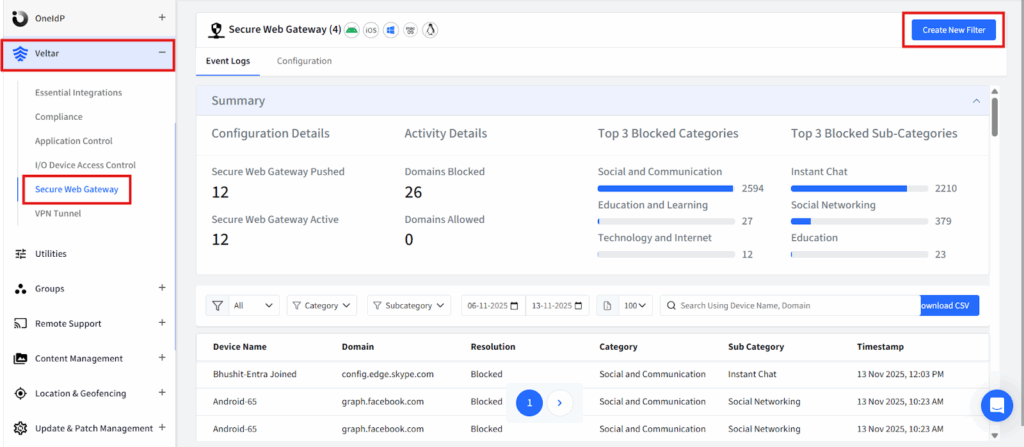
Scalefusion Veltar web content filtering software is built for modern enterprises which brings together security, compliance, and productivity into one unified filtering system that works perfectly for office-based, hybrid, and remote teams. Its cloud-based filtering engine delivers consistent protection across laptops, smartphones, tablets, and shared devices, regardless of where users work.
Built on the Scalefusion UEM platform, Veltar enables IT teams to manage web access and device policies from a unified dashboard. It also provides detailed visibility into web requests, blocked and allowed access, internet usage, and policy violations, helping organizations detect risks, support compliance, and meet audit requirements.
Key features:
- Built-on MDM/UEM platform: Veltar is built-on Scalefusion’s device management platforms, allowing admins to enforce internet rules based on device type, ownership (BYOD vs corporate), and user role. This brings maximum control with minimal effort.
- Real-time filtering engine: Web requests can be inspected based on configured policies. Harmful or suspicious websites are blocked automatically before they load, reducing the risk of malware, phishing, and drive-by attacks.
- Granular access controls: Admins can create policies for specific users, teams, departments, or locations. For example, HR can access social platforms for hiring, while customer service cannot.
- Category-based website controls: Websites are grouped into categories such as adult content, gambling, social media, streaming, and more. Blocking broad categories only takes one click.
- Pattern-based domain blocking: Automatically blocks entire domains that match known malicious or suspicious patterns, even if the exact site has not been seen before.
- Cloud-scalable architecture: Whether you manage 50 devices or 50,000 devices, Veltar scales effortlessly without additional hardware or manual setup.
Pros:
- Strongest integration with device management platforms
- Very easy to roll out and maintain
- Deep compliance and audit-friendly reports
Cons:
- Feature-rich, which may overwhelm smaller teams
Ideal for: Enterprises that need unified control over browsing, security, and compliance across large distributed device fleets.
Pricing: Starts at $3/device/month/billed annually. It is an add-on plan that requires an active Scalefusion UEM subscription.
*Note: This is an annually billed add-on plan that requires an active Scalefusion UEM subscription.
2. DNSFilter
DNSFilter is a cloud-based web filtering solution that uses DNS-layer protection to block malicious websites, inappropriate content, and web-based threats before users connect to them. Its AI-powered classification engine, Webshrinker, continuously identifies and categorizes emerging domains. The platform also provides customizable filtering policies and multi-tenant management, making it suitable for organizations and managed service providers that need simple, scalable web protection.
Key features:
- Real-time threat detection: DNSFilter blocks malicious domains by identifying them before they can be a threat and stopping them before a connection is made.
- Content filtering: Filters by category, domain, or keyword for precise control.
- Flexible policies: It supports per-user/network rules with transparent mode, domain whitelisting, and DHCP relay.
- Integrations & reporting: Syncs with AD and SIEMs for automated policy assignment while offering detailed DNS and threat reports.
Pros:
- User-friendly and easy to deploy
- Fast logging and report generation
- Flexible pricing models
Cons:
- Lacks deeper integrations with third-party tools
- The AI engine, at times, may misclassify legitimate websites
Ideal for: Small to medium-sized businesses(SMB) that require a user-friendly interface and a quick solution.
Pricing: Starts at $1/month per license at the base plan.
3. Cisco Umbrella
Cisco Umbrella is an enterprise-grade cloud security solution that uses DNS-layer protection and Cisco Talos threat intelligence to block malicious domains before connections are established. Its cloud-based architecture supports protection across large, distributed workforces, branch offices, and remote users without adding significant network overhead. With category-based filtering and detailed reporting, Umbrella is well suited to global enterprises that require scalable web security.
Key features:
- DNS-layer security: Umbrella blocks malicious websites at the very first request, even before the browser loads anything. This significantly reduces infection risks.
- Category-based filtering: Admins can block entire groups like adult content, gambling, social media, or proxy sites with one click.
- Real-time threat intelligence: Cisco’s massive threat engine detects new malicious domains faster than most competitors.
- Cloud-based protection: Can extend protection to remote users when traffic is routed through the service, may it be office, home, airport, or a cafe.
- Detailed reporting and logs: Admins get visibility into browsing trends, risky requests, and policy violations.
Pros:
- One of the strongest DNS-layer filtering engines
- Extremely scalable for global enterprises
- Fast and lightweight
Cons:
- Expensive compared to SMB-focused tools
- Setup can be technical for beginners
Ideal for: Global enterprises with thousands of users and a distributed workforce.
Pricing: Available upon request.
4. Zscaler Internet Access (ZIA)
Zscaler Internet Access (ZIA) is a cloud-native security platform designed for large, distributed enterprises. It secures web traffic through advanced URL filtering, SSL inspection, malware detection, sandboxing, and real-time threat analytics. Its global cloud network delivers low-latency protection across locations while providing detailed visibility into user activity and application usage. ZIA is a strong fit for organizations adopting zero-trust security and managing complex compliance requirements.
Key features:
- Real-time SSL inspection: ZIA inspects encrypted traffic which is a must-have feature since most modern threats hide in HTTPS.
- Advanced threat protection: Suspicious files are analyzed in a cloud sandbox before reaching users.
- Cloud-native architecture: No hardware or VPNs required. Traffic is routed through Zscaler’s nearest cloud node for instant filtering.
- User and device visibility: Admins can track who accessed what, when, and from which device, which is important for compliance audits.
- Global low-latency network: Users get fast browsing speeds regardless of their country or office location.
Pros:
- Best-in-class inspection capabilities
- Cloud-native and highly scalable
- Ideal for large, complex environments
Cons:
- Expensive
- Requires specialized knowledge for setup
Ideal for: Multinational corporations, financial institutions, and regulated industries.
Pricing: Custom pricing.
5. Symantec WebFilter
Symantec WebFilter is an AI-powered web filtering solution that analyzes website reputation, categories, and behavior to identify malicious or inappropriate content. Its dynamic categorization engine including endpoint protection and secure web gateways continuously adapts to emerging threats, helping organizations block phishing websites and malware hosts before users access them. The platform also integrates with broader Symantec security solutions, making it suitable for organizations seeking a more unified security environment.
Key features:
- AI-powered threat intelligence: Symantec scans web traffic using machine learning models to detect suspicious sites before they cause harm.
- Dynamic categorization engine: Websites are automatically classified into categories to simplify policy creation.
- Cloud deployment: Admins can roll out policies across locations without installing hardware.
- Web traffic visibility: Every web request is logged, giving teams full insight into browsing patterns and potential risks.
- App and URL control: Block entire applications, cloud services, or specific URLs as needed.
Pros:
- Strong AI threat detection
- Simple to deploy
- Great for detailed reporting
Cons
- Basic plans lack advanced features
- Can be heavy on network resources
Ideal for: Enterprises seeking AI-driven filtering without complex deployment steps.
Pricing: Subscription-based.
6. Barracuda Web Security Gateway
Barracuda Web Security Gateway is an appliance-based web filtering solution designed for organizations that prefer on-premises deployment. It combines malware protection, SSL inspection, application blocking, and granular content filtering to secure both inbound and outbound web traffic. Its centralized management and detailed reporting support organizations with strict compliance or data sovereignty requirements, although it may be less suitable for fully remote workforces.
Key features:
- SSL traffic decryption: Barracuda decrypts encrypted web traffic, scans it for threats, and re-encrypts it securely.
- Malware protection: Built-in virus scanning prevents harmful downloads and suspicious file transfers.
- Application and web blocking: Admins can block apps like YouTube, TikTok, or anonymous proxy services.
- Real-time reporting: Provides live dashboards and logs to help detect policy violations.
- Centralized admin panel: Useful for managing multiple office sites under one gateway.
Pros:
- Strong malware filtering
- Deep SSL inspection
- Granular control over apps and content
Cons:
- Resource-intensive
- More complex to deploy
- Not ideal for fully remote teams
Ideal for: Organizations with on-premise networks, schools, and data-sensitive industries.
Pricing: Subscription-based.
7. Forcepoint Web Security
Forcepoint Web Security combines web filtering with behavioral analytics, data loss prevention, and deep content inspection. It evaluates user activity and contextual risk to identify threats such as unusual downloads, repeated access to restricted content, and suspicious uploads to cloud applications. With both cloud and on-premises deployment options, it is well suited to regulated organizations that handle sensitive data or need stronger protection against insider risks.
Key features:
- Behavioral analytics: Forcepoint tracks user behavior to detect abnormal or risky activities.
- Deep content inspection: Every web request is scanned for hidden malware, sensitive data leakage, or policy violations.
- Data loss prevention (DLP): Ensures sensitive files don’t get uploaded or shared with unauthorized platforms.
- Context-aware filtering: Allows rules based on user role, device, location, and time of day.
- Flexible deployment: Works in cloud-first or on-prem environments depending on compliance requirements.
Pros:
- Excellent for insider threat protection
- Strong DLP capabilities
- Highly detailed filtering and analytics
Cons:
- Can be expensive
- Steeper learning curve
- UI may feel overwhelming for new teams
Ideal for: Highly regulated industries like finance, healthcare, and government agencies.
Pricing: Custom quote.
8. Webtitan
Developed by TitanHQ, WebTitan is a DNS-based web filtering solution that protects users and networks from malicious domains, phishing attempts, and inappropriate online content. It uses real-time threat intelligence and category-based filtering while avoiding the need for complex proxy configurations. Its simple deployment and flexible integration options make it suitable for organizations of different sizes seeking efficient DNS-layer protection.
Key features:
- Scalable DNS filtering: Handles unlimited queries with low latency, avoiding bandwidth issues.
- Real-time URL categorization: Uses extensive category lists and live threat feeds for precise filtering.
- Flexible deployment: Install on Windows, Linux, or as a virtual appliance; integrates with directory services.
Pros:
- Comprehensive feature set
- Cost-effective
Cons:
- Difficulties in fine-tuning certain granular settings
- No geo-based blocking
Ideal for: Organizations heavily reliant on cloud-based security structure.
Pricing: Base plan starts at $2.25/month/user/billed annually.
9. Cloudflare Gateway
As part of the Cloudflare suite, Cloudflare Gateway provides DNS-based filtering software that intercepts and evaluates traffic before it reaches an organization’s network. By leveraging Cloudflare’s expansive global infrastructure, it is able to provide fast and efficient filtering that helps protect users from malware, phishing, and other online threats. Through this network-centric approach, Cloudflare Gateway simplifies deployment by removing the need for complex hardware or additional endpoint agents. It enhances network security and restricts employees’ internet access, helping protect internal users and data.
Key features:
- Customizable filtering options: Offers a diverse range of filtering configurations.
- Seamless integration: Integrates with Cloudflare Access and other services without hassle.
Pros:
- User-friendly interface
- Seamless integration with Cloudflare web services
Cons:
- Vendor lock-in risks due to ecosystem dependencies
- Prone to blocking legitimate websites
- Comparatively expensive to other DNS solutions.
Ideal For: Companies deeply integrated with Cloudflare services
Pricing: Provides a free plan for personal projects.
Paid plans begin at $20/month/billed annually.
10. Lightspeed Filter
Lightspeed Filter is a web filtering solution from Lightspeed Systems designed for schools and other educational institutions. It offers comprehensive web filtering for schools with online safety, enabling admins to block inappropriate content, monitor student activity, and ensure compliance with internet safety regulations. It provides customisable filtering policies and detailed reports to help maintain a secure digital learning environment. It comes pre-built with 138 categories that differentiate sites such as adult gaming versus educational gaming. It provides comprehensive protection with end-to-end cloud-based filtering, blocking websites in schools, simplified SSL decryption, and fast and accurate roster syncing.
Key features:
- Agent Filtering: Device-level filtering without compromising performance.
- Parent Portal: Gives parents insights and controls over children’s internet activity.
- Granular Control: Create unique policies for different groups, classes, and individuals.
Pros:
- Catered to schools with a comprehensive suite of features.
- Real-time dynamic web filtering.
Cons:
- Lacks certain features for corporate security, such as vulnerability scanning and patch management
- No malware detection
Ideal for: Schools and other educational institutions
Pricing: Contact for a custom quote


What to look for in a Web Content Filtering solution?
Choosing the right web content filtering solution is more than just blocking a few websites. A good WCF tool should help your organization stay secure, productive, and compliant while giving IT teams full visibility into how users behave online. Before selecting from the best web content filtering solutions, it is important to understand the features that truly matter.
Below are the essential elements you should look for, explained in simple and practical terms:
1. Category-based filtering
Category-based filtering is one of the foundational capabilities of any strong web filtering solution. Instead of manually blocking thousands of individual websites, admins can instantly block entire categories such as:
- Gambling
- Adult content
- Social media
- Gaming
- Malware-infected sites
- Streaming platforms
This saves hours of manual work and ensures users don’t stumble onto inappropriate or risky content. It also helps maintain productivity by reducing access to non-work-related sites.
2. Pattern-based domain blocking
While category filtering is broad, pattern-based blocking gives you surgical precision. It allows IT teams to block:
- Specific domains
- Subdomains
- Entire TLDs (.xyz, .ru, .click — commonly used for phishing)
- URL patterns
This is extremely useful for companies facing targeted threats or industries that must prevent access to highly specific sites. It also helps block newly created phishing domains that may not yet be categorized by threat engines.
3. Granular policy enforcement
A good WCF tool should let you create different rules for different users, devices, and departments. For example:
- Finance teams may need access to banking websites that other teams shouldn’t use
- HR might require social media access for recruitment
- Guest Wi-Fi may need stricter restrictions than corporate Wi-Fi
Granular controls ensure your internet policies match the real needs of every team—without overblocking or underblocking.
4. BYOD compatibility
Today, many employees use personal smartphones, laptops, or tablets for work. Your web content filtering solution must be able to enforce rules on these devices as well. BYOD compatibility ensures:
- Personal devices follow the same security rules as company-owned devices
- Reduces common bypass paths where employees can bypass controls
- Remote teams stay protected even outside corporate networks
This is especially important for hybrid workforces and distributed teams.
5. SSL/HTTPS inspection
Most modern cyberattacks hide inside HTTPS encryption. Without SSL inspection, harmful sites can easily pass through undetected. This feature allows your WCF tool to:
- Decrypt encrypted web traffic
- Scan it for malware or policy violations
- Re-encrypt it securely before delivering it to the user
If this capability is missing, your filtering system is only seeing half the internet.
6. Real-time threat intelligence
Threats evolve by the minute. A powerful web content filtering solution should continuously update itself using global threat intelligence feeds.
This ensures your organization automatically gains protection against:
- Newly created phishing sites
- Randomized malware domains
- Botnet command-and-control servers
- Zero-day exploit websites
- Fast-moving ransomware links
The faster the intelligence updates, the safer your users remain.
7. Reporting & analytics
Filtering isn’t just about blocking websites, it’s about understanding user behavior. Good reporting tools help IT teams answer questions like:
- Which departments access the most risky websites?
- Are employees trying to bypass policies?
- Which threats were blocked today?
- What websites are causing productivity loss?
Clear dashboards and detailed logs make compliance audits easier and help IT teams respond to suspicious activity faster.
8. Integration with existing IT stack
Your WCF solution should fit naturally into your existing ecosystem. This includes compatibility with:
- MDM/UEM platforms (for device-level enforcement)
- SIEM tools (for centralized monitoring)
- IAM systems (for identity-based filtering)
- Directory services like Azure AD or Active Directory
When everything works together, policies stay consistent across apps, devices, and networks, reducing admin effort and improving security visibility.
Choose your Web Filtering Solution wisely
The internet has become the biggest entry point for cyberattacks, and in 2026, strong web filtering solutions will play a crucial role in blocking phishing attempts, malware sites, and accidental data leakage.
Selecting the right solution depends on understanding your own environment such as how large your company is, how mature your security processes are, whether employees use personal devices, and what compliance standards your industry must follow. Each of these factors influences the level of filtering and control you truly need.
Ultimately, the decision comes down to one question: Is your business ready to face the next online threat without a reliable Web Content Filtering Solution in place? If the answer is uncertain, it’s time to explore your options.
All the best web content filtering solutions covered in this guide offer free trials. Test them, compare how they fit your workflow, and choose the one that gives your organization the right balance of security, visibility, and control.
References:
1. Huntress
FAQs
1. What’s the best web filtering solution for businesses?
The best solution provides centralized management, real-time threat protection and device-wide policies. It balances security and productivity, controlling access to harmful or distracting content while giving IT visibility and flexibility across employees, devices and locations.
2. How does web content filtering protect my business needs?
Web content filtering blocks malicious, unsafe, and non-work-related websites. It prevents malware, phishing, and data breaches, ensures compliance with organizational policies, improves productivity, and maintains device security, giving IT teams full visibility over user browsing behavior.
3. Is it possible to customize content filtering for different teams or users?
Yes. Modern solutions like Scalefusion Veltar allow granular control, creating policies by user, role, device, or location. Teams can have tailored access to websites and apps, ensuring necessary resources are available while limiting exposure to harmful or non-essential content.
4. Does web content filtering work on remote or mobile devices?
Yes. Cloud-based filtering extends protection to remote employees and mobile devices. IT teams can enforce consistent security policies, monitor activity and block unsafe content, ensuring devices remain secure and compliant regardless of location or network.

