The biggest misconception about cybersecurity is that only a hacker’s cyberattack can cause data leakage, overlooking potential data leaks from internal sources. Sometimes, all it takes is a poorly configured device, a careless human, or a misdirected email.
More often than not, data leakage stems from simple oversights and human error. Like an employee uploading files to a personal drive, a public cloud folder left unsecured, or confidential data shared over an unprotected channel.
Going by the golden rule of “prevention is better than cure,” let’s look at what a data leak is, its common causes, and how you can better tighten the security around your digital infrastructure to maximize security with the best data loss prevention (DLP) solutions.
What is data leakage?
Data leakage or a data leak is the accidental or unintentional exposure of sensitive, confidential, or private information to unauthorized parties. It typically occurs from the inside out rather than a forceful external cyberattack.
There are two types of data leakage:
- Physical data leakage: It happens via misplaced printouts, lost or stolen USB drives, unsecured external hard disks, or discarded hardware containing sensitive data.
- Electronic data leakage: It occurs due to misconfigured cloud storage, insecure file-sharing apps, email misdeliveries, or unauthorized data transfers over the internet.
If a cybercriminal locates a data leak, they can leverage the information for a data breach attack. When sensitive data is stolen from either a data breach or a ransomware attack and published on the dark web, these events are also classified as data leaks.
Data leakage vs Data breach vs Data loss: What is the difference?
Now, you might think, “Aren’t data leakage, data breach, and data loss the same?” They do sound similar, but no, they are not the same; they have different meanings and reasons for them to occur.
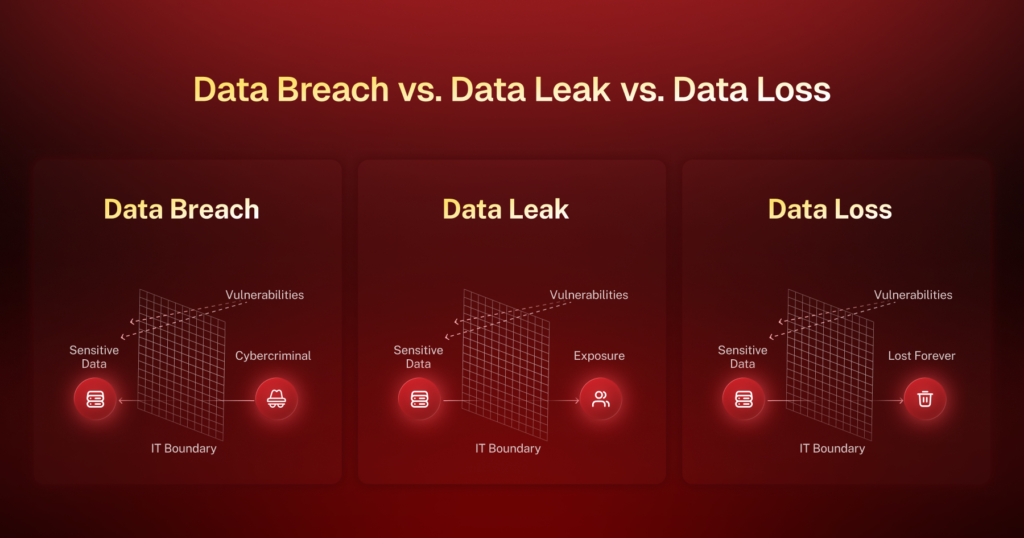
These terms are often used interchangeably. However, they describe different stages of risk. Let’s understand them in detail so you can respond to such situations more effectively.
| Aspect | Data leak | Data breach | Data loss |
|---|---|---|---|
| Definition | Unintentional exposure of data, often still accessible | Unauthorized access by external attackers exploiting vulnerabilities | Irreversible destruction or deletion of data |
| Cause | Misconfiguration, weak access controls, poor security hygiene | Targeted cyberattacks exploiting weaknesses (often a leak) | Human error, system failure, ransomware, or malicious activity |
| Intent | Accidental/unintentional | Deliberate/malicious | Either accidental or intentional |
| Severity | Low | High | Critical |
| Immediate impact | Limited: data exposed but not necessarily stolen | Significant: unauthorized access, regulatory disclosure needed | Maximum: data permanently lost, operations disrupted |
| Detection | Relatively easier to detect with audits | Difficult to detect, especially in real time | Evident only after the damage is done |
| Prevention | Policies, access controls, and user awareness | Patch management, threat monitoring, and hardened configurations via DLP | Regular backups, disaster recovery plans |
To put it simply, data leakage leads to data breach, which results in complete data loss.
Also read: How to prevent data breaches
Common causes for data leaks
Data leakage results from a combination of systemic gaps, process failures, and behavioral risks. While some causes are technical, others stem from a lack of oversight or user awareness. Here’s a breakdown of the most frequent and high-risk contributors to data leaks:
1. Misconfiguration issues
Misconfigured cloud services, databases, firewalls, or access control lists (ACLs) are among the most prevalent causes of data leaks. These vulnerabilities often go undetected due to inadequate audits or automation errors in provisioning infrastructure.
2. Social engineering attacks
Attackers often bypass technical safeguards by targeting users directly through phishing, vishing, or credential harvesting via fake login portals. Once the data is compromised, attackers can move laterally through systems and extract large volumes of data undetected.
3. Human error
Accidental data exposure is a persistent challenge in both SMBs and enterprises. Misaddressed emails containing confidential attachments, unsecured exports of sensitive reports, or failure to classify documents before sharing often bypass traditional detection tools unless DLP or content inspection systems are in place.
4. Weak or reused passwords
Individuals reusing passwords across multiple systems or selecting simple, easily guessable passwords make it easy for attackers to implement brute force or credential stuffing attacks. This is especially risky in environments lacking multi-factor authentication (MFA) or centralized identity governance.
5. Lack of encryption policies
When organizations do not enforce encryption for data at rest and in transit, the exposed data can be read and misused without resistance. Unencrypted databases, plain-text file transfers via FTP, and unsecured APIs pose a serious risk. This is especially true for industries where compliance with standards like GDPR, HIPAA, or PCI-DSS is mandatory.
6. Software or third-party vulnerabilities
Outdated software components, unpatched systems, and insecure third-party SDKs or APIs often contain exploitable flaws that increase the risk of data leaks. Attackers may use these to execute remote code, elevate privileges, or exfiltrate data.
7. Shadow IT
Unauthorized use of applications, cloud storage platforms, or communication tools by employees without IT approval creates blind spots in the organization’s security posture. Since these tools aren’t monitored or protected by corporate policies, any data stored or transmitted through them is more likely to be leaked or mismanaged. This increases the risk of losing the organizational data.
How to prevent data leakage? Best practices for data leak prevention
When preventing data leakage, building layered, proactive security across people, processes, and technology should be your priority. Below are 10 advanced, enterprise-relevant data leak prevention best practices listed in the logical sequence an IT or security team would typically implement.
1. Establish a data leakage prevention policy
A data leakage prevention policy lays the foundation for ensuring no data is lost and the steps to take if data loss does happen. It defines:
- What counts as sensitive data (e.g., PII, PHI, IP, financial data)
- How it should be classified (public, internal, confidential, restricted)
- Acceptable data usage, transfer, and storage methods
- Incident reporting procedures and accountability roles
Once the policy is created, invest in a good DLP software to implement in your organization.
Why it matters: Without policy, enforcement lacks direction. A documented policy is also mandatory under ISO/IEC 27001 and frameworks like NIST 800-53.
2. Discover and classify critical data assets
Use automated discovery tools to scan endpoints, servers, cloud platforms, and databases for unstructured and structured data. Once discovered, apply classification labels using metadata tags (e.g., “Internal Only,” “Restricted,” “GDPR-Protected”) to define access and handling rules.
Why it matters: You can’t protect data you don’t know exists. Classification helps automate DLP rules, encryption, access control, and audit trails to monitor and analyze data effectively.
3. Implement a robust DLP solution across all endpoints
Deploy agent-based DLP on endpoints, network DLP to inspect traffic, and cloud-native DLP for services like Google Workspace and Microsoft 365.
Key capabilities to look for:
- Real-time scanning of emails, file uploads, and clipboard actions
- Policy-based blocking, quarantining, or redaction
- Detection of sensitive data patterns (e.g., credit card numbers and SSNs)
Why it matters: A comprehensive DLP setup, such as the one provided by Scalefusion Veltar, provides visibility and control across every exit point, including email, USB, browser, and cloud sync.
4. Encrypt data in transit and at rest
For data at rest:
- Use AES-256 encryption for disk-level and file-level protection
- Enable BitLocker (Windows) or FileVault (macOS) on all endpoints
For data in transit:
- Enforce TLS 1.2+ across all network communications
- Use business VPN solutions like Scalefusion Veltar
- Use Zero Trust Access solutions like Scalefusion OneIdP
Why it matters: Even if data is leaked or devices are compromised, encryption ensures the data remains unreadable without keys.
5. Enforce strong passwords and MFA
Implement MFA for all user and admin accounts and require employees to use complex passwords and rotate them regularly.
Why it matters: As per Verizon’s 2025 Data Breach Investigations Report, 88% of basic web application attacks involved stolen credentials. Adding MFA reduces the risk of account compromise, especially in phishing scenarios that can lead to potential data leaks.
6. Use granular access controls and Zero Trust principles
Move beyond traditional role-based access control:
- Combine with attribute-based access control to consider user location, device posture, and time.
- Apply Just-In-Time (JIT) admin access and Just-Enough-Access (JEA) via privileged access management solutions.
- Monitor changes through audit logs and reports. Scalefusion can prevent unauthorized access and help monitor and analyze data effectively.
Why it matters: Attackers exploit lateral movement to access data. Least privilege access limits how far they can go after initial entry, enhancing the data breach prevention strategy.
7. Control external sharing and shadow IT
Configure cloud DLP rules to:
- Block unauthorized third-party app connections
- Limit file-sharing permissions (e.g., view-only, expiration, and watermarking)
- Detect and alert when sensitive data is shared via unauthorized channels like personal emails and USBs
- Block USB access to devices used for work purposes
Why it matters: Most accidental data leaks happen through legitimate tools being misused, such as someone sharing a Google Drive folder publicly by mistake, which can lead to unauthorized access to sensitive data.
8. Continuously monitor user activity and anomalies
Leverage user and entity behavior analytics to detect:
- Data downloads that deviate from a user’s normal pattern
- Login attempts from unusual geolocations or devices
- High-volume file transfers to personal email or USB
Why it matters: Early detection is key. Most confidential data leaks occur after subtle activity, which can escalate into large-scale exfiltration if not detected early.
9. Conduct periodic audits and simulate insider threats
Regular audits and controlled tests help organizations analyze data to evaluate their current security measures and get a better understanding of their capabilities in protecting sensitive data.
- Perform internal red-teaming or simulated phishing and data exfiltration tests
- Review access logs, DLP reports, and privileged activity quarterly
- Include third-party vendors in security assessments
Why it matters: Not all threats are external. Insider threats, both accidental and intentional, are more difficult to detect without ongoing assessments and effective data leak protection measures.
10. Invest in a UEM solution for data security
Adopt a centralized UEM solution like Scalefusion for a more tight-knit security and enhance the capabilities of existing security systems. UEM helps IT admins:
- Enforce security policies like full-disk encryption, app allowlisting, and USB blocking
- Monitor and wipe data on lost or stolen devices
- Apply conditional access to work resources based on conditions like IP address, time, and day
- Enforce full VPN tunneling to direct traffic from the secured gateway
- Manage access for input and output devices
- Apply policies to multiple devices and users at once
- Create device or user groups to simplify policy enforcement
Why it matters: Fragmented endpoint management creates blind spots. A unified platform like Scalefusion centralizes visibility and response for IT and SecOps alike.
Why is sensitive data leakage a serious issue? Risks and consequences
Data leakage doesn’t happen in isolation. One leak can set off a chain of problems for an entire business. Let’s understand the consequences step by step, in the order they typically occur.
1. Identity theft
When sensitive personal data like social security numbers, home addresses, dates of birth, or bank details are leaked, individuals are at the immediate risk of identity theft.
This type of information can be used to impersonate someone online or offline. Thus, when customer data is leaked and identity theft follows, the blame often falls back on the organization responsible for securing the data.
2. Operational disruptions
Once a data leak is discovered, companies often have to act fast: disconnect affected systems, restrict access, or shut down certain operations to contain the problem. This disrupts normal workflows, delays projects, and affects service delivery.
3. Compliance violations
When personal data is leaked, it often means that compliance with data protection laws has been violated. Different regions and industries have strict rules around handling sensitive data, and violating these regulations, even due to accidental leaks, can result in investigations, audits, and catastrophic penalties.
4. Reputational damage
When people hear that their personal data is leaked, they lose trust in the organization. Clients may start questioning whether the company takes security seriously. Even loyal customers may begin to look for alternatives if they perceive their sensitive data is at risk.
5. Financial losses
All the previous consequences come with a cost. Businesses have to pay for incident response, legal consultations, regulatory fines, and customer notification services. They also lose revenue due to lost clients or paused operations.
Seal data leaks with Scalefusion Veltar
Preventing data leakage is not just about deploying tools. You need centralized visibility, the ability to enforce policies on devices in bulk, and to ensure accountability at every endpoint. Scalefusion Veltar empowers IT teams to manage devices and users, enforce security policies, and control how data moves across users and environments.
From blocking risky file transfers to wiping data from compromised devices in seconds, Veltar’s endpoint DLP software helps you stay ahead of data leaks before they become liabilities. Whether you’re managing devices in office or remote teams, BYOD users, or frontline devices, Scalefusion brings the power back to the center.
In a world where one data leak can cost millions, centralized management is critical.