

Web filtering and firewalls both protect users and networks, but they control different types of threats. A firewall monitors and blocks network traffic based on security rules, while web filtering controls access to websites, URLs, and online content to prevent users from visiting harmful, inappropriate, distracting, or non-compliant web pages.
Key Takeaways
Web filtering and firewalls solve different security challenges, and using both together provides stronger protection than relying on either solution alone.
- Different Roles, Same Goal: Firewalls control network traffic by allowing or blocking connections, while web filtering governs which websites and online content users can access.
- Web Filtering Protects Users: URL filtering, category-based controls, and content inspection help block phishing sites, malicious downloads, and non-work-related websites before users can access them.
- Firewalls Protect the Network: Firewalls secure the network perimeter by inspecting IP addresses, ports, and protocols to prevent unauthorized access and malicious network traffic.
- Neither Replaces the Other: A firewall cannot fully control web content, and web filtering cannot replace network-level traffic inspection, making both essential components of a layered security strategy.
- Choose a Layered Defense: Organizations should combine firewalls with modern web filtering or Secure Web Gateway solutions to improve security, support compliance, and protect users across office and remote environments.
Cyberthreats have become more sophisticated, and relying solely on traditional network security tools like a firewall is no longer enough to manage incoming and outgoing network traffic. While organizations debate web filtering vs. firewalls for securing their networks, they overlook a crucial point.
Both web filtering and firewall address very different problems.
Understanding the difference between them plays an integral part in any effective security strategy and helps organizations determine where their priority lies.
Organizations need multiple layers of protection to stay secure, and there’s no one-size-fits-all approach here. Let’s explore what sets web filtering and firewalls apart, how each one works, and why combining them could be the best defense strategy.
What is a firewall?
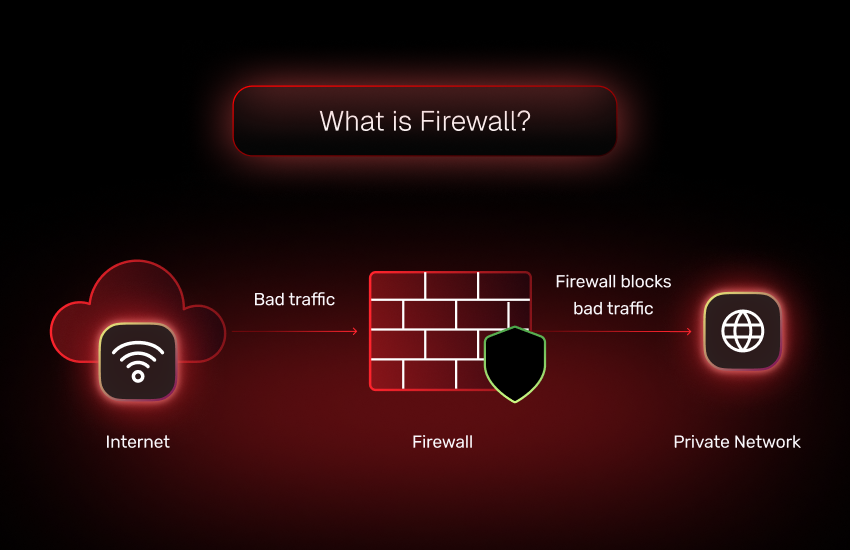
A firewall is one of the oldest and most trusted cybersecurity tools used to protect the network of an organization. Simply put, a firewall is a barrier between your internal network and the outside world.
It inspects data packets entering or leaving your network and decides whether to allow or block them based on rules set by your IT team. Firewalls are of different types, each designed to protect your network in its own unique way.
Key features of a firewall
Firewalls operate at the network level and inspect web traffic, IP addresses, ports, and protocols to determine whether a connection is safe. It performs a variety of functions to ensure the security of the network. Some of their features include:
- Packet filtering: A firewall evaluates every data packet as it passes through the network and, based on predetermined criteria, such as source and destination IP addresses or port numbers, it decides whether to allow or block the packet.
- Access control: A firewall enforces access policies on individual users or systems, which determine who and what can access specific resources.
- Activity logging and monitoring: A firewall provides real-time insights into network activity and security threats through a comprehensive record-keeping and observation of network traffic.
- Threat prevention: Modern firewalls scrutinize network traffic and files in real-time to detect suspicious patterns and deter threats in their tracks before they can move any further in the secure network. This helps enforce security policies to mitigate risks effectively.
- Containerization: Upon detecting malware or a threat, firewalls are capable of containing it within a separate section of the network and preventing it from advancing further.
Different types of firewalls
Let’s break down the different types of firewall one by one in a way that’s easy to understand.
1. Packet-filtering firewall
What it does:
Being the most basic form of firewall, it inspects data packets, the small chunks of data that travel across networks. It looks at the packet’s source IP address, destination IP address, port number, and protocol type.
How it works:
It cross-checks basic attributes such as source IP address, destination IP address, port number, and protocol type against predefined rules and approval policies. The packet is allowed to pass through only after matching these criteria.
Strengths:
- Very fast and lightweight
- Works well for simple network traffic based protection
Limitations:
- Does not inspect the contents of the data packet
- Can’t track whether a connection is part of a safe or risky conversation
- Not very effective against modern threats that hide inside allowed traffic
2. Stateful inspection firewalls
What it does:
This type of firewall goes a step further than packet filtering. It inspects the context of the basic packet and keeps track of the state of the connection. It is capable of understanding if a packet is part of a valid, ongoing session or a suspicious entry.
How it works:
It evaluates the context of each data package and monitors ongoing sessions to make decisions based on the state of those connections.
Strengths:
- More secure than basic packet filters
- Can recognize safe vs. suspicious patterns in ongoing traffic
Limitations:
- Uses more system resources to track sessions
- Doesn’t analyze the actual content being transmitted
3. Proxy firewall (application-level gateways)
What it does:
Proxy firewall acts as a middleman between users and the Internet. Instead of letting the device connect directly to a website or service, the proxy does it on its behalf. It filters traffic at the application level (like HTTP and FTP), which means it can see what content is being accessed.
How it works:
It acts as an intermediary between the content being accessed and the users. It provides deeper inspection by analyzing traffic at the application level rather than just the network level.
Strengths:
- Provides excellent privacy and security
- Can hide internal network details from the outside world
- Filters content, not just connection data
Limitations:
- Slower performance and latency due to the extra processing step
- More complex to set up and manage
4. Next-generation firewall (NGFW)
What it does:
NGFW combines all the features of traditional firewalls with modern threat protection. It offers advanced capabilities like Intrusion Prevention Systems (IPS), Deep Packet Inspection (DPI), and even Application-Aware Filtering.
How it works:
It inspects traffic at every level, be it network, transport, or application layer. It can also identify specific web applications, detect abnormal behavior, and enforce policies based on context rather than just ports or IP addresses.
Strengths:
- Offers the most comprehensive protection
- Helps detect and stop advanced persistent threats (APTs)
- Inspects the actual content of packets, not just headers
- Ideal for modern businesses dealing with complex threats
Limitations:
- Primarily focuses on network traffic and not user action-based threats
- Requires skilled administrators to manage effectively
Firewalls are essential for blocking unauthorized access, preventing cyberattacks, and segmenting network zones to contain potential breaches. However, they don’t inspect what content users access once a connection is allowed.
What is web filtering?
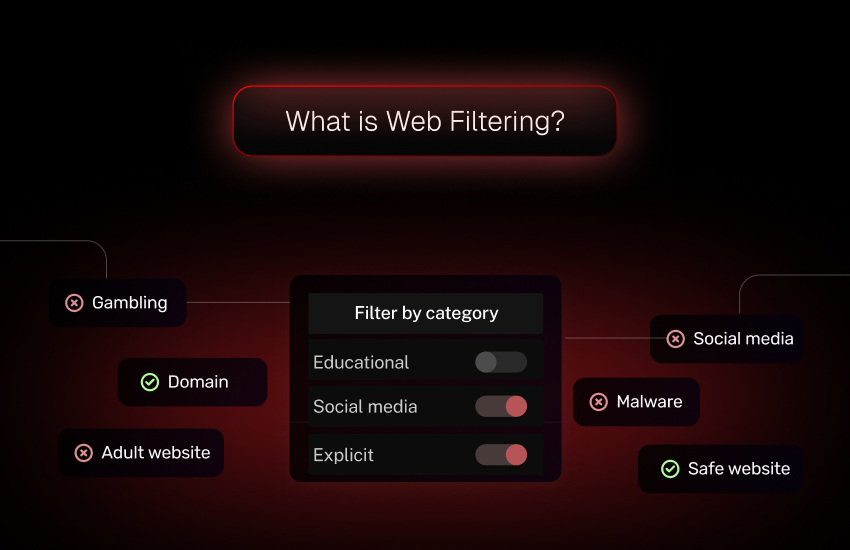
Web filtering is a security technique used to restrict or control access to specific websites or categories of content on the Internet. Unlike firewalls that work at the data traffic level, web filters operate at different levels, with the user and content as the core base. It focuses on content like what users are browsing, downloading, or engaging with online.
Essentially, web filtering acts as a digital content moderator for your organization. It ensures employees, students, or users aren’t accessing non-approved content, including harmful, inappropriate, or non-productive content.
Web filtering works by identifying and blocking unsafe, inappropriate, or non-compliant content before users can access it. IT admins can create allow and block lists for entire domain categories to prevent access to them while maintaining security standards.
Key features of web filtering
Web filtering safeguards users from accidentally stumbling upon malicious sites through phishing links and helps boost productivity and security by blocking unapproved websites. It offers a wide range of features such as:
Category-based blocking: Web filtering can block access to specific websites or entire domain categories. It checks requested URLs against the predefined list of malicious and restricted sites and prevents users from accessing them if they are not in the list.
Content inspection: Web filtering is capable of analyzing the actual content of web pages to detect harmful scripts, suspicious links, and hidden threats. This allows it to prevent access to such websites even if the website itself is not yet categorized as malicious.
Real-time detection and prevention: Web filtering continuously updates threat intelligence. This allows them to identify and block newly discovered malicious websites in real time, reducing the risk of zero-day attacks.
Custom user policies: Web filtering can apply different rules based on users, roles, or devices. This customization allows for stricter controls in certain departments while enforcing security policies for web access in other departments.
Different types of web filtering
Here’s a closer look at the major types of web filtering explained:
1. URL filtering
What it does:
URL filtering blocks access to specific websites based on their web address (URL). You can allow or deny access to individual URLs or entire categories (like social media or adult content).
How it works:
It determines access to websites based on whether that URL or category has been approved or blocked under the predefined ruleset by the IT admins.
Strengths:
- Straightforward and easy to manage
- Effective at blocking known bad or non-work-related websites
Limitations:
- Doesn’t block new or unknown malicious sites unless constantly updated
- If the site changes its URL, it might bypass the filter
2. DNS Filtering
What it does:
DNS filtering blocks website access based on the domain name system (DNS) lookup process. It stops the user before their browser can connect to a dangerous or unauthorized site by enforcing security rules.
How it works:
It checks the domain name that a user is trying to access before it gets translated into an IP address. If the domain is flagged, the request is blocked before a connection to the domain is established.
Strengths:
- Stops threats before they reach your device
- It is fast, and users often don’t even notice it working
- Works across devices and networks, including remote locations
Limitations:
- Doesn’t analyze the content of a site but only the domain
- Might not block specific pages if they’re hosted on safe domains
3. Content Filtering
What it does:
Content filtering scans and blocks web content based on what’s actually on the page, for e.g., text, images, videos, and more. It classifies websites (e.g., violence, adult, gambling, hate speech) and filters them based on your policy.
How it works:
It scans the webpage content in real time, and based on the content and whether there are any suspicious links, access is granted. This helps identify different types of threats that may not have been categorized.
Strengths:
- Highly customizable and granular
- Effective for enforcing workplace or school Internet policies
- Great for compliance with industry regulations (e.g., CIPA for schools)
Limitations:
- Can slow down browsing slightly due to real-time analysis of outgoing network traffic based on predefined security rules
- May occasionally misclassify content (false positives)
4. Keyword Filtering
What it does:
Keyword filtering blocks access to web pages containing specific words or phrases like “torrent,” “casino,” or “hack tool.”
How it works:
It scans web pages or search queries for specific keywords, and if any blocked keywords are found on a page, the system prevents access even if the site isn’t on a URL blocklist.
Strengths:
- Helps catch risky or inappropriate content not covered by URL or category filters
- Adds another layer of precision to web filtering policies
Limitations:
- Can lead to overblocking (e.g., educational sites discussing “alcohol” in a scientific context)
- Requires frequent updates and fine-tuning to stay effective and avoid false positives


Firewalls vs Web Filtering Solutions: Side-by-side comparison
Although web filtering and firewalls are both integral to a secure IT environment, their purposes, functionalities, and scopes are vastly different. Here’s a side-by-side comparison to clarify:
| Feature | Firewall | Web Filtering |
|---|---|---|
| Primary function | Controls data traffic | Controls access to online content |
| Focus | Network-level security | Internet and content-level security |
| Protection against | Unauthorized access, intrusions | Malicious or inappropriate websites |
| Scope | Entire network | Specific to user activity on browsers |
| Common types | Packet-filtering, NGFW, proxy | URL, DNS, content-based filters |
| Granularity | IPs, ports, protocols | URLs, categories, keywords |
| Use cases | Block hackers, DDoS protection | Block phishing sites, restrict usage |
Web filtering and firewall: Can you use one without the other?
Technically, yes, you can use either a firewall or web filtering independently. But should you?
If you use only a firewall: You’re protected against many external threats, but users may still click on phishing links or visit malicious sites that your firewall can’t recognize based on IP or port alone.
If you use only web filtering: Users might be blocked from visiting harmful sites, but attackers could still exploit network vulnerabilities that only a firewall would catch.
In short, one without the other creates security blind spots. Cyberthreats aren’t one-dimensional, so your defense strategy shouldn’t be either; it should enforce security policies that address various attack vectors.
Why does using both web filtering and firewalls make sense?
The concept of defense in depth is foundational in cybersecurity. No single tool can provide 100% protection, which is why layered security is critical. Combining web filtering and a firewall creates a strong security posture.
Here’s why you need both:
- Protection capabilities: Firewalls protect your network perimeter, filtering traffic at the source. On the other hand, web filtering protects users from their own risky behavior, such as clicking on malicious links or downloading harmful content.
- Phishing protection: A firewall may not identify URL phishing, but a web filter can prevent users from accessing such websites altogether.
- Zero-day website defense: Even if a site is new and not yet on blocklists, advanced content filtering can detect suspicious behavior and block access.
- Remote work safety: Web filtering works even when users are outside the network, filling in the gaps a firewall can’t cover for mobile workers.
- Compliance and monitoring: Many regulations require controls on Internet usage, which firewalls alone can’t enforce.
Together, web filtering and firewalls minimize both external threats and internal risks. It’s like installing both a lock on your door and a security camera. You need both to stay secure.
Common use cases that require both web filtering and firewalls
Let’s break it down by industry and scenario:
1. Educational institutions
Schools need to comply with laws like CIPA.
- Firewall: Blocks DDoS attacks and unauthorized device access.
- Web filtering: Restricts adult content, social media, and gaming sites to ensure student safety and productivity.
2. Healthcare providers
Regulations like HIPAA demand strong data security.
- Firewall: Protects patient databases and IoT devices.
- Web filtering: Prevents staff from accessing phishing or malware-laden sites.
3. Small and medium businesses (SMBs)
Every dollar counts, and so does every second of productivity.
- Firewall: Stops unauthorized data exfiltration.
- Web filtering: Reduces time wasted on social media, gaming, and online distractions.
4. Remote and hybrid teams
Work-from-anywhere means risks-from-everywhere.
- Firewall: Works at HQ, but is limited for remote workers.
- Web filtering: Extends protection to remote users via cloud-based filters.
5. Financial institutions
Banks and fintech platforms are prime targets for attacks that bypass security policies.
- Firewall: Prevents external breach attempts.
- Web filtering: Detects and blocks fraud-related websites and phishing campaigns.
Final thoughts: Do you need both?
Let’s answer the big question: Do you really need both a web filter and a firewall?
The answer is a clear yes.
Each tool covers a different aspect of threats. While firewalls secure the gates of your network, web filtering software secures the paths your users take once they’re inside. Without one or the other, your organization can be left exposed.
Scalefusion Veltar brings you the best of both worlds. Enforce robust web filtering backed by an ironclad firewall that keeps threats at bay and allows users to freely and securely access all mission-critical services. Deploy custom policies and bolster your security posture all from a unified dashboard.

FAQs
1. Can a firewall be a replacement for a web filter?
No, a firewall cannot fully replace a web filter. While firewalls control network traffic and block unauthorized access, web filters specifically monitor and control web content, preventing users from accessing harmful or inappropriate websites. They serve different but complementary purposes.
2. Do I need a firewall and a web filtering solution for my business?
Yes, using both offers stronger security. A firewall protects your network perimeter, while a web filter keeps users safe from web-based threats like phishing, malware, and harmful content. Together, they provide layered protection.
3. How does a web filter work differently from a network firewall?
A firewall controls access to and from your network based on IP addresses, ports, or protocols. A web filter, on the other hand, analyzes URLs, domain reputations, and website content to allow or block access based on safety or company security policies.
4. Is a web content filtering solution only valid for schools or parental controls?
Not at all. While web filtering is standard in educational settings, it’s also crucial for businesses. It helps prevent data breaches, improves productivity by limiting non-work-related browsing, and ensures compliance with company policies.
5. Are there different types of web filtering and firewalls?
Yes. Web filters can be DNS-based, URL-based, or content-based. Firewalls can be hardware, software, or next-gen firewalls (NGFWs) with advanced features like deep packet inspection and intrusion prevention.
6. Firewall vs web filtering, which is better for schools?
Schools need both, but for different reasons. Firewalls protect the school network from external attacks. Web content filtering protects students from unsafe, distracting, or non-compliant websites across devices, networks, and locations. For student safety and compliance, both web filtering and a firewall are essential.

