

The top Zebra tablets for business are rugged Android and Windows devices built for frontline, field, warehouse, retail, logistics, and industrial work environments. Models such as Zebra ET40, ET45, ET60, ET65, L10, and ET80 help businesses run critical apps, scan data, support mobile workflows, and maintain productivity in demanding conditions where standard consumer tablets may not be reliable enough.
Key takeaways
Zebra tablets are purpose-built for demanding business environments, offering durability, performance, and reliability where consumer devices fall short.
- Enterprise-Grade Design: Zebra tablets are rugged, enterprise-grade devices built to withstand drops, dust, and extreme conditions while delivering consistent performance in logistics, retail, healthcare, and manufacturing environments.
- Use-Case Fit Matters: Different models serve distinct needs—ET40/ET45 for indoor and mobile teams, ET60/ET65 for industrial and outdoor operations, and ET401 for legacy or basic enterprise workflows.
- Operational Reliability: Features like hot-swap batteries, barcode scanning integration, and secure connectivity ensure uninterrupted workflows, minimizing downtime and maintaining productivity during long shifts.
- Scalability & Performance: Businesses benefit from deploying purpose-built Zebra tablets instead of adapting consumer devices, ensuring consistent performance, reduced setup time, and reliable operations at scale.
- Selection Criteria: Choosing the right Zebra tablet depends on environment, connectivity needs, workload intensity, and mobility requirements to ensure optimal performance and long-term device value.
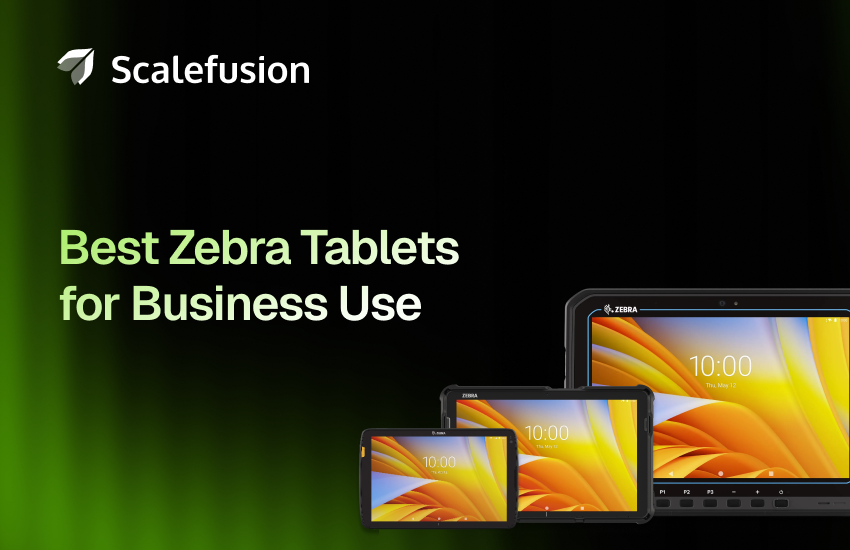
Consumer tablets are built for convenience. Business environments are built for pressure. On a warehouse floor, a tablet doesn’t just display information; it drives operations. In retail, it supports customer interactions in real time. For field teams, it becomes the primary system for updates, tracking, and execution. In these environments, performance drops, connectivity gaps, or device failures directly impact productivity.
That’s why businesses don’t rely on standard tablets at scale. They rely on Zebra tablets. Purpose-built for continuous use, unpredictable conditions, and tightly integrated workflows. The kind that don’t just support operations, but keep them moving.
Let’s look at the top Zebra tablets for business use in 2026, compare their strengths, and help you decide which model fits your use case best.
What are Zebra tablets, and why do businesses rely on them?
Zebra tablets are rugged, enterprise-grade mobile devices designed by Zebra Technologies for use in demanding work environments. Unlike consumer tablets, they are built to withstand drops, dust, water, and extreme temperatures while delivering reliable performance.
Businesses rely on Zebra tablets because they offer durability, long battery life, and built-in enterprise features like barcode scanning, secure connectivity, and device management support. They are widely used in industries such as logistics, retail, healthcare, and manufacturing, where consistent performance and real-time data access are critical for daily operations. This makes a significant difference at scale.
Instead of adapting consumer devices, businesses can deploy Zebra tablets as ready-to-work tools, reducing setup time, minimizing downtime, and ensuring consistent performance across teams, locations, and operations.
Best Zebra tablets for business in 2026
Before diving into each model, here’s a quick side-by-side view to help you shortlist the right tablet faster.
| Zebra tablet | Screen size | Operating system | Connectivity | IP rating | Battery options | Best for |
|---|---|---|---|---|---|---|
| Zebra ET40 | 8” / 10” | Android | Wi-Fi | IP65 | Standard / Extended | Retail, hospitality |
| Zebra ET45 | 8” / 10” | Android | Wi-Fi + LTE / 5G | IP65 | Standard / Extended | Field teams, delivery |
| Zebra ET60 | 10” | Android / Windows | Wi-Fi | IP66 | Hot-swap | Warehouses, manufacture |
| Zebra ET65 | 10” | Android / Windows | Wi-Fi + 5G | IP66 | Hot-swap | Outdoor & field operations |
| Zebra ET401 | 8” / 10” | Android | Wi-Fi | IP54 | Standard | Legacy enterprise setups |
Use this table as a quick filter. Once you narrow down the environment and connectivity needs, the right model becomes much easier to identify.
1. Zebra ET40
The Zebra ET40 is designed for businesses that need a reliable enterprise tablet for indoor environments. It offers a good balance of performance and durability without moving into heavy rugged hardware, making it suitable for large-scale deployments where cost and consistency matter. Available in 8-inch and 10-inch variants, the ET40 supports everyday business applications, scanning workflows, and customer-facing tasks.
Key specifications
The ET40 is available in both 8-inch and 10-inch variants and runs on Android with long-term OS support from Zebra. It supports Wi-Fi connectivity and integrates easily with Zebra accessories such as scanners and mounts.
Industry use cases
- Retail: Assisted selling, inventory checks, POS workflows
- Hospitality: Guest services, staff coordination, back-office tasks
- Warehousing (light use): Stock lookups and basic inventory handling
Why is it a good fit for businesses?
The ET40 is well-suited for customer-facing and light operational roles. Retail associates can use it for assisted selling, inventory checks, and POS workflows. Hospitality teams can use it for guest check-ins, room service, or back-office tasks. Since it is more affordable than fully rugged models, the ET40 works well for large deployments where cost control matters.
Use-case boundaries
The ET40 is not designed for extreme environments. If your operations involve outdoor exposure, heavy dust, or constant drops, you may need a higher-end model.
2. Zebra ET45
The Zebra ET45 extends the ET40 by adding cellular connectivity, making it a better fit for teams that operate beyond fixed locations. With LTE and 5G support, it enables reliable access to business systems while on the move. It is built for mobility-first workflows where connectivity and location awareness are important.
Key specifications
Like the ET40, the ET45 is available in 8-inch and 10-inch versions and runs Android. The key difference is support for LTE and 5G, along with GPS capabilities for location-aware workflows.
Industry use cases
- Logistics: Delivery tracking and route management
- Field services: Job updates, work orders, and digital forms
- Transportation: Mobile workforce coordination and navigation
Why is it a good fit for businesses?
The ET45 is ideal for delivery drivers, field service technicians, and transportation teams. Workers can stay connected in real time, update job status, capture signatures, and access applications without relying on public Wi-Fi. For businesses with a distributed workforce, the ET45 provides flexibility without moving into heavy industrial hardware.
Use-case boundaries
While more rugged than consumer tablets, the ET45 is still not intended for harsh industrial environments. It is best suited for mobile use rather than factory floors.
3. Zebra ET60
The Zebra ET60 is built for demanding indoor industrial environments where devices are used continuously across long shifts. It supports both Android and Windows, giving organizations flexibility based on their existing software ecosystem. Features like hot-swap batteries make it suitable for operations that cannot afford device downtime.
Key specifications
The ET60 supports both Android and Windows, giving businesses flexibility depending on their software ecosystem. It features a high-performance processor, an IP66-rated enclosure, and hot-swap battery support for uninterrupted shifts.
Industry use cases
- Warehousing: Picking, packing, and inventory validation
- Manufacturing: Production data capture and monitoring
- Distribution centers: Scanning and verification workflows
Why is it a good fit for businesses?
The ET60 excels in environments where uptime matters. Workers can swap batteries without shutting the device down, which is critical for long shifts. The tablet handles dust, moisture, and repeated handling without performance drops. It also integrates well with scanning workflows, making it suitable for inventory management, picking, and quality checks.
Use-case boundaries
The ET60 comes at a higher cost than the ET4x series. For lighter use cases, it may offer more ruggedness than necessary.
4. Zebra ET65
The Zebra ET65 is designed for outdoor and remote work where durability and connectivity are critical. With high-brightness displays and advanced cellular support, it performs reliably in environments where standard tablets struggle. It is best suited for mission-critical workflows that require constant connectivity in challenging conditions.
Key specifications
The ET65 offers Android or Windows options, a high-brightness display for outdoor visibility, 5G connectivity, and an IP66 rating. Like the ET60, it supports hot-swap batteries for uninterrupted use.
Industry use cases
- Utilities: Inspections, maintenance, and field reporting
- Public sector: On-site data capture and enforcement tasks
- Construction and infrastructure: Outdoor inspections and audits
Why is it a good fit for businesses?
This tablet is built for field operations such as utilities, public services, construction support, and remote inspections. Teams can work outdoors in varying conditions while staying connected through high-speed cellular networks. The ET65 is also a good fit for organizations that want a future-ready device with strong performance and connectivity.
Use-case boundaries
The ET65 is a premium device. It is best suited for demanding environments where its capabilities are fully used.
5. Zebra ET401
The Zebra ET401 is an older enterprise tablet still used in many existing business environments. While it lacks the advancements of newer models, it continues to support basic enterprise workflows in controlled indoor settings. It is mainly relevant for organizations maintaining or expanding existing ET401 deployments.
Key specifications
The ET401 runs Android and supports Wi-Fi connectivity. It is available in multiple screen sizes and is designed primarily for indoor enterprise use.
Industry use cases
- Retail: Back-office data entry and internal applications
- Healthcare (non-clinical): Administrative workflows
- Enterprise IT: Legacy tablet fleet extensions
Why is it a good fit for businesses?
Organizations that already have ET401 tablets deployed may continue using them for basic tasks such as inventory lookups, data entry, and internal applications. It can be a cost-effective option when expanding existing fleets.
Use-case boundaries
Compared to newer models, the ET401 has limited future-proofing. New deployments should consider ET4x or ET6x series tablets instead.
The right devices deserve the right management
Zebra tablets are built for performance in demanding environments, but without the right management layer, that potential is hard to sustain at scale. Scalefusion, as a Zebra Validated solution, complements Zebra devices by enabling consistent management, visibility, and reliability across deployments, so businesses can get the most out of their investment from day one.
Simplify Zebra tablet management with Scalefusion
Buying Zebra tablets is only the first step. The real challenge begins after devices are deployed across teams, locations, and shifts. Devices need to be enrolled, configured, secured, and kept up to date, often with limited IT bandwidth. Without a centralized approach, inconsistencies build up quickly.
Scalefusion helps IT teams manage the entire device lifecycle from a single platform, bringing consistency, security, and visibility across every deployment.
With Scalefusion, IT admins can:
- Enroll devices in bulk and apply standardized configurations using StageNow
- Manage barcode scanning and data capture workflows through DataWedge
- Deploy firmware, OS updates, and security patches remotely using LifeGuard OTA
- Manage hardware buttons, connectivity, and device behavior through Zebra OEMConfig
Choosing the right Zebra tablet
The right Zebra tablet depends on where and how it will be used. Indoors or outdoors, stationary or on the move, light workflows or demanding operations.
Each model is built for a specific environment. Choosing the right fit ensures better performance, longer device life, and smoother operations.
And once deployed, managing everything with Scalefusion Zebra device management ensures those devices stay aligned, secure, and ready for work at any scale.

