Every mobile device management vendor claims to “manage and secure your devices from a single console.” That sentence is true of all of them and useful for choosing none of them. What actually separates the best MDM software in 2026 is narrower and more decisive: how deep it goes on your operating systems, whether security and identity are built in or bolted on, how it prices at your scale, and how much setup your team can absorb.
This guide compares ten leading mobile device management solutions, from lightweight mobile device management software for phones and tablets to full unified endpoint management (UEM) suites on those dimensions. Each entry leads with what genuinely distinguishes the tool, names who it’s not for, and lists current pricing, so you can shortlist the right MDM software in minutes instead of reading ten near-identical feature lists.
Key Takeaways
- Best overall for mixed fleets: Scalefusion — the broadest OS coverage with identity and endpoint security built in, from $2/device/month.
- By environment: Apple-first → Jamf Pro · Microsoft shops → Microsoft Intune · rugged/frontline → SOTI MobiControl or SureMDM · identity-led → JumpCloud · on-prem or lowest price → ManageEngine.
- Pricing range: Pricing spans a ~7× range across the ten tools — roughly $1.28 to $9 per device or user per month — and four are quote-only.
- Deployment model: Only ManageEngine offers on-premises deployment; the other nine are cloud-only.
- How to choose: Weigh your OS mix, built-in security/identity, deployment model, cost at scale, and admin effort — then trial your hardest enrollment scenarios, not the demo path.
What is MDM (mobile device management)?
MDM stands for mobile device management. It is software that lets an organization enroll, configure, secure, monitor, and manage devices, smartphones, tablets, laptops, and more from one centralized console. The best mobile device management software helps IT teams enforce security policies, deploy applications, manage OS updates and third-party patching, and remotely lock, locate, or wipe devices when needed.
MDM vs. UEM vs. EMM: MDM began with phones and tablets. Enterprise mobility management (EMM) added app and content management. Unified endpoint management (UEM) extends all of it to laptops, desktops, rugged devices, wearables, and IoT across Windows, Apple, Android, Linux, and ChromeOS. In practice, most 2026 buyers searching for “MDM” are really buying UEM; few teams want one tool for phones and another for laptops. Several products below are full UEM platforms that also pair endpoint management with identity and access management (IAM) and endpoint security.
What changed in MDM in 2026
Three things separate 2026’s best MDM software from last year’s: built-in AI, native Zero Trust, and platform consolidation. Here’s what each means for your shortlist:
- AI moved into the admin console. Copilot-style assistants, AI-prioritized patching, and risk insights now ship inside several platforms. Judge them on whether the AI reduces real work, triage, scripting, or remediation, not on the label.
- Zero Trust is table stakes. Feeding device-compliance signals into conditional access is no longer a premium differentiator. The real question is whether identity and access are native to the platform or require a separate stack.
- Consolidation is the buying pressure. Teams are collapsing device management, identity, and endpoint security into fewer tools to cut costs and blind spots, which favors platforms that cover the most surface without ecosystem lock-in.
How to choose the best mobile device management software
The best MDM software for you is the one that matches your device mix, security needs, deployment model, and budget — not the one with the longest feature list. Map your requirements before comparing features, then score each candidate against these five criteria, weighting them to your situation:
| Criterion | What to check | Weight |
|---|---|---|
| Device & OS mix | Your platforms and ownership models, including corporate, BYOD, kiosk, and rugged devices, and how deep the tool goes on each. | 5/5 |
| Security & identity | Conditional access, endpoint DLP, encryption management, Zero Trust built in or integrated? | 5/5 |
| Deployment model | Cloud vs. on-premises, especially where regulated or air-gapped needs narrow the field fast. | 4/5 |
| Total cost at scale | Per-device vs. per-user pricing against your real device count; capabilities gated behind tiers. | 4/5 |
| Admin capacity | Learning curve vs. the team that will run it day to day. | 3/5 |
Score candidates, weight the rows that matter most to you, and use a free trial to test your hardest enrollment and policy scenarios — not the guided demo path.
Best MDM solutions in 2026, compared
These mobile device management solutions are grouped by fit, not scored; use the “Best for” and “Not ideal if” notes to match your environment. Pricing is each vendor’s advertised starting price as of July 2026; confirm current pricing on the vendor’s site before purchase. Vendor names link to each product/features page; prices link to each pricing page.
| Solution | Platforms | Deployment | Identity/security built-in | AI features | Starting price | G2 rating | Best for |
|---|---|---|---|---|---|---|---|
| Scalefusion | Android, Apple (iOS/iPadOS/macOS/tvOS), Windows, Linux, ChromeOS | Cloud | Yes OneIdP + Veltar | AirThink AI (scripting) | $2/device/mo | 4.7★ (394) | Mixed fleets, breadth + value |
| SOTI MobiControl | Windows, Android, iOS, macOS, Linux | Cloud | Content/DLP | Stella + XSight | On request | 4.3★ (30) | Rugged & frontline fleets |
| Jamf Pro | Apple (Mac, iPhone, iPad, Apple TV); limited Android | Cloud | Security | AI Assistant | $5.75/device/mo | 4.7★ (2,088) | Apple-first orgs |
| Microsoft Intune | Windows, Apple, Android | Cloud | Yes Entra + Defender | Copilot | $8/user/mo | 4.5★ (267) | Microsoft-centric orgs |
| IBM MaaS360 | Android, Apple, Windows, ChromeOS | Cloud | Yes identity + Zero Trust | Watson AI | $4/device/mo | 4.0★ (127) | Security-first enterprises |
| ManageEngine MDM Plus | Multi-OS | Cloud & on-prem | Security | Zia (analytics) | $1.28/device/mo | 4.5★ (173) | Cloud-or-on-prem flexibility |
| SureMDM (42Gears) | Android, iOS/iPadOS, macOS, Windows, Linux, Wear OS, ChromeOS | Cloud | Security | DeepThought + ChatGPT | $3.99/device/mo | 4.8★ (86) | Dedicated-purpose & frontline |
| NinjaOne | Endpoints + mobile | Cloud | Patch/security | AI patching | On request | 4.7★ (4,388) | Unified IT ops + RMM |
| JumpCloud | Windows, Linux, Android, Apple | Cloud | Yes, identity-first | AI Assistant + Agentic IAM | $9/user/mo | 4.5★ (3,970) | Identity + device consolidation |
| Citrix Endpoint Management | Corporate + BYOD (multi-OS) | Cloud | Access/identity-aware | Aidrien (preview) | On request | 4.0★ (27) | Citrix/virtual-workspace shops |
The 10 best MDM solutions in 2026
1. Scalefusion: Best all-round value for mixed fleets
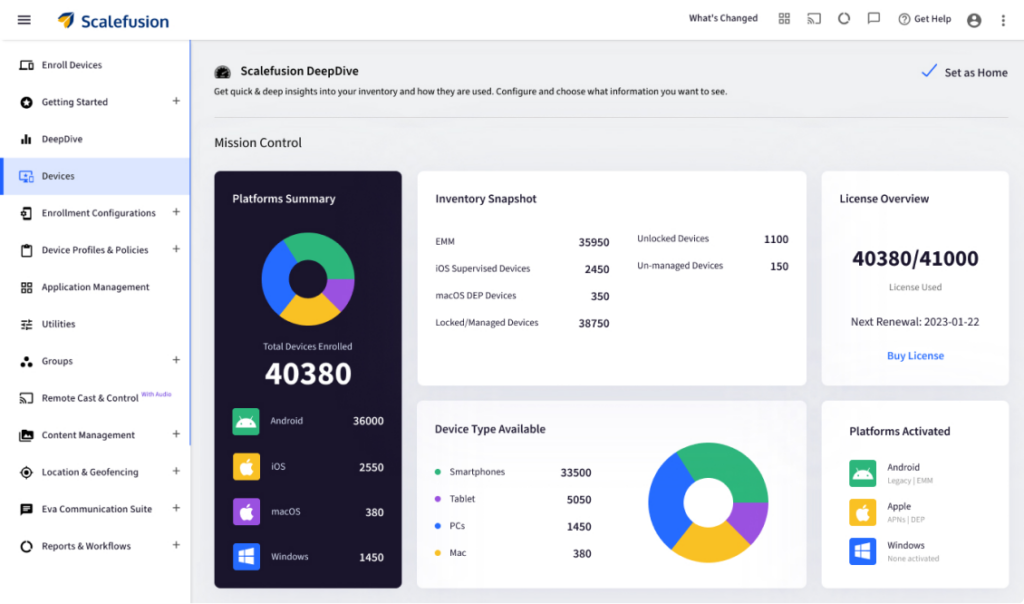
Scalefusion is the pick when you want genuinely broad platform coverage without paying enterprise premiums or committing to one vendor’s ecosystem. It started as an MDM and grew into a full UEM that pairs device management with its own identity (OneIdP) and endpoint-security (Veltar) products, so conditional access, Zero Trust Access, and endpoint DLP are part of the same platform rather than a separate purchase.
What stands out
- Widest practical OS and device range: Android, iOS, iPadOS, macOS, tvOS, Windows, Linux, and ChromeOS, plus kiosks, rugged devices, POS, digital signage, printers, and IoT from one dashboard.
- Zero-touch at scale: native enrollment via Apple Business Manager, Windows Autopilot, and Android Zero-Touch.
- Identity + security built in: conditional access and Zero Trust Access via OneIdP; endpoint DLP, full-disk encryption (BitLocker/FileVault), remote wipe, and passcode policy via Veltar and Core UEM.
- Fast remote support: Remote Cast & Control, remote commands, file transfer, VoIP calling, and session recording.
- AI-assisted scripting: AirThink AI turns natural-language prompts into deployment-ready PowerShell, Shell, Bash, and Python scripts, run directly from the dashboard (GPT-based; validate output before deploying).
In practice, a retail chain running POS tablets on the shop floor and rugged scanners with field technicians can put store devices in a kiosk profile, technician laptops under full UEM with conditional access, and manage OS updates and app rollouts for both from the same console, without buying a separate identity or security tool.
Pricing: A transparent per-device ladder, Basic $2, Growth $3.50, Business $5, Enterprise $6 per device/month (billed annually) with a 10-device minimum, no setup fee, and a 14-day trial that unlocks every feature. (Verified: scalefusion.com/pricing.)
Best for: SMBs to enterprises running a mixed Apple/Android/Windows/Linux/ChromeOS fleet that want management, identity, and security in one place at accessible pricing.
Not ideal if: You need a fully on-premises deployment, or you want a single-OS niche tool and won’t use the broader UEM, identity, and security capabilities.


2. SOTI MobiControl: Built for rugged and frontline
SOTI’s strength is the hard stuff: rugged handhelds, scanners, and IoT endpoints in warehouses, logistics, and field operations, managed across their full life cycle. Its content tools (SOTI Hub and SOTI Surf) and offline-aware location tracking are tuned for distributed, sometimes-disconnected fleets.
Strengths: Rugged/IoT lifecycle management; remote provisioning and role-based configs; last-known-location retention for offline devices; LDAP and DLP content control; Stella AI assistant (2026 beta) and XSight operational/battery intelligence.
Pricing: Quote-only (some third-party listings cite ~$4/device/month); 30-day trial.
Best for: Rugged, frontline, and large distributed fleets.
Not ideal if: You want simple, fast setup for a mostly office-based fleet.
3. Jamf Pro: The Apple specialist
If your fleet is Apple-first, Jamf is the deepest option: same-day OS support, declarative device management, smart groups, and compliance benchmarks purpose-built for Apple, now with an AI Assistant for routine admin. It offers limited Android management via Manager for Android (included with Jamf for Mobile since 2025), but Apple is where it excels.
Strengths: Best-in-class Apple management (DDM, smart groups, inventory); automated security configs and benchmarks; AI-assisted administration.
Pricing: $5.75/device/month for the Jamf for Mobile tier (mobile MDM); full Mac management (Jamf for Mac) runs higher, ~$12.50/device/month. There is a 14-day trial.
Best for: Apple-centric organizations that want depth over breadth.
Not ideal if: Windows, Android, or Linux make up a meaningful share of your fleet.
4. Microsoft Intune: The default for Microsoft shops
Intune‘s advantage is the ecosystem: native ties to Entra ID, Microsoft 365, and Defender make identity-driven conditional access and Zero Trust feel like one system. Copilot brings GenAI to troubleshooting, error analysis, and scripting.
Strengths: Deep Microsoft integration; MDM and MAM for corporate and BYOD; conditional access combining device state with user, app, location, and Defender signals; Copilot for admin tasks.
Pricing: $8/user/month for Intune Plan 1 (standalone); also bundled into Microsoft 365 E3/E5. 30-day trial for 25 users.
Best for: Organizations already invested in Microsoft.
Not ideal if: You’re not on the Microsoft stack or you want a gentle setup curve, conditional access gets complex fast.
5. IBM MaaS360: Security-first, AI-assisted
MaaS360 leans hardest into security and analytics, pairing endpoint management with Watson AI for risk detection, remediation prioritization, and contextual insights, plus native identity and Zero Trust support across mobile, desktop, rugged, and BYOD.
Strengths: Watson AI risk insights; multi-OS endpoint management (incl. ChromeOS); BYOD containerization (encrypted work partition); integrated identity, MFA, conditional access, automated compliance.
Pricing: From $4/device/month (Essentials tier; higher editions run to ~$9); 30-day trial.
Best for: Enterprises that want security and AI-driven insight at the core.
Not ideal if: Your budget is tight, several advanced capabilities sit in higher tiers.
6. ManageEngine MDM Plus: Cloud or on-prem flexibility
ManageEngine’s differentiator is deployment choice: it runs equally as the cloud or on-premises, which matters for regulated or data-residency-sensitive teams. It covers phones, tablets, laptops, desktops, rugged devices, and kiosks with solid app, email, and security management.
Strengths: Cloud and on-prem deployment; app catalog and silent install; email access controls; compliance, encryption, and remote lock/wipe; Zia AI analytics (via Analytics Plus, AI is lighter than Intune/MaaS360).
Pricing: from $1.28/device/month (cloud standard), among the lowest here; on-prem from ~$9.90/device/year; 30-day trial (cloud and on-prem).
Best for: Teams needing on-prem or the lowest entry price.
Not ideal if: You want a heavily guided setup.
7. SureMDM (42Gears): Dedicated-purpose and frontline devices
SureMDM shines on single-purpose and frontline hardware, kiosks, signage, wearables, and IoT, backed by 42Gears’ companion apps (SureLock, SureFox, and SureVideo) for lockdown, secure browsing, and digital signage. It supports an unusually wide OS list, including Wear OS.
Strengths: Broad multi-OS support (incl. Wear OS); MDM + MAM + MCM in one console; deep kiosk/lockdown tooling; DeepThought AI assistant with ChatGPT integration.
Pricing (verified July 2026): From ~$3.99/device/month (Standard; some sources cite a ~$3.49 entry); 30-day trial for up to 100 devices.
Best for: Dedicated-device and mixed frontline environments.
Not ideal if: You’d rather not depend on companion 42Gears apps for some capabilities.
8. NinjaOne: MDM inside unified IT operations
NinjaOne treats mobile management as one part of a broader RMM/IT operations platform, monitoring, automation, patching, and remote support in one pane. It fits IT teams that want device management folded into daily operations rather than a standalone MDM.
Strengths: AI-assisted autonomous patch management; automatic hardware/software inventory and compliance reporting; BYOD data separation.
Pricing: Quote-only; 14-day trial.
Best for: IT teams unifying RMM and endpoint operations.
Not ideal if: You need deep, mobile-specific UEM features; its MDM depth is lighter than dedicated platforms.
9. JumpCloud: Where identity and device management meet
JumpCloud‘s angle is consolidation of identity, access, and device management in one cloud platform. If your priority is tying users, access, and endpoints together with MFA, conditional access, and identity lifecycle automation, it removes the seams between an IdP and a UEM.
Strengths: Conditional access to trusted devices/networks; automated OS patching and policy enforcement; end-to-end identity lifecycle automation; AI Assistant plus agentic IAM (2026) for governing AI agent identities.
Pricing: $9/user/month for the device management plan; 30-day trial.
Best for: Organizations consolidating identity and device management.
Not ideal if: You need deep, granular macOS controls for an advanced Apple fleet.
10. Citrix Endpoint Management: For Citrix and virtual-workspace shops
Citrix Endpoint Management is the natural choice where Citrix virtual apps and desktops already anchor the environment. It combines MDM and MAM with identity-aware access and micro-VPN app tunneling to secure hybrid work without full device VPNs.
Strengths: Micro-VPN per-app tunneling (via NetScaler Gateway) and MDX app containerization; SSO with Citrix Workspace, Azure AD, and Okta; remote lock, selective wipe, and factory reset; Aidrien AI operations assistant (preview, GA 2026).
Pricing: Quote-only (enterprise-tier); 60-day trial (the longest here).
Best for: Enterprises invested in Citrix virtual environments.
Not ideal if: You’re outside the Citrix ecosystem, where you may hit latency and performance overhead in large virtualized deployments.
Best MDM software by use case and industry
The best mobile device management solution varies by environment. Mapping common fleets to a fit:
- Logistics & Transportation / Field Services (rugged scanners, handhelds, offline devices): SOTI MobiControl, SureMDM, or Scalefusion for rugged and mixed fleets.
- Retail & Manufacturing (POS, kiosks, digital signage, shop-floor tablets): Scalefusion or SureMDM for dedicated-device and kiosk management.
- Healthcare (shared clinical devices, strict compliance): security-first options like IBM MaaS360 or Scalefusion for mixed clinical and admin fleets.
- Education (shared iPads/Chromebooks at scale): Jamf for Apple-heavy campuses; Scalefusion for mixed Chromebook/iPad/Windows estates.
- Microsoft-centric enterprises: Microsoft Intune. Identity-led or consolidating IT: JumpCloud. Citrix shops: Citrix Endpoint Management.
For most organizations running a genuinely mixed fleet, Scalefusion offers the best balance of platform breadth, built-in identity and security, ease of use, and price.
Related reading: MDM pricing guide · Best Apple MDM solutions · Best Android MDM solutions · Scalefusion UEM vs. NinjaOne
Common mistakes when choosing an MDM solution
- Buying for today’s devices only. Fleets drift toward mixed OS and BYOD; choosing a single-OS tool now often forces a migration later.
- Treating identity and security as “later.” Bolting on a separate IdP or endpoint-security stack costs more and leaves gaps; check what’s native.
- Comparing sticker prices, not scaled cost. Per-user vs. per-device pricing, tier gating, and minimums change the real number at your device count.
- Skipping the hard trial scenarios. Test your messiest enrollment (BYOD, offline, or rugged), not the demo path.
- Ignoring admin effort. The most powerful platform is the wrong one if your team can’t operate it.
Choosing the right MDM solution
Map your device and OS mix and ownership models first, then filter by deployment and budget, and compare features last. On that path, a few natural fits emerge: Intune for Microsoft shops, Jamf for Apple-first, SOTI/SureMDM for rugged and frontline, MaaS360/JumpCloud/Citrix for security, identity, or virtual-workspace-led needs, and ManageEngine for on-prem or lowest entry price.
For a genuinely mixed fleet that wants broad management, built-in identity and security, and value in one console, Scalefusion is the strongest all-round mobile device management solution, with broad platform support without ecosystem lock-in, from SMBs to large enterprises.
See how Scalefusion manages Android, Apple, Windows, Linux, and ChromeOS from one console; start a 14-day free trial (all features unlocked).
FAQs
1. What is MDM (mobile device management)?
MDM is software that lets organizations enroll, configure, secure, monitor, and manage devices from a central console — enforcing policies, deploying apps, managing updates, and enabling remote lock or wipe across company-owned and BYOD devices.
2. What does MDM stand for?
MDM stands for mobile device management. It’s sometimes used interchangeably with EMM (enterprise mobility management) and UEM (unified endpoint management), though UEM is the broader, multi-endpoint category.
3. How does mobile device management work?
Devices are enrolled (manually or via zero-touch programs like Apple Business Manager, Android Zero-Touch, or Windows Autopilot), then receive policies, apps, and configurations from the MDM console. The MDM agent enforces those settings and reports compliance, so IT can update, lock, locate, or wipe devices remotely.
4. What is the difference between MDM and UEM?
MDM manages mobile devices (phones, tablets); UEM extends the same control to laptops, desktops, rugged devices, and IoT across multiple operating systems. Most 2026 buyers effectively need UEM.
5. What is MDM in cybersecurity?
In a security context, MDM is a control layer that enforces encryption, passcodes, and compliance policies, and feeds device-posture signals into conditional access — helping ensure only trusted, compliant devices reach corporate data.
6. Which MDM software is best for enterprise or office use?
It depends on your OS mix and priorities: Intune for Microsoft-centric enterprises, Jamf for Apple-first, and Scalefusion for mixed fleets that also want built-in identity and endpoint security.
7. Which is the best MDM for SMBs?
SMBs usually want broad OS coverage, quick setup, and predictable per-device pricing. Full-feature trials and low entry tiers (e.g., Scalefusion from $2/device/month or ManageEngine from $1.28) make it easy to test against your real devices.
8. How much does MDM software cost?
Typically $1–$9 per device or per user per month depending on tier and deployment; some enterprise plans are quote-based. See the comparison table for current starting prices, and confirm on each vendor’s site.