
Classrooms don’t look the way they used to. Blackboards have given way to interactive flat panel displays, textbooks are now tablets, and most learning begins with a browser tab. This shift to digital-first education has opened new doors for how students learn but it has also changed what schools need to protect.
When students spend a large part of their day online, the risks are no longer limited to playgrounds or hallways. Distractions, unsafe content, and security threats now sit just a click away.
A 2025 study by the Seattle Children’s Research Institute found that students aged 13–18 spent nearly 1.5 hours of a 6.5-hour school day on smartphones.[1] The internet may be a powerful learning tool, but without the right controls, it can just as easily derail focus and online safety.
That’s where web content filtering steps in. But this isn’t about blocking everything in sight. Overly strict Internet filters often do more harm than good, locking students out of useful educational resources and slowing down learning instead of supporting it. The real challenge for school districts is finding the right balance to protect students without limiting what they can explore and learn.
In this blog, we will break down what web content filtering really means for schools, why it matters, the key features to look for, and how to choose a solution that keeps learning open, safe, and uninterrupted.
What is web content filtering?
Web content filtering is a security and access control process that restricts which websites and online content users can access on a network or device. It is used to prevent exposure to unsafe, inappropriate, or non-work-related content, while allowing access to legitimate and relevant resources.
Organizations use web content filtering to improve security, reduce distractions, and enforce acceptable internet usage across users and devices.
In short, web content filtering helps maintain a safer and more controlled browsing environment without limiting access to essential online content.
How does web content filtering work for schools?
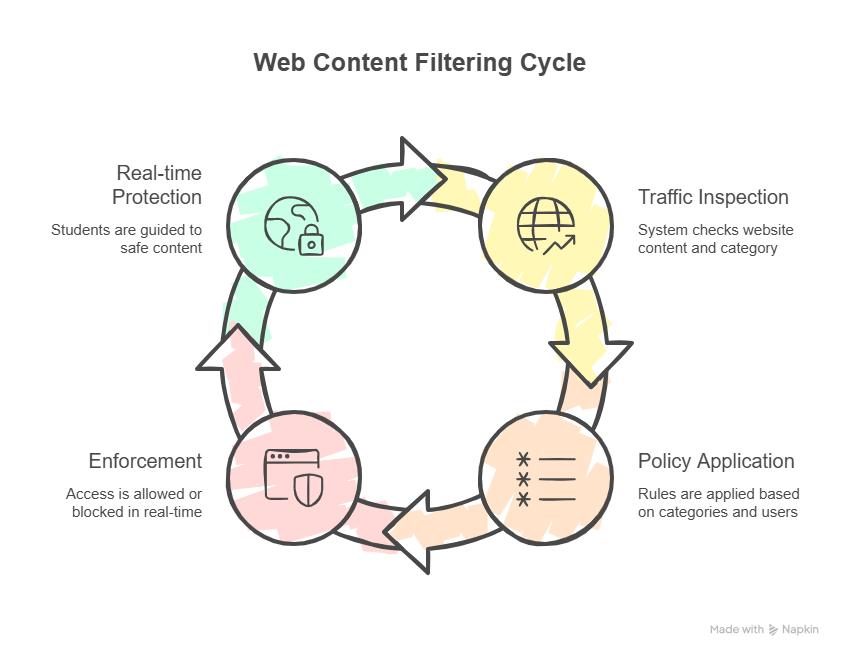
Web content filtering for schools works by controlling what kind of online content students and staff can access on school-managed devices and networks. Instead of allowing open access to the internet, schools define what is safe, appropriate, and relevant for learning.
At a high level, it works in three simple layers:
1. Traffic inspection and classification
Every time a student tries to access a website, the system checks what that site contains and what category it falls under, such as education, social media, gaming, or adult content.
2. Policy-based access control
Schools set clear rules on what categories or types of content should be allowed, restricted, or blocked. These policies to restrict websites in schools can vary by grade level, user group, time of day, or device type.
3. Enforcement and real-time protection
Once policies are applied, the filter actively allows or blocks access in real time. This ensures students are guided toward safe and relevant content while risky or distracting sites are kept out.
Most modern web content filtering tools also work across both on-campus and remote learning environments, so students remain protected whether they are in a classroom or learning from home.
Why is web content filtering important for schools?
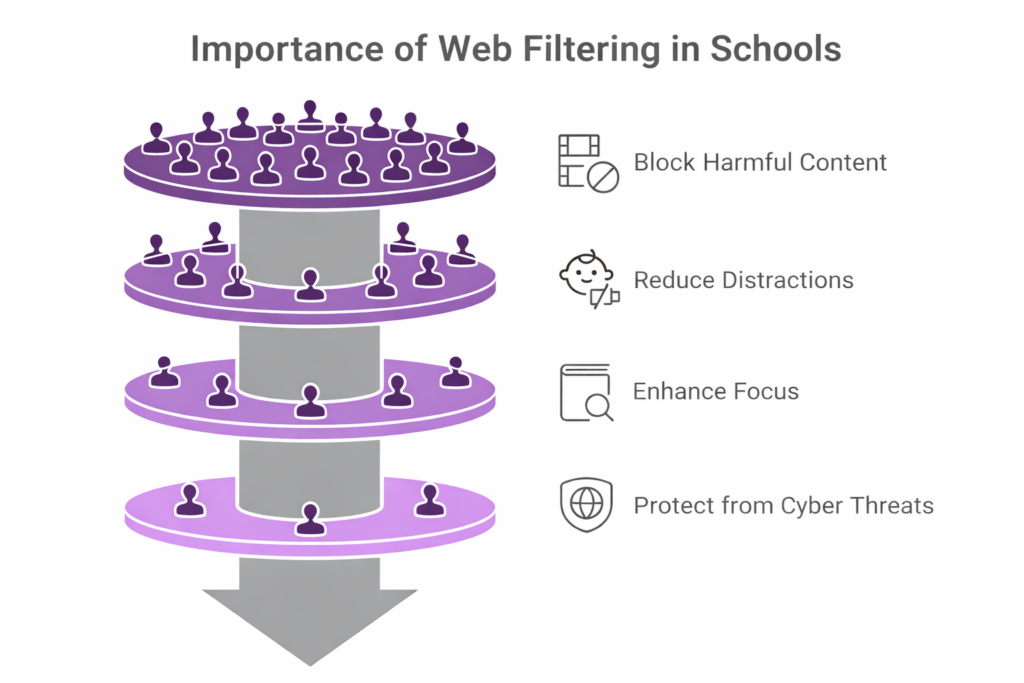
The internet brings massive learning opportunities into the classroom, but it also brings risks that schools cannot afford to ignore. Without proper web content filtering, students are exposed to a wide range of online threats that go far beyond simple distractions.
Here is why web content filtering software has become essential for schools:
- Exposure to inappropriate content: Students can easily stumble upon adult, violent, or otherwise unsuitable material that has no place in a learning environment. This can affect their behavior, focus, and emotional well-being.
- Cyberbullying and toxic behavior: Social platforms and messaging apps often become spaces for harassment, abuse, and peer pressure. These issues can spill into classrooms and disrupt learning.
- Online predators and unsafe interactions: Chat rooms, gaming platforms, and open forums can expose students to dangerous individuals. Younger users are especially vulnerable to manipulation and exploitation.
- Malware and infected websites: Some websites silently infect devices with viruses, spyware, or ransomware, putting school systems at risk. This can lead to data loss and costly downtime.
- Phishing and online scams: Fraudulent pages can trick students into sharing personal information or login credentials. This puts both student privacy and school networks in danger.
- Hate speech and extremist content: Unfiltered access can expose students to harmful ideologies and misleading narratives. Over time, this can influence attitudes and behavior in unhealthy ways.
- Excessive gaming and time-wasting platforms: Easy access to online games often leads to loss of focus and misuse of school time. It also makes it harder for teachers to keep students engaged.
- Unregulated social media access: Open access to social platforms increases distractions and raises safety concerns. It can also make students more vulnerable to online pressure and trends.
- Trolling and online harassment: Negative online behavior can directly impact students’ confidence and mental well-being. In severe cases, it can lead to long-term emotional stress.
- Data privacy risks: Student information can be exposed or misused through unsafe websites and applications. This creates compliance and trust issues for schools.
Web content filtering helps schools stay ahead of these risks so technology supports learning instead of becoming a liability.
Sign Up to secure student browsing with Veltar’s web content filtering.
→ Start Your Free Trial NowKey features of a web content filtering solution for schools
A good web content filtering solution for schools goes beyond basic website blocking. It gives IT teams the control and flexibility needed to protect students while keeping learning uninterrupted. Here are the key features to look for:
- Category-based filtering: Block or allow access based on predefined website categories such as social media, gambling, gaming, or adult content, making it easier to control broad types of content at scale.
- Fine-tuned allowlists and blocklists: Create custom lists of allowed or blocked domains and URL filtering to tailor access according to your school’s specific needs.
- User and device-based policies: Apply different filtering rules to different users or device groups so students, teachers, and staff each get the right level of access.
- Pattern-based domain control: Block or allow specific domains, subdomains, or top-level domains for more precise and granular control over web access.
- Modern and easy-to-use interface: Manage web filtering policies through a clean, intuitive dashboard that simplifies configuration and daily operations.
- Flexible deployment across environments: Apply filtering policies consistently across different devices and networks, whether students are on campus or learning remotely.
Benefits of web content filtering software for schools
Schools must strike the right balance between open internet access and protecting students from online risks. Web content filtering software helps maintain this balance by creating a secure, focused, and compliant digital environment.
Here are the key benefits of using web content filtering software for schools:
- Creates a safer online space for students: Students stay protected from inappropriate websites, explicit material, and unsafe content, ensuring their online experience supports healthy learning and development.
- Keeps classrooms focused and productive: Access to non-educational websites, social media, and gaming platforms is limited during school hours, so students remain focused on lessons.
- Strengthens protection against cyber risks: Common sources of phishing, malware, and other cyber threats are blocked before they reach school systems or student data. This helps schools avoid disruptions and costly security incidents.
- Simplifies compliance with internet safety regulations: Alignment with CIPA and other safety requirements becomes easier through controlled and monitored browsing. This simplifies audits and reinforces a strong commitment to student safety.
- Gives IT teams flexible and scalable control: Age-appropriate access levels, filtering categories, and policies can be applied easily across devices and user groups. Protection can scale smoothly as student needs and device usage grow.
- Ensures smoother performance for learning tools: More bandwidth remains available for educational applications by limiting high-traffic, non-academic sites. Digital classrooms run without slowdowns or frequent interruptions.
Key factors to consider while choosing a web filtering software for your school
The effectiveness of a school web content filtering tool is not just about blocking inappropriate content, but how well it fits into your school’s real-world environment. The best web content filtering solutions go beyond surface-level features and support how schools actually operate.
Here are the key factors to consider when selecting a web content filtering solution for schools:
1. Device compatibility
Device compatibility can make or break your filtering strategy. If the software does not support all the devices used in your school, it creates gaps where students remain unprotected. Look for a solution that works seamlessly across Android, macOS, iOS, Windows, and ChromeOS to ensure consistent filtering everywhere.
2. Granularity of content filtering
Basic blocking is not enough. Schools need precision. Choose a solution that lets you block specific pages, sections, or domains instead of entire websites. This ensures useful educational content stays accessible while distractions and unsafe material are restricted.
3. Ability to monitor and track activity
Visibility matters. A strong solution should give you insights into browsing history, app usage, and search behavior so you always know how the internet is being used in your digital classrooms.
4. Ease of management and customization
No one wants to deal with complex, clunky software. Pick a solution that is easy to deploy, simple to manage, and flexible enough to customize policies, reports, and filtering rules based on your school’s needs.
5. Compliance with regulations
Staying compliant is non-negotiable. Ensure the solution supports regulations like FERPA and COPPA, which protect student data and privacy. This helps schools avoid legal risks while maintaining trust with parents and authorities.
6. Cost and licensing structure
Budget always plays a role. Some tools are priced per device, others per user or household. Choose a model that fits your budget without compromising on essential features, and consider long-term costs like support and updates.
7. Endpoint security with unified management (UEM)
Think beyond just web filtering. A solution that integrates with Unified Endpoint Management (UEM) allows schools to manage, secure, and monitor all devices from one platform. This means filtering content, enforcing security policies, managing updates, and protecting devices whether they are on or off campus.
Keep your schools secure and compliant with Veltar
Creating a safe and distraction-free online environment is one of the biggest challenges schools face today. From harmful content to meeting digital safety regulations, the risks are real and so is the responsibility.
Veltar’s web filtering solution for schools makes it easier for them to stay in control. With advanced filtering capabilities, real-time visibility, and seamless device compatibility, Veltar ensures students access only age-appropriate and educational content. Its intuitive dashboard gives administrators and teachers full visibility into online activity, while built-in compliance tools help schools meet regulatory requirements without adding operational overhead.
With Veltar, schools do more than just block harmful websites. They create a secure, compliant, and focused learning environment where students can thrive.
References:
Protect your students online with Veltar.
Sign up for a 14-day free trial now.
FAQs
1. Can web content filtering work on student-owned devices?
Yes. Web content filtering solutions with BYOD compatibility enforce the same browsing policies on personal devices as school-owned ones, ensuring consistent protection across on-campus and remote learning environments.
2. Does web content filtering slow down school networks?
Web content filtering solutions operate at the network or endpoint level with minimal latency. When properly implemented, they block threats and distractions without affecting browsing speed or classroom workflows.
3. Is Google SafeSearch more effective than web content filtering software?
No. Google SafeSearch only filters content within Google search results. Web content filtering software controls access across all websites, apps, and devices, making it a more complete and reliable solution.
4. What is the difference between web content filtering and URL filtering?
URL filtering controls access by blocking or allowing specific website addresses. Web content filtering goes a step further by managing access based on the type of content and usage policies, making it more suitable for environments like schools where content needs vary.
5. How can schools comply with CIPA?
Schools can comply with CIPA by putting internet safety measures in place that limit access to harmful content and promote responsible online use on school networks and devices. Web content filtering software is one of the key solutions that helps schools enforce these rules consistently, along with policies, user education, and regular monitoring.
6. How do I implement web content filtering in an educational setting?
To implement web content filtering in educational settings, you should invest in a web content filtering tool and clearly decide what students and staff should and should not access online. Once these rules are defined, the filtering policies can be applied across school networks and devices to ensure safe and appropriate internet use.

