

Let’s say your team’s productivity app gets an update overnight. By morning, a new UI appears, a key feature is missing and your team starts flooding the IT inbox. Not because they’re resistant to change, but because the update has quietly broken their workflow.
App updates are supposed to fix bugs and improve performance, but they sometimes cause more trouble than they solve. In consumer devices, this might be a minor inconvenience. But in a business setting, where hundreds of devices run the same app version, the impact multiplies. Downtime, confusion and broken processes follow.
That’s where app downgrading comes in as a solution. Not as a hack but as a practical solution.
But here’s the catch: app stores don’t make downgrading easy. For public apps, it’s almost impossible. And for internal apps or enterprise apps, it needs the right setup and tools.
Let’s break down why downgrading is essential for enterprises, the risks of doing it manually and how you can manage app versions cleanly and securely using solutions like Scalefusion.
Need for downgrading apps in enterprise environments
Enterprises often operate within tightly structured workflows where consistency in app behavior is non-negotiable. Here’s why downgrading becomes essential:
- Legacy dependencies: Some apps are built to work with older systems or specific OS versions. A new update can easily break compatibility.
- Internal API conflicts: App updates may introduce changes that don’t play well with internally developed APIs or connected systems.
- Feature removals or changes: Updates sometimes remove or relocate features, affecting teams that rely on them for critical tasks.
- Training and documentation impact: User manuals, training material and support content are often tied to a specific version. A redesign means retraining users across departments.
- Compliance risks: In sectors like healthcare or finance, even minor UI or behavior changes could impact audit trails or regulatory workflows.
- Stability over novelty: Many businesses prioritize app stability over new features, especially when managing large fleets of devices.
- Version locking needs: IT teams often want to manage exactly when and how app versions are updated across devices rather than relying on auto-updates.
Ways to downgrade apps: Workarounds & risks
Downgrading public apps isn’t officially supported on either iOS or Android. Still many IT teams look for ways to get around this limitation. While a few workarounds exist most come with limitations or risks, especially when used at scale or in managed environments.
a. For Android devices
- Uninstalling updates (system apps only): Some pre-installed system apps allow you to roll back to their factory version by uninstalling updates. But this only works for apps that shipped with the device and doesn’t help with user-installed or enterprise apps.
- Sideloading older APKs: You can manually install an older version of an app using an APK file. This requires turning off Play Protect, enabling “Install from Unknown Sources,” and finding a trustworthy source for the APK. It’s not scalable, secure, or compliant in enterprise environments.
- Using third-party tools: Tools exist that help manage APK versions, but most are consumer-focused and not meant for enterprise use. They typically lack device-level management, version locking or deployment oversight.
- Disabling auto-updates: Even if you manage to install an older version, Google Play Store may auto-update it again unless updates are manually disabled. This creates constant maintenance and monitoring issues.
b. For iOS devices
- App Store limitations: Apple doesn’t allow users to roll back to a previous version of an app through the App Store. Once updated, there’s no “undo” button.
- No APK equivalent: Unlike Android, iOS doesn’t support sideloading public apps using files like .apk. Instead, any installation outside the App Store must use enterprise-signed .ipa files.
- Enterprise app management (only via MDM): If your app is internal (developed in-house and not available on the App Store), you can manage versions through Apple Business Manager and a Mobile Device Management (MDM) solution. This is the only supported way to push and lock specific app versions on supervised iOS devices.
How Scalefusion enables app downgrades
Scalefusion offers a reliable and scalable way to downgrade enterprise apps on both Android and iOS devices, without needing risky workarounds or third-party tools.
Pre-requisites
- Enterprise Store access: Ensure the Enterprise Store feature is enabled for your Scalefusion account.
- Storage allocation: Your account should have sufficient storage space to upload enterprise apps.
- App type: This method applies only to internal or enterprise apps, not public apps from the Play Store or App Store. These apps are meant for private distribution within your organization.
How to downgrade apps on iOS and Android: Step-by-step guide
A. How to downgrade apps for Android devices
Downgrading an enterprise app on Android using Scalefusion involves just a few admin-side actions:
- Go to the Scalefusion Dashboard > Application Management > Enterprise Store.
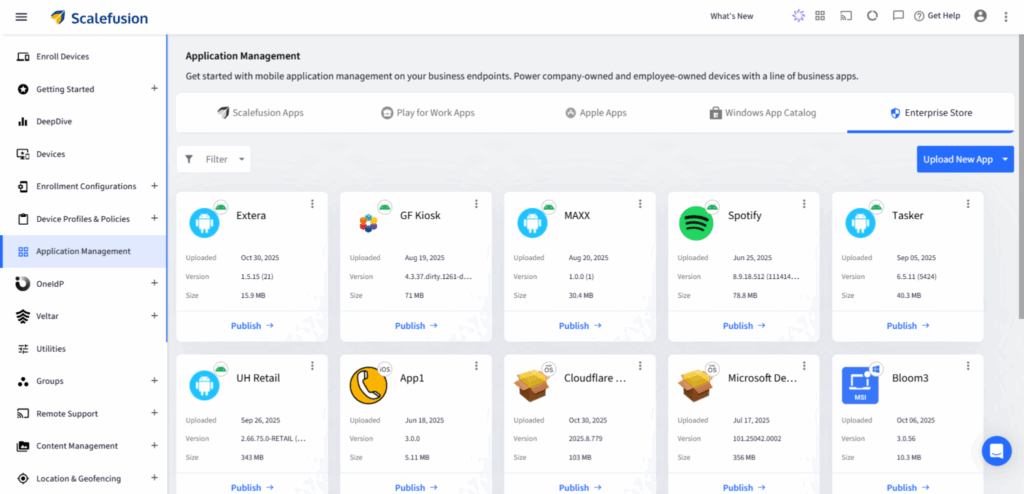
- Uninstall the existing version of the app from target devices or device profiles.

- Upload the older version of the APK—either by directly uploading the file or by linking to an external APK.
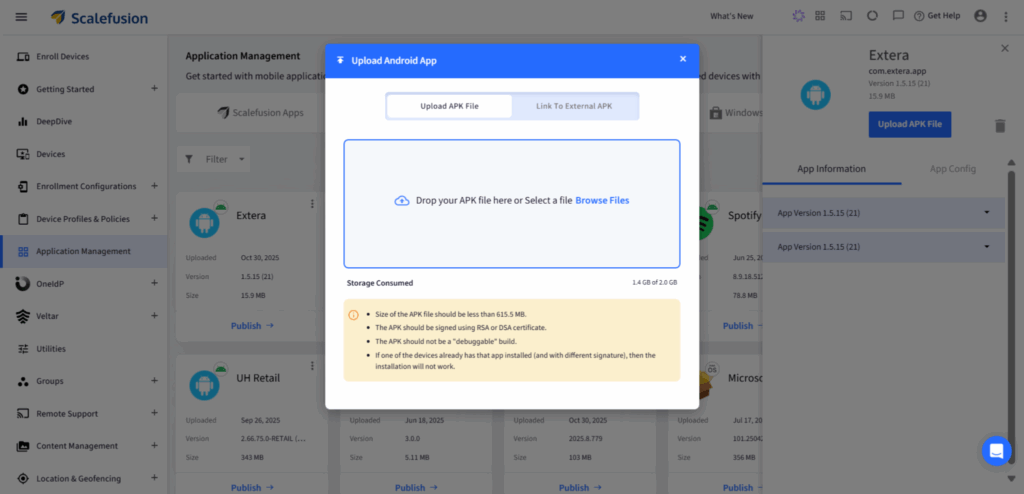
- Once the file is verified, publish it to the required devices or profiles.
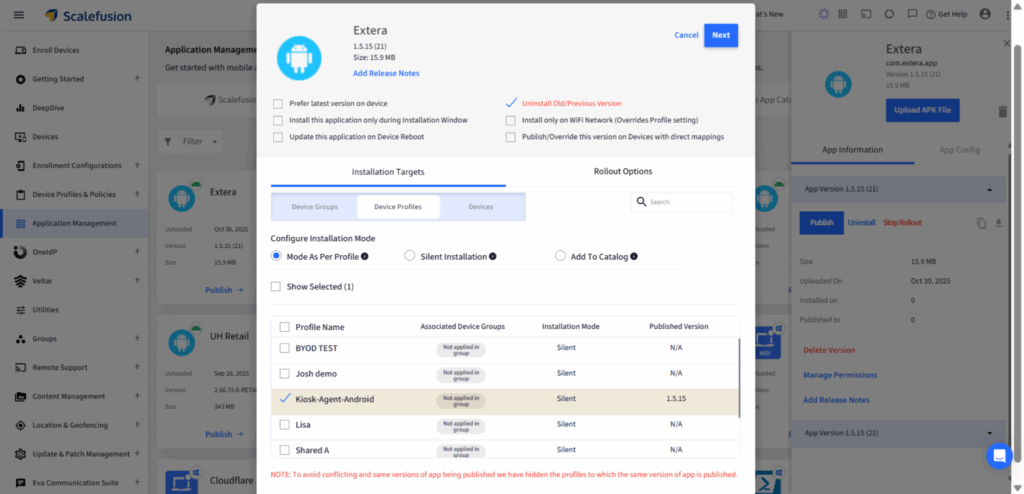
- To prevent auto-updates, make sure the “Prefer Latest Version” flag is disabled.
- Use “Uninstall Previous Version” to ensure the rollback takes effect cleanly.
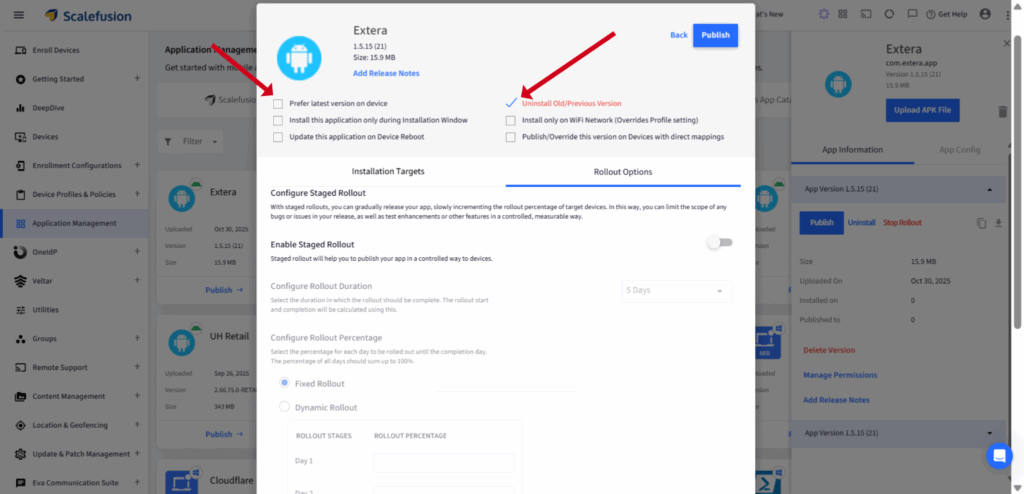
Admins can also configure rollout options like staged deployment or installing only over Wi-Fi, to manage how and when the app downgrade is executed.
Note: If the uploaded APK is unsigned, it must be signed first. Scalefusion alerts you about this during the upload process.
B. How to downgrade apps for iOS devices
Downgrading iOS apps requires a bit more setup—but it’s fully supported if you’re managing enterprise apps.
- Ensure the app is signed and distributed via Apple Business Manager or Scalefusion’s iOS Enterprise distribution.
- Go to the Scalefusion Dashboard > Application Management > Enterprise Store.
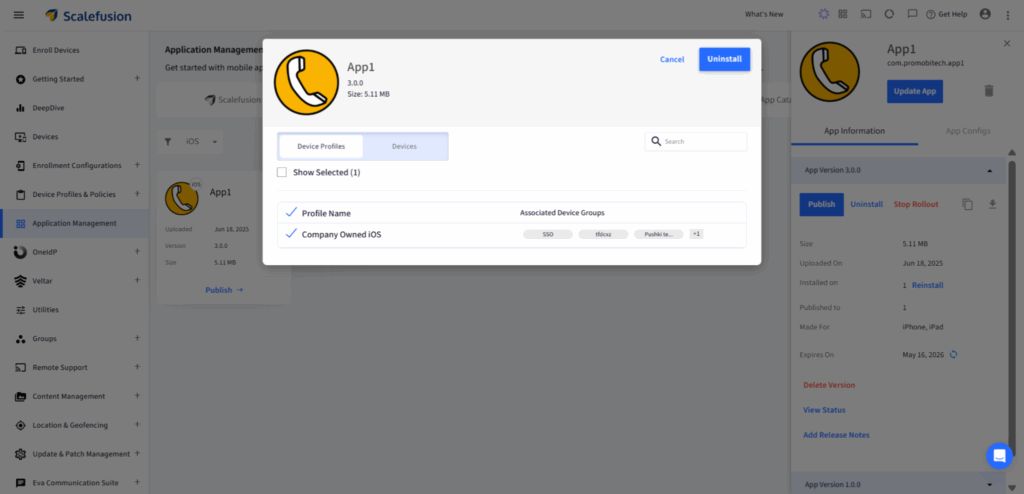
- Remove the existing app version from the targeted devices or groups.
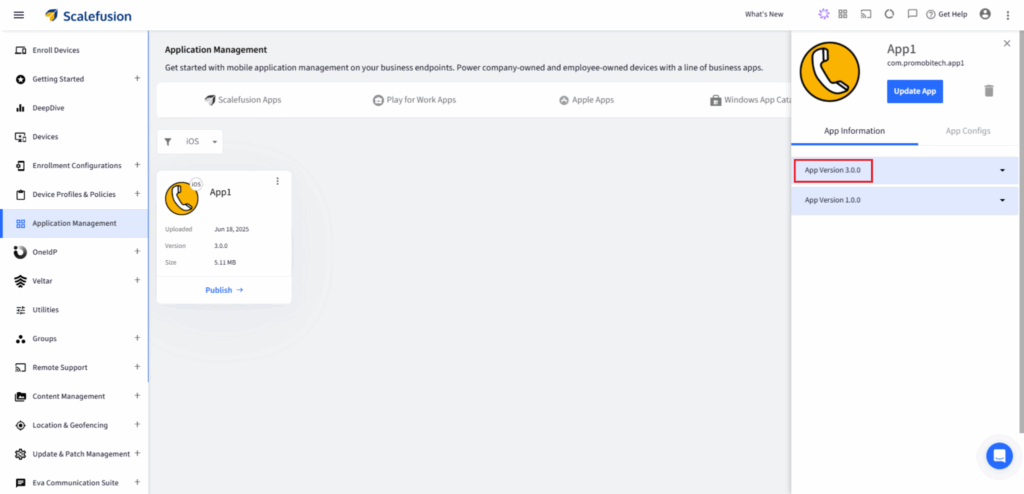
- Upload the older .ipa file version you want to deploy.
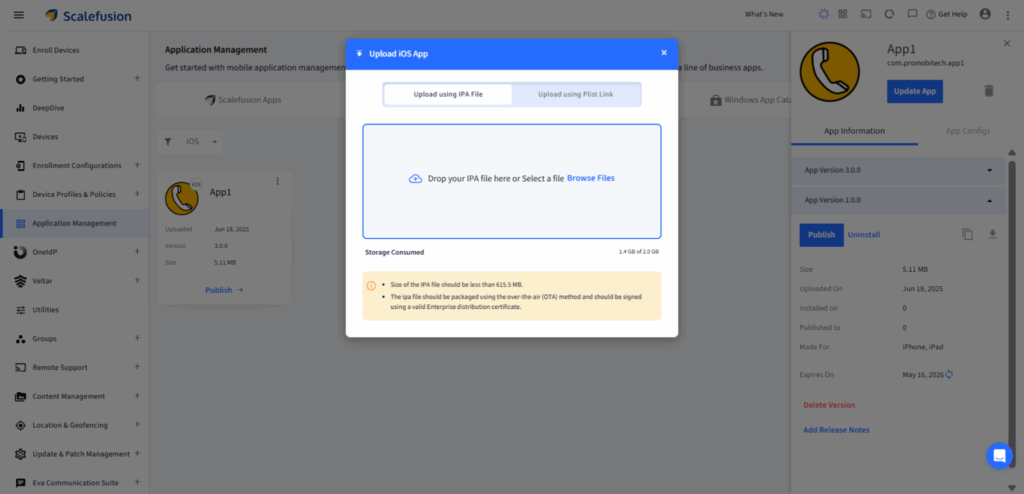
- Publish the desired version to devices or profiles via the Enterprise Store.
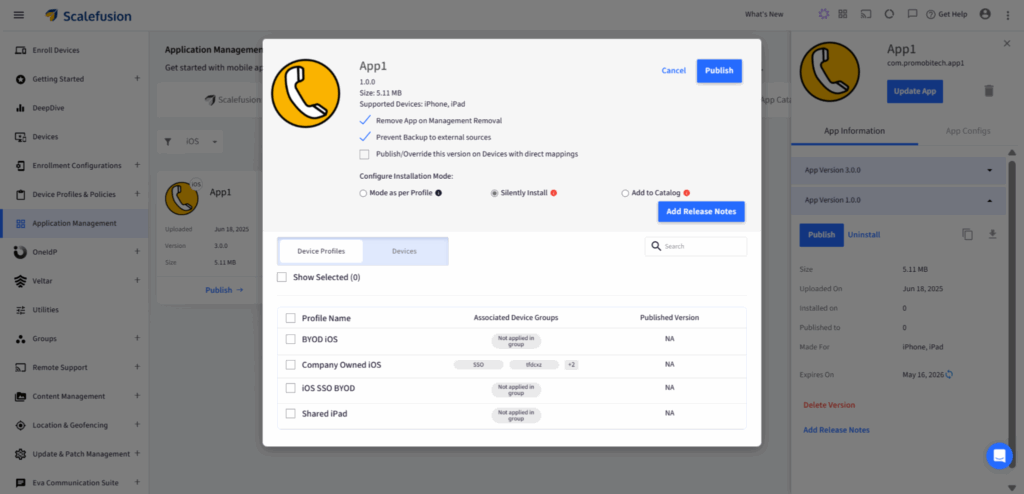
- The MDM will push this version remotely, replacing the current one on the supervised devices.
Like with Android, app updates and version locking can be managed centrally. You can monitor the installation status, confirm the app version on each device, and avoid unplanned version changes.
Why choose Scalefusion over other methods
Most downgrade methods available today are either manual, inconsistent, or risky, especially when applied across large device fleets. Scalefusion simplifies this with a secure, policy-driven approach designed for IT teams managing enterprise environments.
Here’s why it stands out:
- No risky workarounds: No need for sideloading, third-party tools, or APK download sites. Everything is managed from a single, secure dashboard.
- Works across platforms: Downgrade enterprise apps on both Android and iOS devices from one console, without hustling with separate tools or systems.
- Version management built-in: Admins can upload, push, and lock specific app versions, preventing automatic updates until the organization is ready.
- Centralized visibility: Track which version is installed where, view install status in real-time, and manage how updates or downgrades are deployed.
- Supports remote actions at scale: Scalefusion facilitates remote app version deployment to a large number of devices, eliminating the need for physical access.
- Compliant with enterprise standards: Keeps apps within approved channels, ensures signed packages and prevents exposure to unverified sources.
- Built for IT teams: With features like staged rollouts, Wi-Fi-only installs, silent deployment and group-based publishing, Scalefusion gives IT full management and visibility without interrupting end users.
Make app downgrading simple and secure with Scalefusion
App updates are meant to improve functionality, but when they disrupt workflows or break compatibility, they can do more harm than good. In everyday consumer use, this is frustrating. In an enterprise setup, it’s a major operational risk.
That’s why the ability to downgrade apps, especially enterprise apps used across managed Android and iOS devices, is essential.
Either you want to restore a stable build, lock down a specific version or roll out updates on your own terms, Scalefusion gives IT teams a reliable, secure and scalable way to manage app versions across devices.
Skip the workarounds. Use a system built for scale, security, and sanity.
Sign up for a 14-day free trial now.

